
Vandaag of morgen in huis

Kwaliteit gegarandeerd

Welkomstaanbiedingen ontgrendelen: GRATIS bezorging | Tot 80% korting | Gratis 30 dagen JoyPlus-proefperiode
Download de app
Buying headphones sounds simple, until you have to choose between wireless, wired, on-ear, over-ear, noise cancellation and a gaming headset. Marketing terms do not always make the choice any clearer. For example, long battery life means little if the ear cushions are uncomfortable. And a microphone listed in the specifications does not automatically guarantee that your voice will sound clear in a busy environment.
So pay particular attention to the connection, fit, battery information and what you intend to use the headphones for. Below, you’ll find the most common pitfalls, practical buying criteria and some popular choices from the Joybuy range.
Wireless headphones with long battery life can be useful for travelling and everyday use. However, check the conditions under which the manufacturer measures this. With noise-cancelling headphones, battery life may differ depending on whether noise cancellation is switched on or off. Volume, codec and phone calls also have an effect.
Also pay attention to the charging port. USB-C is now standard, but check whether a charging cable or adapter is included. According to the product information, for example, no charger is supplied with the Bose QuietComfort Ultra Headphones.
Active noise cancellation uses microphones and electronics to reduce ambient noise. The result varies depending on the type of sound, the fit and the environment. Low, constant sounds such as train or aeroplane noise are generally a different use case from voices in an office.
Brands may describe their own performance, but these claims are not a universal guarantee. According to Sony’s own information, the WH-CH720N features adjustable active noise cancellation. Treat this as a product specification, not a promise that every sound will disappear.
On-ear headphones rest on your ears and are often compact. Over-ear headphones surround your ears and may provide more isolation, but usually take up more space. Weight, clamping pressure, ear cushion material and headband adjustability all determine comfort.
If you’re looking for comfortable headphones for a full working day, it’s best not to look at weight alone. A lightweight model can still feel uncomfortable if the headband or ear cushions do not fit properly.
Bluetooth headphones are practical for smartphones, laptops and tablets when you do not want to use a cable. Multipoint is useful if you want to connect to, for example, a phone and laptop at the same time. However, check whether your devices and operating system support this feature.
Wired headphones do not need a battery and can be a reliable choice for a permanent workstation or gaming. The Jabra EVOLVE 30 II MS Stereo uses a 0.95-metre cable and comes with a LINK MS controller for a USB connection. The 3.5mm connection works according to the plug-and-play principle.
For headphones used for work and calls, the microphone, controls and connection are more important than sound reproduction alone. Check whether the headset is suitable for your meeting software and whether a USB adapter is required.
A gaming headset often uses a 3.5mm connection. With a desktop computer, check whether you have one combined connection or need a splitter. According to the product information, the Razer BlackShark V2 X is suitable for, among others, PC, PlayStation, Xbox, Nintendo Switch and mobile devices.
With wireless headphones, the Bluetooth version, supported codecs and stated battery life are useful points of comparison. A higher Bluetooth version does not automatically mean better sound quality; the combination of source device, codec and software also matters.
Also check the values given in the product specifications. The Sony WH-CH520 weighs 147 grams, has an on-ear design, multipoint and USB-C. The product description states up to 50 hours of battery life; always check the current specification table and included accessories on the product page.
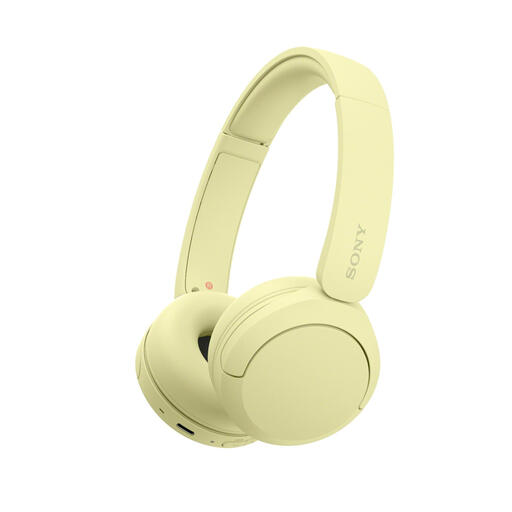
Why it suits this profile: This lightweight on-ear model is suitable for music, podcasts and phone calls without being tied to a cable. The adjustable headband and multipoint function make it a good fit for everyday use with a phone and laptop.
The specifications clearly state the weight, wearing style, Bluetooth connection and microphone. This means you can assess in advance whether on-ear and wireless headphones suit the way you use them.
147 grams, Bluetooth, multipoint, microphone and USB-C charging. The product description states up to 50 hours of battery life.
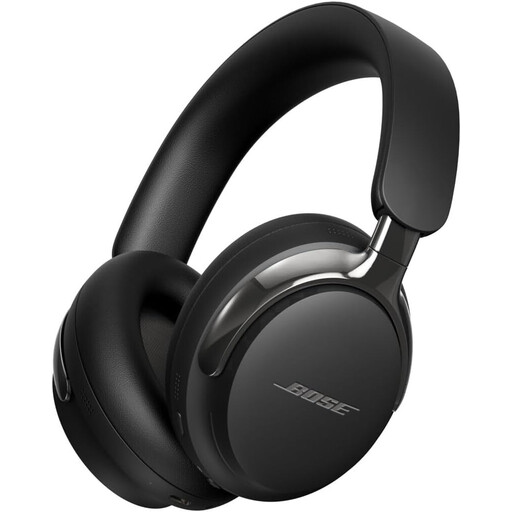
Why it suits this profile: This over-ear model combines Bluetooth 5.4 with active noise cancellation, spatial audio and a detachable cable. It is designed for listening to music, travelling and working with fewer distractions.
As well as Bluetooth, a wired option is available via 3.5mm and USB-C. This means you are not entirely dependent on the battery or wireless connection.
Bluetooth 5.4, active noise cancellation, spatial audio, multipoint support and a detachable cable.

Why it suits this profile: This wired gaming headset is designed for players who need a microphone, a 3.5mm connection and compatibility with multiple platforms.
There is no battery to charge. The product information also states a weight of 240 grams and memory foam ear cushions, so you can take extended use into account in advance.
50mm drivers, cardioid microphone, 3.5mm connection, 1.3-metre cable and support for multiple gaming platforms.
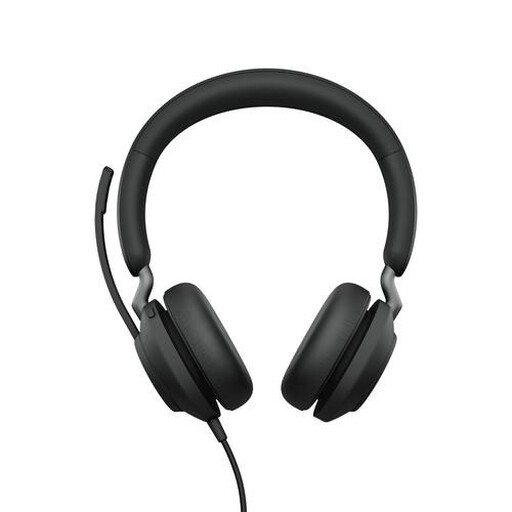
Why it suits this profile: This wireless headset with microphone is designed for calls, meetings and listening to music while working. The included USB-A Bluetooth adapter makes it easier to connect to a computer.
The connection, battery life and microphone function are clearly stated. This means you can compare this model based on work features rather than general sound claims alone.
Bluetooth 5.0, range of up to 30 metres according to the product description, up to 37 hours of battery life and an included USB-A adapter.
We have put together a complete, up-to-date list of products that fully meet these strict selection criteria and the applicable European safety regulations.
Yes, as long as the model has a suitable microphone, a stable Bluetooth connection and sufficient battery life. Multipoint is useful if you want to switch between a laptop and smartphone while working. For a permanent workstation, a wired headset may be simpler because you do not need to charge it.
Their lifespan depends on usage, storage, hinges, ear cushions and the battery. A wired model does not have a battery that loses capacity, whereas with wireless headphones, the battery is an important wear component. Keep the device dry, avoid high temperatures and do not use the volume at a high level for extended periods.
The electricity costs of charging are usually limited. The practical costs are more likely to involve replacing the ear cushions, cables or the entire pair of headphones when the battery no longer performs sufficiently. So, in addition to the purchase price, check the charging standard, warranty information and availability of accessories.
