
Vandaag of morgen in huis

Kwaliteit gegarandeerd

Welkomstaanbiedingen ontgrendelen: GRATIS bezorging | Tot 80% korting | Gratis 30 dagen JoyPlus-proefperiode
Download de app
Buying a gaming PC seems straightforward until you start comparing dozens of configurations. A fast processor, an RTX graphics card and RGB lighting sound appealing, but they don’t tell you everything about whether a gaming desktop PC is right for you. The best choice depends on your resolution, the games you play, your storage needs and your upgrade plans.
An RTX 5060, RTX 5070 or RTX 5080 attracts plenty of attention, but the processor, power supply and cooling also affect how reliably a system runs. A powerful graphics card paired with limited RAM or a low-capacity power supply may not be the best fit for extended gaming, streaming or video editing.
Not every Windows 11 PC comes with the same licence. Some systems have Windows 11 Home fully installed, while others use an evaluation version. Before buying, check which software version is included and whether it still needs to be activated.
A gaming PC with 16GB of RAM may be suitable for many games, but 32GB of RAM can be more practical if you’re streaming, browsing with multiple tabs open and using creative software at the same time. A gaming PC with a 1TB SSD also offers more space than a system with 480GB or 500GB, especially when modern games can take up tens of gigabytes.
For a PC for 1080p gaming, systems with an RTX 5060 or RTX 5060 Ti are sensible options to consider. For 1440p gaming, high refresh rates and more demanding graphics settings, a gaming PC with an RTX 5070 or a similar configuration may be worth looking at. If you play at 4K or use ray tracing extensively, you could consider a gaming PC with an RTX 5080.
Ray tracing and DLSS are NVIDIA features that are only available in supported games. Actual performance varies depending on the game, settings, resolution and driver.
A Ryzen gaming PC is a good option for players who value gaming performance and multitasking. The Ryzen 7 7800X3D in some configurations features 3D V-Cache, which the product information says is designed with gaming in mind. An Intel gaming PC may appeal to people who also edit video, render content or run several applications at once, alongside gaming.
Don’t just look at the processor name. Check the number of cores, generation, motherboard type and upgrade options too.
Look out for these features:
A barebone or mini PC needs extra consideration. With a barebone, you may need to install the RAM, storage and operating system yourself. So it’s not automatically ready to use as a gaming computer.
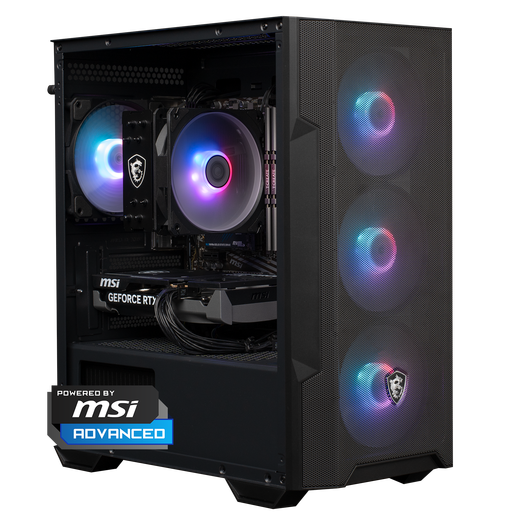
Why it suits this profile: This ready-to-use configuration combines an AMD Ryzen 5 5500, RTX 5060, 16GB DDR4 and 1TB NVMe storage. It’s a good match if you want to get started with 1080p gaming without building your own PC.
The specifications list the processor, graphics card, RAM and storage. That means you don’t have to rely on the RTX label alone.
RTX 5060 with 8GB GDDR7, 1TB NVMe SSD and Windows 11 Home, according to the product information.
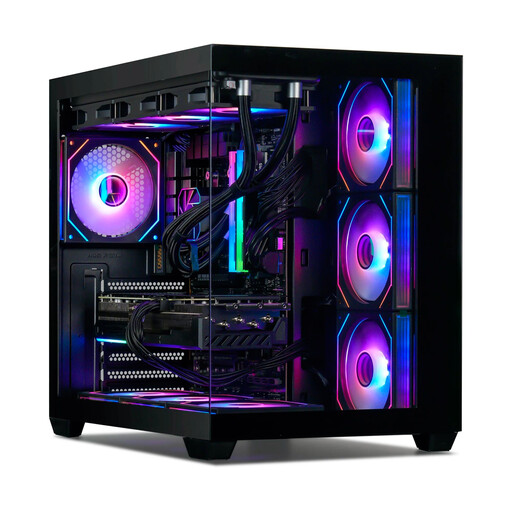
Why it suits this profile: The combination of a Ryzen 7 7800X3D, RTX 5080, 32GB DDR5 and 1TB NVMe is designed for demanding gaming at 1440p and 4K, according to the product information provided.
The configuration also lists the cooling system, 850W power supply and 32GB of memory. Do check whether 1TB is enough for your games library.
RTX 5080 with 16GB of graphics memory, 32GB DDR5 and 360mm liquid cooling, according to the product specifications.
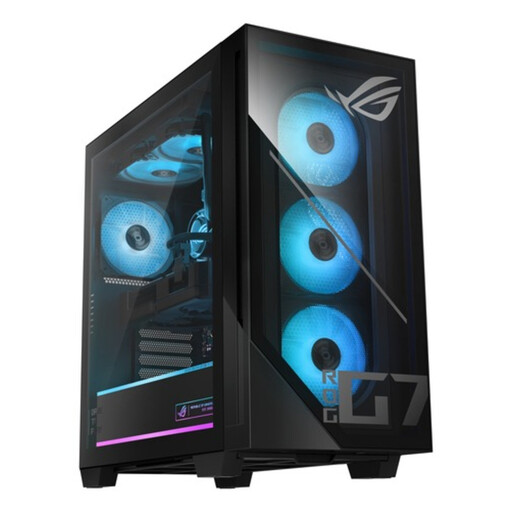
Why it suits this profile: This Intel gaming PC has a Core Ultra 7 265F, RTX 5070, 32GB DDR5 and 1TB PCIe 4.0 SSD. It’s a good fit for gamers, streamers and content creators who use several applications at once.
The memory capacity, SSD interface, power supply and cooling are listed separately. This makes it easier to compare than relying on marketing terms.
32GB DDR5, 1TB PCIe 4.0 NVMe SSD, RTX 5070 12GB GDDR7 and 850W 80 Plus Gold power supply.
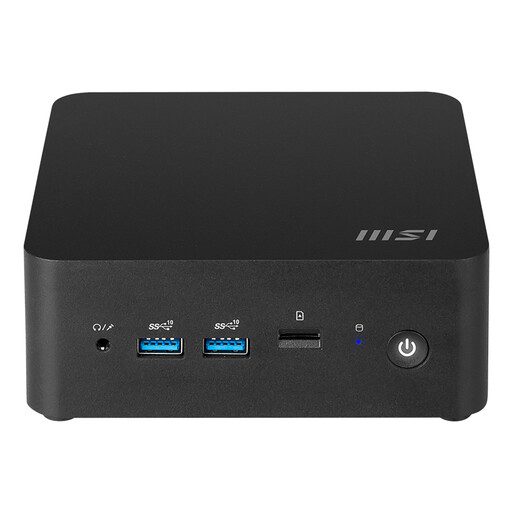
Why it suits this profile: This compact Windows 11 PC has a volume of 0.52 litres, Wi-Fi 6E, two 2.5Gbps Ethernet ports and support for up to 64GB DDR5.
The compact case saves space, but this isn’t a full-fledged RTX gaming PC. Choose this model primarily for everyday use and light graphics work.
Intel Core Ultra 7 155H, integrated Intel Arc graphics, two HDMI ports and support for M.2 storage.
We’ve put together a complete, up-to-date list of products that meet these strict selection criteria and comply with current European safety regulations.
16GB is enough for many games, especially if you don’t use many other programmes at the same time. For streaming, video editing and intensive multitasking, a gaming PC with 32GB RAM is more practical. Check whether the motherboard also has extra memory slots.
Power consumption depends on the graphics card, processor, power supply, settings and how long you play. An RTX gaming PC uses more power under heavy load than a mini PC with integrated graphics. You can check the power consumption using an energy monitor plugged in between the socket and the PC.
Lifespan depends on use, maintenance and how easy it is to upgrade. Keeping the ventilation free of dust, ensuring adequate cooling and choosing a power supply with plenty of capacity can help keep the system suitable for longer. When buying, check whether the RAM, SSD and graphics card can be replaced later. That way, you won’t need to buy a completely new gaming computer as soon as you want to upgrade.
