
Vandaag of morgen in huis

Kwaliteit gegarandeerd

Welkomstaanbiedingen ontgrendelen: GRATIS bezorging | Tot 80% korting | Gratis 30 dagen JoyPlus-proefperiode
Download de app
Buying a gaming PC may seem simple until you start comparing specifications. A low price can be tempting, but an outdated processor, limited storage or unclear power supply can lead to extra costs later on. A powerful gaming PC is not automatically suitable for every player either. Someone who mainly plays esports has different requirements from someone who combines modern AAA games, streaming and video editing.
Joybuy’s Product Recommendation Officer filters the most important market information based on verifiable product specifications. This helps you avoid paying mainly for lighting, brand names or vague performance claims.
The graphics card has a major influence on gaming performance, but the processor, RAM and cooling are important too. A gaming PC with an RTX 5060 may be suitable for 1080p and certain 1440p scenarios, but the final experience depends on the processor, game settings, resolution and display.
That is why you should consider the combination of components. A Ryzen gaming PC with a Ryzen 5 5500 and RTX 5060 is configured differently from a system with a Ryzen 7 7800X3D and RTX 5070.
A gaming PC with a 1TB SSD provides more space than a model with 480GB or 500GB, but modern games can use a lot of storage. Also check whether there is a free M.2 slot or an additional 2.5-inch or 3.5-inch connection. Some compact systems have limited expansion options.
Windows is often installed on ready-made desktops, but accessories such as a monitor, keyboard and mouse are usually not included. Some product listings also state that a charger or power accessory is not supplied as standard. Always check the current product page, package contents and warranty conditions before placing your order.
For competitive games such as Counter-Strike 2, League of Legends, VALORANT and Fortnite, a stable high refresh rate is important. For more graphically demanding games, available video memory and support for technologies such as ray tracing and DLSS also matter. According to NVIDIA’s own information, these features are supported by suitable RTX cards; actual performance varies by game and settings.
16GB RAM is a practical starting point for gaming, browsing and everyday multitasking. Streamers and video editors may benefit from expandable memory. Check the number of memory slots and the maximum capacity before buying.
An Intel gaming PC may be a good choice if you are looking for a system with plenty of threads for multitasking. A Ryzen gaming PC also comes in a range of configurations, from compact mini PCs to desktops with Ryzen 7 processors. Do not look only at the processor name. Also consider the number of cores, threads, boost frequency and memory type.
Measure the space where you plan to position the PC in advance. Also check:
A compact model such as a mini gaming PC saves space, but usually has less room for a dedicated graphics card or additional drives. A tower generally offers more expansion options, but also takes up more space.
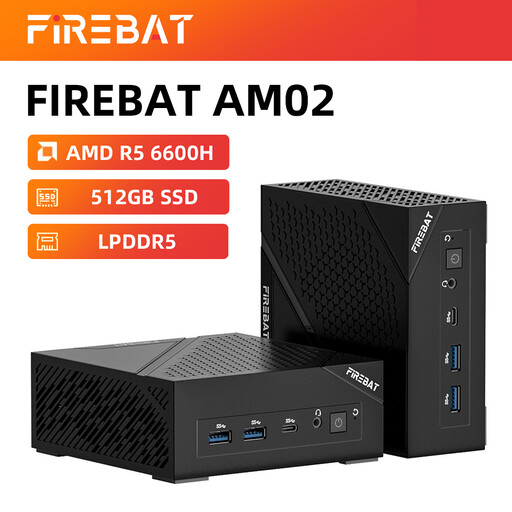
Why it suits this profile: This compact gaming PC combines an AMD Ryzen 5 6600H with 16GB LPDDR5, a 512GB M.2 NVMe SSD and Windows 11 Home. It is well suited to everyday use, study and light gaming without the need for a large tower.
The key specifications are clearly listed. However, bear in mind the smaller storage capacity and more limited expandability of a mini PC.
Compact design, 4K output via HDMI 2.1 and DisplayPort 1.4, plus Wi-Fi 6 and 2.5G Ethernet.
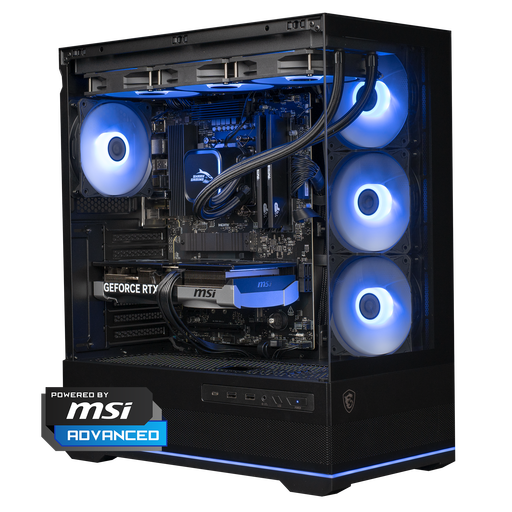
Why it suits this profile: The combination of a Ryzen 7 7800X3D, RTX 5070 with 12GB of video memory, 16GB DDR5 and 1TB of NVMe storage is designed for demanding games, high refresh rates and creative applications.
The power supply is specified as a 750W model and the case uses a 360mm liquid cooler. Check the available space and connections before buying.
RTX 5070, Ryzen 7 7800X3D, 1TB NVMe and Windows 11 Home in one ready-to-use tower.
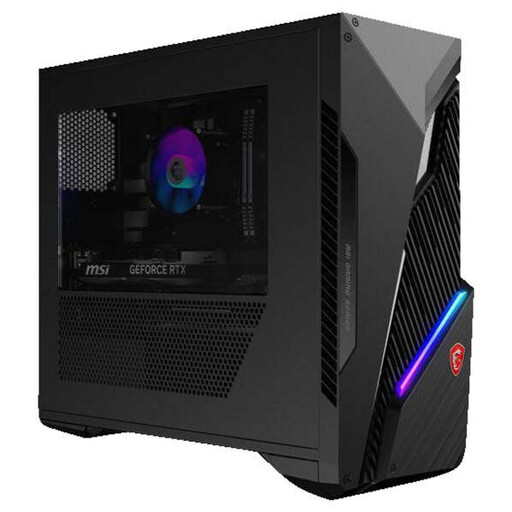
Why it suits this profile: This Intel gaming PC features a Core i5-14400F, RTX 5060 Ti 8GB, 16GB DDR5 and a 1TB SSD. This configuration is suitable for combining gaming with everyday multitasking.
The available memory slots and two additional 2.5-inch drive bays make expansion straightforward to assess. According to the specifications, the M.2 slot is already occupied.
RTX 5060 Ti, 1TB SSD, Wi-Fi 6E and support for up to 64GB of memory.
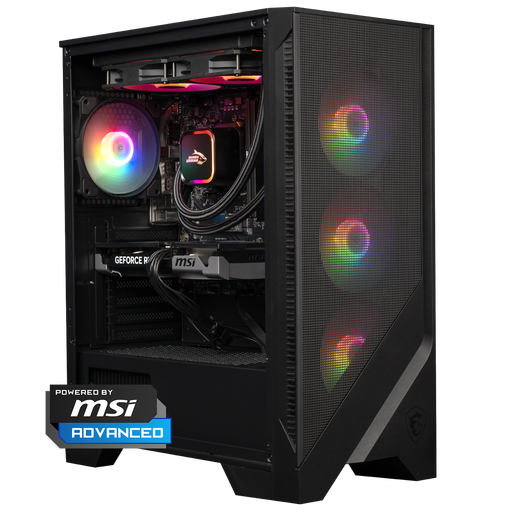
Why it suits this profile: The Ryzen 5 7400, RTX 5060 Ti, 16GB DDR5 and 1TB NVMe SSD provide a configuration for gaming, streaming and image editing. The 240mm liquid cooler is listed as part of the system.
The storage capacity and memory standard are clearly specified. Check the accessories on delivery, as this product listing includes a warning that a charger is not supplied as standard.
RTX 5060 Ti, 1TB NVMe, 16GB DDR5 and an airflow case with 240mm cooling.
We have put together a complete, up-to-date list of products that fully meet these strict selection criteria and the applicable European safety regulations.
The price mainly depends on the graphics card, processor, storage and expandability. A compact mini PC can be an attractive option for everyday use and light gaming. For modern games at 1440p or for streaming, a desktop with a dedicated RTX GPU is generally the better choice. Always compare the complete configuration rather than looking only at the price or graphics card.
For many games and everyday use, 16GB is a useful starting point. If you stream at the same time, use lots of browser windows or edit video, it is worth checking whether you can upgrade to 32GB. Pay attention to the number of free memory slots and the maximum supported memory.
Service life varies depending on the component and how you use the PC. A computer remains practical for longer when the power supply, cooling, storage and expansion options are chosen appropriately. You can adjust settings and resolution later, but a compact mini PC usually offers less room for upgrades than a tower. Before buying a gaming PC, therefore, check not only its current performance but also its connections and potential for expansion.
