
Vandaag of morgen in huis

Kwaliteit gegarandeerd

Welkomstaanbiedingen ontgrendelen: GRATIS bezorging | Tot 80% korting | Gratis 30 dagen JoyPlus-proefperiode
Download de app
Buying electronics and accessories online may seem straightforward, but comparing product pages can quickly become confusing. A high resolution, a large number of amps or advanced health features may sound appealing, while important details are sometimes less clearly stated. Think of connections that are incompatible with your laptop, a monitor that is too large for your desk or a jump starter whose capacity is specified differently from what you expected.
This buying guide helps you assess specifications in practical terms. The focus is on how and where you will use the product, compatibility and verifiable product information — not isolated marketing claims.
A gaming monitor with 320 Hz or a 6000A car battery booster sounds powerful. However, one figure does not tell you everything. With a monitor, you should also consider the resolution, connections, panel type and your computer’s graphics card. For a jump starter, the supported vehicle voltage, starting current and suitability for petrol or diesel engines are also important.
Also pay attention to the difference between peak current and the stated starting current. For example, the Porbi S306 specifies a 1200A peak current and 600A starting current for 12V vehicles. This is more useful information than simply quoting a large peak figure.
An ultrawide monitor measuring 44.5 or 49 inches requires a wide, sturdy desk. Also check whether your computer has a suitable DisplayPort or HDMI output. For a monitor light, the clamp must fit the thickness of the screen and the USB connection must provide sufficient power.
For household appliances such as a cooker hood, the available niche width, air outlet and recirculation option play a similar role. A 90 cm model will not automatically fit above every hob.
Features such as low blue light, flicker-free technology or a blue-light filter may be included in the product description, but they do not guarantee less eye strain. Take regular breaks and set the brightness and viewing distance appropriately.
For a smartwatch, fitness tracker, pulse oximeter or oxygen saturation monitor, measurement results depend on the conditions in which the device is used. According to the Treesmile GX5 product information, the results are for reference only and do not constitute a medical diagnosis. The yuwell pulse oximeter also states that the device is not intended for medical diagnosis without professional guidance.
Choose the resolution based on the screen size and how you intend to use it:
A higher refresh rate, such as 100, 170 or 320 Hz, is particularly relevant for fast-paced games. However, your computer must also be capable of delivering enough frames per second. A high refresh rate will not automatically make a weak graphics card faster.
At a minimum, check for:
A monitor with HDMI only is not necessarily unsuitable, but it may be less flexible when connecting multiple devices. For a home office, ergonomic adjustability is often more useful than an extremely high refresh rate.
When comparing a USB power bank, car jump starter or car battery booster, do not look at mAh alone. Also consider:
An LED emergency light, power bank or jump starter with a remaining-capacity display is practical because you can check before setting off whether it needs charging.
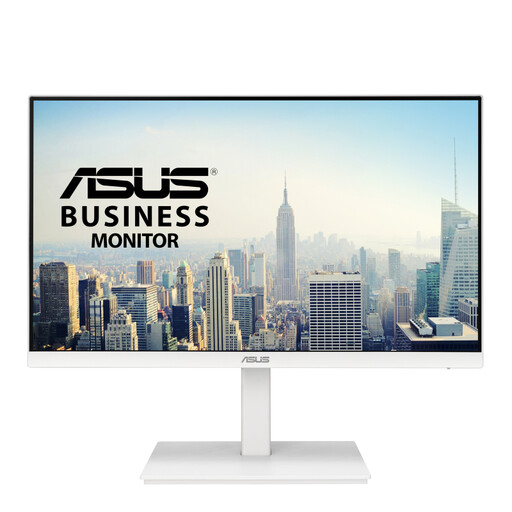
Why it suits this profile: This 23.8-inch Full HD screen is suitable for working from home, studying and everyday use. The adjustable stand helps you position the screen at your preferred height.
The key information is clearly presented: Full HD, 75 Hz, IPS, HDMI, DisplayPort, VGA and VESA 100 mm.
IPS panel, 130 mm height adjustment, pivot function and integrated USB hub.
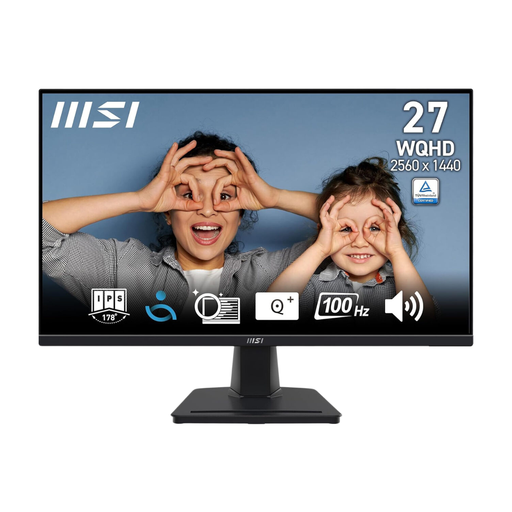
Why it suits this profile: The 27-inch Quad HD resolution provides extra workspace for productivity, media and gaming without having to move straight to a very large screen.
The combination of 2560 × 1440, 100 Hz, IPS and 4 ms makes it clear what the screen is designed for.
IPS panel, matt finish, FreeSync and connections for DisplayPort and two HDMI devices.

Why it suits this profile: For multitasking, simulation games and wide creative software, the 32:9 format offers plenty of horizontal space.
The product information clearly states the dimensions, 5120 × 1440 resolution, 165 Hz and VESA 75 × 75 mm. However, check that your desk can support at least 15 kg.
DQHD resolution, 165 Hz, 1500R curvature, two HDMI 2.1 ports and two DisplayPort 1.4 ports.
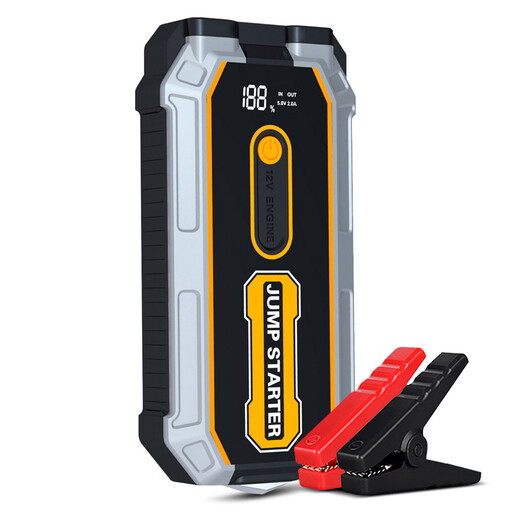
Why it suits this profile: This compact model is designed for motorists who want to carry starting assistance, USB charging and lighting in a single device.
The specifications state 12V, 600A starting current, 1200A peak current, a capacity of 12800mAh and support for petrol and diesel vehicles.
330 grams, LCD display, 10W USB output, SOS, flashing and continuous lighting.
We have put together a complete, up-to-date list of products that fully meet these strict selection criteria and the applicable European safety regulations.
Start by considering how you will use the product, then check compatibility, dimensions, connections, power requirements and warranty terms. Do not compare price or one standout feature alone. For products with a battery, also check the storage advice and charging type.
Lifespan depends on usage, heat, charging habits and storage. Do not place a monitor against ventilation openings and do not leave a jump starter in a hot car for extended periods. Check the battery status regularly and follow the manufacturer’s instructions.
Look at the stated power consumption and the expected number of hours of use. A monitor with lower energy consumption can make a difference when used every day. For a cooker hood, also compare the power consumption of the motor and LED lighting. For battery-powered devices, charging frequency and capacity also matter. Energy label information and product specifications provide a verifiable starting point.
