
Vandaag of morgen in huis

Kwaliteit gegarandeerd

Welkomstaanbiedingen ontgrendelen: GRATIS bezorging | Tot 80% korting | Gratis 30 dagen JoyPlus-proefperiode
Download de app
Buying a new desktop PC can feel like navigating a maze of technical specifications and marketing promises. The market is flooded with options, from a compact mini PC to a powerful gaming PC, and it's easy to overpay for features you don't need, or to choose a computer that already feels sluggish after just one year.
As a Product Recommendation Officer at Joybuy, I see the challenges consumers face every day. To help you make an informed decision, I've outlined the most common pitfalls and explained what you should really be looking for.
To avoid the pitfalls above, it's important to understand a few key technical specifications. Not the marketing terms, but the actual components that determine performance.
The processor is the brain of the computer. For most users, an Intel Core i5 or AMD Ryzen 5 is the ideal sweet spot. These offer more than enough speed for a home office PC or an office computer. If you only use basic applications, a Core i3 or Ryzen 3 will suffice. If you're a serious gamer or video editor, look for a Core i7/i9 or Ryzen 7/9.
The memory (RAM) determines how many tasks your PC can handle simultaneously without slowing down.
The era of slow, rattling hard disk drives (HDDs) is over. A Solid State Drive (SSD) is an absolute must-have for a modern computer. A PC with an SSD boots up in seconds, and programs load noticeably faster. Specifically, look for the term NVMe SSD, which is the fastest variant currently available. A storage capacity of 512 GB is a great starting point for most users.
Think carefully about where the computer will be placed and what you want to connect to it.
compact PC that takes up hardly any space. Ideal for a clutter-free desk, as a media centre for your TV, or for office work.Apple iMac. This creates a sleek look with minimal cables.gaming PC.Always check the number and type of connections. Ensure there are enough USB ports (including USB-C), the right video outputs for your monitor (HDMI or DisplayPort), and a modern network connection like Wi-Fi 6E and a 2.5G Ethernet port for a stable and fast connection.
To help you make the right choice, we have selected a few models that suit different user profiles.
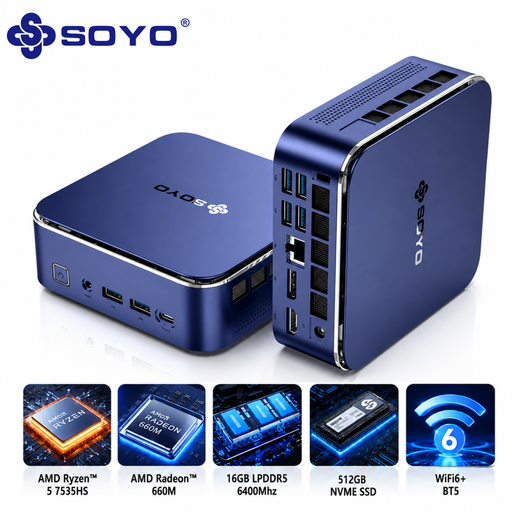
Why This Fits Their Persona: This mini PC is compact, affordable, and powerful enough for all office tasks, online classes, and streaming. It takes up minimal desk space and is an ideal, no-nonsense home office PC.
It offers a balanced AMD Ryzen 5 processor, more than enough for office work without the high cost of a top-tier model. The compact PC design immediately solves the 'form factor mistake'.
Equipped with 16GB LPDDR5 RAM and a 512GB NVME SSD, ensuring very smooth operation. Features Wi-Fi 6E and plenty of ports, including USB-C.
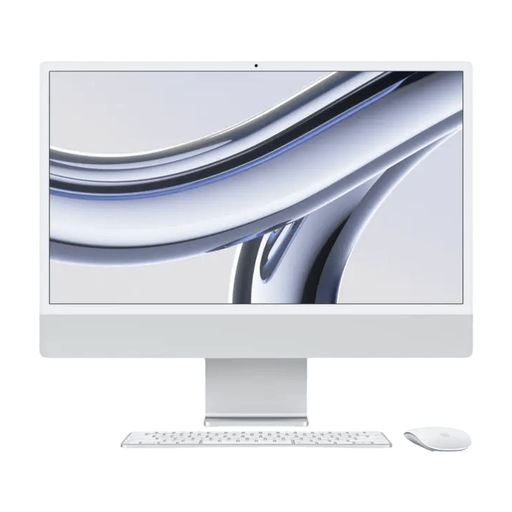
Why This Fits Their Persona: Perfect for those who value a clutter-free desk, a superior display, and a seamless user experience for graphic design, photo editing, or simply a stylish workspace.
As an all-in-one PC, this is a fully integrated system. No fuss with separate components or cables. The 4.5K Retina display prevents the disappointment of a mediocre screen.
The combination of the powerful M3 chip and the razor-sharp 4.5K display in one slim design. Equipped with modern Thunderbolt ports for fast data transfer.
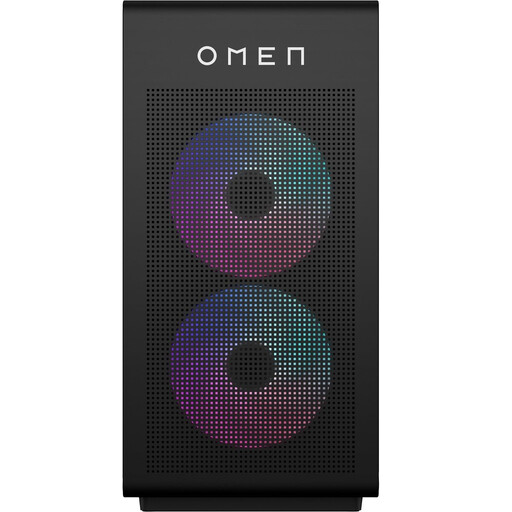
Why This Fits Their Persona: Built for maximum performance in the latest games and demanding applications. The spacious case provides excellent cooling and ample room for future upgrades, which is essential for a true enthusiast.
This gaming PC has a powerful Intel Core i7 and a dedicated NVIDIA GeForce RTX graphics card, so it doesn't fall into the trap of subpar graphics performance. The tower case makes upgrades easy.
Designed for high and stable performance thanks to powerful cooling and power supply. Plenty of modern connections, including DisplayPort 2.1 for the latest monitors.
We have compiled a complete, real-time list of products that fully satisfy these strict selection criteria and UK safety regulations.
For most users, 16 GB RAM is the gold standard in 2026. This is more than enough for smooth multitasking, such as browsing, emailing, editing documents, and watching videos simultaneously. If you only use the PC for very light tasks, 8 GB may suffice. For serious gamers, video editors, or programmers, 32 GB or more is a wise investment.
Yes, absolutely. The technology in a mini PC has advanced tremendously in recent years. Modern models with an AMD Ryzen 5/7 or Intel Core i5/i7 processor are more than powerful enough for all common office and study tasks, and even for light photo editing and gaming. They are an excellent, space-saving choice as an office computer or for home use.
An all-in-one PC, like the Apple iMac or MSI Modern series, integrates all computer components into the monitor's chassis. This creates a sleek, clutter-free desk with fewer cables. The downside is that upgrades (like replacing the processor or graphics card) are often difficult or impossible. A traditional desktop with a separate tower case offers much more flexibility and is easier to upgrade, making it a popular choice for gamers and tech enthusiasts.
