
Vandaag of morgen in huis

Kwaliteit gegarandeerd

Welkomstaanbiedingen ontgrendelen: GRATIS bezorging | Tot 80% korting | Gratis 30 dagen JoyPlus-proefperiode
Download de app
A wireless gaming mouse gives you more freedom to move around your desk, but not every model is suited to fast-paced games. For example, a high DPI figure on the box doesn’t mean much if the shape doesn’t suit your hand or the wireless connection keeps dropping. A lightweight mouse may also be less comfortable if you prefer to use your whole hand.
For PC gamers, streamers and esports fans, there are three common pitfalls to watch out for:
DPI determines how far the cursor moves in response to a particular hand movement. For everyday use, 800 to 1,600 DPI is often enough. Many gamers use a lower sensitivity setting with a large mouse mat, while others prefer a higher setting.
Also consider the polling rate. This is how many times per second the mouse sends information to your computer. 1,000 Hz is a practical setting for many PC gamers. Higher values may appeal to competitive FPS players, but they often put more demands on your connection and computer.
The GravaStar Mercury M1 product listing specifies a PAW3395 sensor with up to 26,000 DPI and 4,000 Hz when used with the 4K receiver, which is available separately. The AJAZZ AJ159 PRO is listed with a PAW3395 sensor, up to 26,000 DPI and an 8K receiver. Think of these figures as available settings, not a guarantee that you’ll automatically play better.
A 2.4GHz gaming mouse with a USB receiver is generally designed to connect directly to a PC. Bluetooth is handy for laptops, tablets and everyday use, but always check whether the polling rate you want is available over Bluetooth too.
A tri-mode mouse usually combines 2.4GHz, Bluetooth and USB-C. That’s useful if you want one mouse for gaming and office work. Also check:
Battery life claims come from brand product information. According to Razer’s product description, the Viper V3 HyperSpeed offers up to 280 hours on an AA battery; actual battery life depends on your settings and how you use it.
A lightweight gaming mouse weighing around 55 to 70 grams can feel comfortable for large movements in FPS games. A heavier model may feel more stable. Check the length, width and height too. A small mouse for small to medium-sized hands will feel different from an ergonomic gaming mouse designed for a wider palm.
Extra buttons are useful for MOBA games and MMO-style controls. A gaming mouse with programmable buttons can activate shortcuts or macros, but check that the software supports your operating system. RGB lighting is mainly a style choice; it doesn’t affect sensor performance.
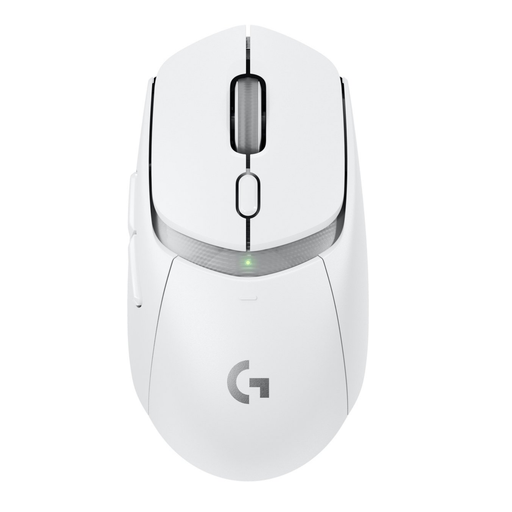
Why it suits this profile: This model combines LIGHTSPEED and Bluetooth and runs on an AA battery, so there’s no need for a regular charging routine. According to the product description, it supports up to 6 programmable buttons and features a HERO 25K sensor.
The specifications list both Bluetooth and a wireless LIGHTSPEED connection. Just check which mode you’re using and whether you have a USB-A port available.
68 g without the battery according to the product details, 6 buttons, Bluetooth and an AA battery included.
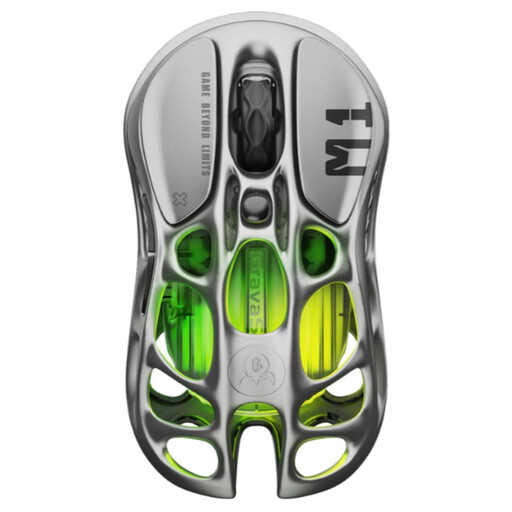
Why it suits this profile: This mouse features a magnesium alloy body, an open-frame design and a PAW3395 sensor. The product listing specifies tri-mode connectivity, 5 programmable buttons and RGB lighting modes.
According to the product specifications, the stated 4,000 Hz requires a 4K receiver, sold separately. Check this before buying any extra accessories.
88 g, tri-mode connection, up to 26,000 DPI according to the product details, and customisable RGB lighting.

Why it suits this profile: This model is designed for users looking for a wide range of settings. The listing specifies a PAW3950 sensor, up to 42,000 DPI, an 8K polling rate and a magnetic charging dock.
The charging dock and receiver are listed as part of the set. Still, check the software requirements and connection mode needed to achieve your chosen polling rate.
56 g according to the product information, tri-mode connection, magnetic charging dock and software-adjustable buttons.
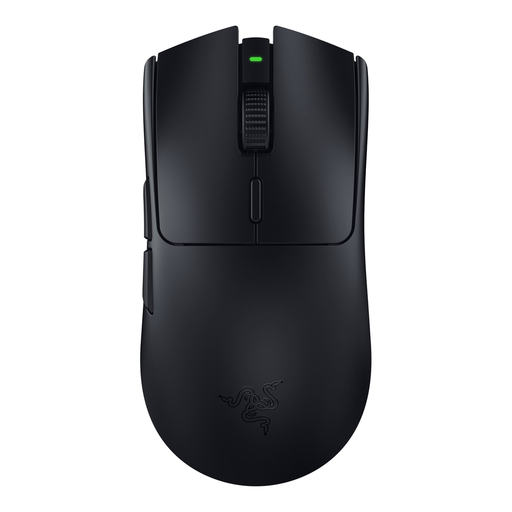
Why it suits this profile: The combination of an AA battery, Bluetooth and HyperSpeed works well with both a gaming PC and a mobile workstation. According to the product details, the model has 6 buttons and weighs 82 g.
The connection and power options are clearly separate: use HyperSpeed for gaming and Bluetooth as an alternative. Check that the receiver is included and that you have a suitable USB port available.
Up to 30,000 DPI according to the product listing, 82 g, 6 buttons and Bluetooth alongside the wireless gaming connection.
We’ve put together a complete, up-to-date list of products that meet these strict selection criteria and comply with current European safety regulations.
Bluetooth can work well for everyday use and less demanding games. For fast-paced FPS games, many users prefer a 2.4GHz gaming mouse with a USB receiver. Check the polling rate, software support and distance to the receiver.
Its lifespan depends on the switches, rechargeable battery or replaceable battery, charging habits and how you use it. A model with a replaceable AA battery remains usable without needing to replace a built-in battery. With a rechargeable mouse, follow the manufacturer’s safety instructions and don’t use it if the casing, cable or charging port is damaged.
Not necessarily. A high DPI gives you more settings to choose from, but many players use much lower values. Focus on a sensor that tracks consistently, a shape that suits your hand and a connection that works reliably with your gaming PC.
