
Vandaag of morgen in huis

Kwaliteit gegarandeerd

Welkomstaanbiedingen ontgrendelen: GRATIS bezorging | Tot 80% korting | Gratis 30 dagen JoyPlus-proefperiode
Download de app
Buying a backpack seems straightforward – until you find that it won’t fit under the plane seat, the laptop compartment is too small or the shoulder straps turn out to be impractical after a few weeks. Product titles often use terms such as “cabin bag”, “water-repellent” and “ergonomic”, but these only tell you so much. Check the dimensions, capacity and construction to find out what they really mean.
This guide helps travellers, students, school pupils and working men and women choose the right backpack without paying extra for features that don’t suit their needs.
A backpack may be advertised as a cabin bag, but airlines have different size limits. For a Ryanair backpack, it’s particularly important to know the difference between a free personal item and a larger cabin bag. Always check:
A 40 × 20 × 25 cm model won’t automatically be suitable for every flight. A 40 × 30 × 20 cm bag can hold more, but you’ll need to pay extra attention to the conditions of your ticket.
A capacity of 24 or 25 litres sounds clear enough, but the layout determines how much you can actually carry in a practical way. A laptop backpack with one large compartment may be less organised than a slightly smaller bag with separate compartments for documents, a charger, clothes and a water bottle.
Also check the difference between the standard and maximum capacity. According to the product information, the HP Travel backpack below has a capacity of 25 litres and expands to 30 litres. That extra space is handy for short trips, but the bag will also be deeper when expanded.
A water-repellent backpack can help keep out light rain, but that doesn’t mean your laptop and clothes will stay dry during a heavy downpour. Check whether the product information only mentions water-repellent material or also specifies a covered zip, rain cover or waterproof construction.
A separate cover is still a sensible choice for electronics. A USB port won’t protect your phone from moisture either: this type of bag usually just has a cable pass-through, and you’ll need to put the power bank inside separately.
Choose a size that suits how you’ll use it:
A lightweight backpack weighing 0.5 to 0.9 kg leaves more room for your belongings within the baggage allowance. On the other hand, thinner materials and a lightweight construction may offer less protection from knocks.
For a 15.6-inch laptop backpack, the stated screen size isn’t the only thing that matters. Check the compartment’s height, width and depth too. A laptop with a wide casing or protective cover may fit more snugly than the screen size suggests.
A padded compartment, a separate tablet section and a reinforced base are practical advantages. Avoid placing heavy items against the laptop compartment, and distribute the weight throughout the bag.
For everyday use, look for adjustable, padded shoulder straps and a padded back panel. These are features you can check in the product information. A chest strap can help keep larger bags stable when you’re carrying them. A trolley strap is useful if you often travel with a suitcase.
Also look for:
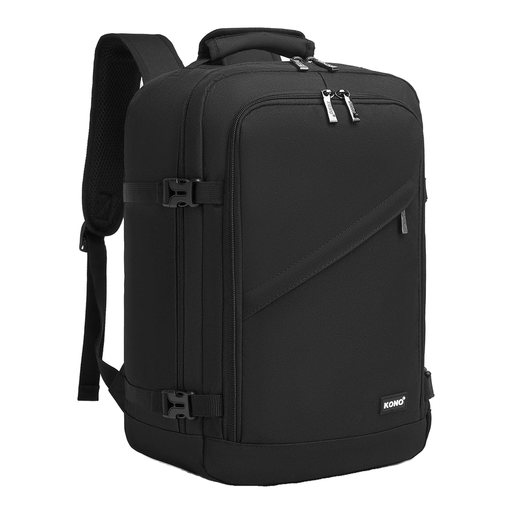
Why it suits this profile: A compact travel backpack for travellers mainly looking for a personal item for short flights. The stated dimensions are 40 × 20 × 25 cm and the capacity is 20 litres.
The dimensions are clearly stated, so you can compare them with the baggage requirements. Be sure to check the current rules for your ticket before you travel.
20-litre capacity and compact external dimensions for short trips, documents and everyday essentials.

Why it suits this profile: This business backpack combines a 15.6-inch laptop compartment with several compartments. It’s suitable for commuting, studying and short trips.
The capacity and laptop compatibility are specified. The expandable capacity from 25 to 30 litres makes it easy to see the difference between everyday use and a short trip.
25-litre capacity, expandable to 30 litres, a laptop compartment for laptops up to 15.6 inches and a stated weight of 860 grams.
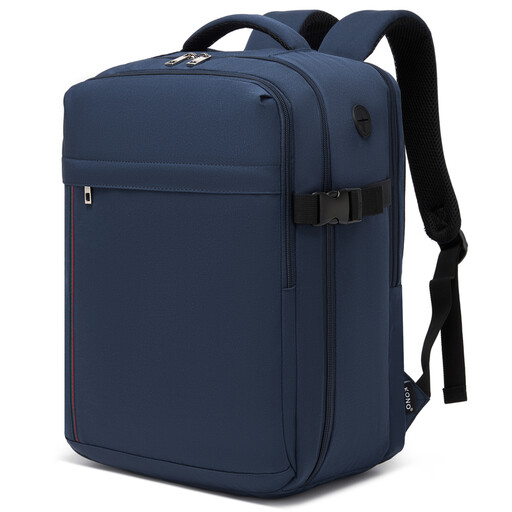
Why it suits this profile: For travellers and commuters who need a roomier, lightweight bag with a laptop compartment. The product information lists a capacity of around 24 litres and a weight of 0.5 kg.
The bag’s external dimensions and laptop size are both listed. Don’t mistake the water-repellent polyester for fully waterproof material.
0.5 kg weight, 24-litre capacity, 15.6-inch laptop compartment, clamshell opening, trolley strap and padded shoulder straps.
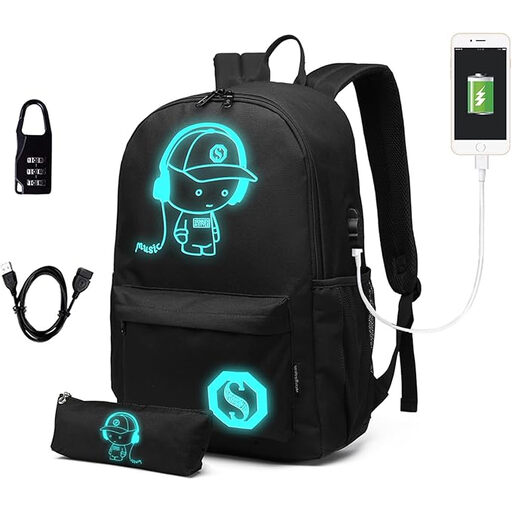
Why it suits this profile: A school backpack with space for a 15.6-inch laptop, A4 books and school essentials. It also has a USB port and several compartments.
The product description lists the laptop size, material and care instructions. The USB feature requires your own power bank, which isn’t included.
Dimensions of 30 × 17 × 48 cm, weight of 0.47 kg, Oxford material, laptop compartment for laptops up to 15.6 inches and several storage compartments.
We’ve put together a complete, up-to-date list of products that meet these strict selection criteria and the applicable European safety regulations.
That depends on the airline and your ticket. Check the permitted dimensions for a personal item and measure your backpack once it’s fully packed. The depth can increase in particular if you pack the bag heavily.
Its lifespan depends on the material, zips, seams, load and how often you use it. Don’t overfill the bag, put sharp objects in a case and follow the care instructions. A bag with a sturdier construction may be more suitable for everyday commuting than a very lightweight daypack.
A USB port is mainly a cable pass-through. You’ll need your own power bank, and should check that the cable and port are compatible with your device. Think of it as a handy extra, not a built-in charger.
