
Vandaag of morgen in huis

Kwaliteit gegarandeerd

Welkomstaanbiedingen ontgrendelen: GRATIS bezorging | Tot 80% korting | Gratis 30 dagen JoyPlus-proefperiode
Download de app
Buying a tablet seems simple until you have to choose between screen sizes, storage capacity, mobile data and different Android versions. A low price also says little about the experience after a few months. A tablet may have plenty of RAM on paper, yet still be limited by a basic processor or a low-resolution display.
Joybuy Product Recommendation Officer helps you cut through marketing terms and focus on verifiable specifications. This makes it easier to see which features matter for streaming, studying, work, creative use or mobile internet.
Some Android tablets advertise, for example, 20 GB, 26 GB or even 48 GB of RAM. Part of this is often virtual RAM: storage space that is temporarily used as working memory. This can help keep apps open, but it is not the same as physical RAM.
So pay attention to how the memory is configured. “8 GB + 12 GB virtual” means that the tablet has 8 GB of physical RAM. That may be enough for browsing, videos and basic apps. For heavy multitasking, photo editing or demanding games, the processor, physical RAM and software optimisation are at least as important.
A tablet with 64 GB of storage may seem affordable, but the operating system and pre-installed apps already take up space. If you store lots of downloads, photos or offline films, you can quickly run out of room.
So check:
A 128 GB model may be more practical for everyday use. For documents, creative projects and large media files, 256 GB is more appealing.
A large screen is ideal for films and documents, but it also makes a tablet heavier and less convenient to carry around. A 13- or 14-inch model is less likely to fit easily into a small bag than an 8.7- or 11-inch tablet.
Do not just look at the diagonal measurement. Also consider:
The processor determines how quickly apps open and how smoothly the tablet responds. An octa-core processor alone is no guarantee of good performance; the chipset model is more important. A MediaTek Helio G99, for example, is designed for everyday use, while a Snapdragon 8 Gen 3 or Apple M4 offers more headroom for demanding apps and multitasking.
For a tablet for studying, at least 4 GB of physical RAM and 64 GB of storage are suitable for basic use. If you also use the tablet for work, it is better to choose 8 GB of physical RAM and 128 GB of storage or more.
A 90Hz or 120Hz screen can make scrolling and animations look smoother than on a 60Hz display. However, resolution remains important for text and video. An 11-inch screen with 1280 × 800 pixels is suitable for simple tasks, but a 2K or 3K screen provides more detail when reading, drawing and watching films.
For a tablet for streaming, Widevine L1 is also relevant. Check whether your preferred streaming service and picture quality are actually supported. A product description may state that the tablet is compatible, but availability and quality can vary between services.
A tablet with Wi-Fi only connects to the internet on the go via a hotspot or public network. A tablet with 4G requires a SIM card and mobile data plan. Check the supported LTE bands in advance and ask your provider whether the combination is suitable.
Battery capacity is measured in mAh, but battery life also depends on brightness, processor, network and apps. A capacity of 8,000 to 10,000 mAh can be appealing for larger tablets, while a compact model often has a smaller battery. Also check what charger is included: with some models, you need to purchase one separately.
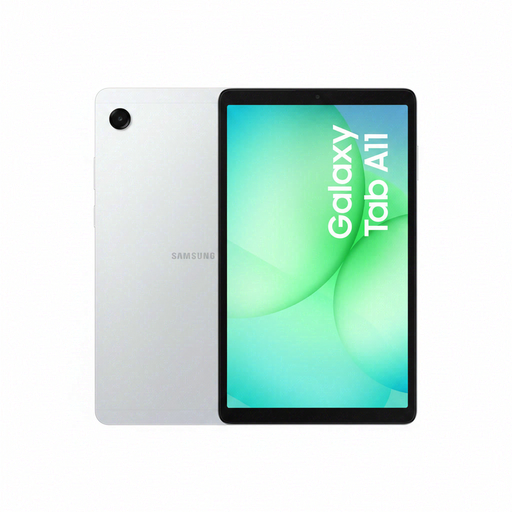
Why it suits this profile: The compact 8.7-inch size is suitable for browsing, videos, e-books and light everyday use. The 4G version enables mobile internet with a Nano SIM card.
The product specifications clearly state 4 GB of RAM, 64 GB of storage and microSD support. This makes it clear what is physically included and what can be expanded.
8.7-inch screen, 90Hz refresh rate, 4G LTE, 5,100mAh battery and microSD expansion.
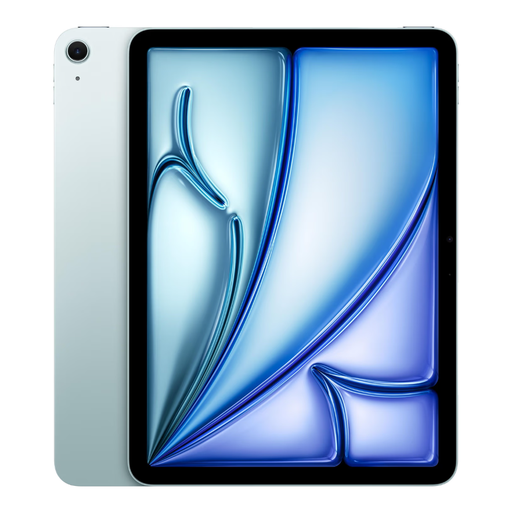
Why it suits this profile: The combination of the Apple M4 chip, 11-inch Liquid Retina display and Apple Pencil Pro support is well suited to creative tasks, studying and demanding work.
The storage capacity, lack of a card slot and lack of an adapter are listed separately. This helps prevent surprises regarding accessories and expansion options.
12 GB RAM, 128 GB storage, Wi-Fi 7, USB-C and compatibility with Apple Pencil Pro and Magic Keyboard.
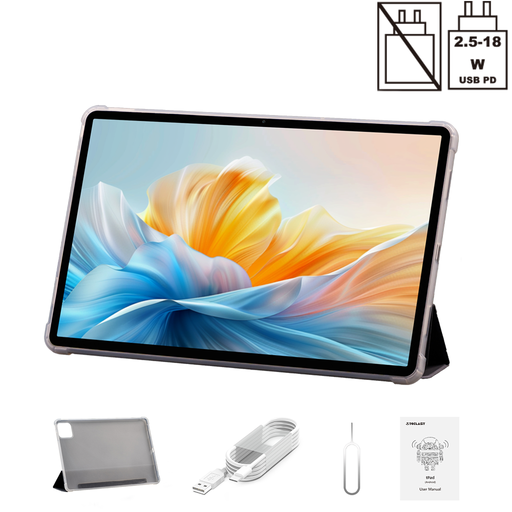
Why it suits this profile: The 14-inch 2.2K screen, Dual 4G and 10,000mAh battery are ideal for users looking for a large display for work and streaming.
The product specification distinguishes between 8 GB of physical RAM and 40 GB of virtual RAM. It also clearly lists Dual 4G, 128 GB ROM and the included folio case.
14-inch 2.2K display, Helio G100, Dual 4G, 128 GB storage, 10,000mAh battery and folio case included.
We have compiled a complete, up-to-date list of products that fully meet these strict selection criteria and the applicable European safety regulations.
A tablet with a stylus is useful for handwritten notes, sketches and PDF documents. Check whether the pen is included or needs to be purchased separately. The Lenovo Idea Tab, for example, is listed with 8 GB of RAM, 128 GB of storage and a Tab Pen. Apple Pencil support is available for an iPad Air, but accessories may be sold separately.
For families, parental controls, a protective case and a headphone socket are practical considerations. A cheap tablet for children should not be judged on price alone: also look at storage, battery life, drop protection and supervision during use.
For all models, check for CE marking, included safety information and a responsible party within the EU. Use a suitable USB-C charger, do not charge the tablet in a damp or enclosed environment, and do not allow young children to use a tablet unsupervised.
Look for a screen of at least 10 inches, a resolution of Full HD or 2K and above, sufficient speakers and support for your preferred streaming services. Widevine L1 may be relevant for streaming at higher picture quality. Always check the latest product specifications and service compatibility.
Its lifespan depends on battery wear, software support, storage and how you use the device. A model with expandable storage and regular security updates may remain practical for longer. Do not leave the tablet completely flat for long periods, and avoid heat while charging.
That depends on how you use it. For home, study and office use with reliable Wi-Fi, a Wi-Fi model is usually sufficient. If you travel frequently, work outdoors or do not want to use a hotspot, a tablet with 4G may be worthwhile. Bear in mind the cost of a SIM card or data plan.
