
Vandaag of morgen in huis

Kwaliteit gegarandeerd

Welkomstaanbiedingen ontgrendelen: GRATIS bezorging | Tot 80% korting | Gratis 30 dagen JoyPlus-proefperiode
Download de app
Buying a mouse seems straightforward, until you find yourself dealing with a stiff cable, flat batteries or a shape that doesn’t suit your hand every day. High DPI figures and terms such as “ergonomic” don’t tell the whole story either. The right choice depends mainly on how you’ll use it: working from home, office work, creative projects or gaming.
DPI indicates how sensitively the cursor responds to movement. A mouse with 24,000 or 42,000 DPI isn’t automatically more accurate for everyday use. For office work, settings between around 800 and 3,200 DPI are often more practical. Gamers may need higher values, but they don’t always use them at the maximum setting.
Look for a mouse with adjustable DPI so you can tailor the speed to your screen, programme or game.
A wireless mouse can connect via a USB receiver, Bluetooth or both. A USB receiver is often simple to set up with plug-and-play, while Bluetooth is useful for laptops and tablets without a spare USB port. Check which connections your devices support before you buy.
Also consider the power supply. A model with AA or AAA batteries can be used straight away with a spare battery, while a rechargeable mouse needs to be plugged in when its battery runs low. A wireless gaming mouse may also have different polling rate and response-time requirements from an office mouse.
An ergonomic mouse might have a standard shape, a large palm rest or a vertical angle. The Trust Bayo II, for example, has a vertical angle of 57 degrees. According to the product information and its ErgoCert classification, this design is intended to support hand and arm posture during long periods of work. It isn’t a medical guarantee: fit, hand size and working posture still matter.
Always check whether the mouse is right-handed, left-handed or symmetrical. A right-handed mouse may be impractical for left-handed users, even if the other specifications look suitable.
A USB mouse is suited to a permanent workstation and doesn’t need a battery. A Bluetooth mouse keeps USB ports free and works well with compatible laptops, tablets and other devices. RF wireless models usually use a small USB receiver and offer a straightforward connection.
If you switch between several computers, consider a model with a multi-device feature. According to its product specifications, the Logitech M720 Triathlon can connect to up to three devices and has an optical sensor with 1,000 DPI.
An optical mouse uses a light sensor to track movement across a surface. For best results, use it on a flat mouse mat or a suitable desk surface. Glass and glossy surfaces can cause problems with some models.
DPI is mainly an adjustable setting for everyday use. A lower setting can make precise selections easier, while a higher setting requires less physical movement. Also check the number of buttons and whether they can be programmed.
A compact mouse is handy when you’re out and about, but may offer less support for larger hands. A bigger model with a rubber grip may feel more comfortable, while a lightweight gaming mouse makes quick movements feel less strenuous.
If you work in a shared space, quiet buttons are worth considering. Also check whether this applies to every button or just the main clicks. A quiet mouse isn’t always completely silent.
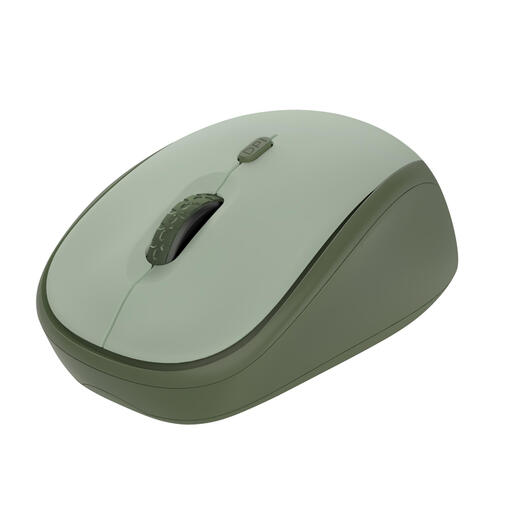
Why it suits this user: This compact wireless mouse is designed for office work, working from home and use on the go. It connects via an RF USB receiver, and its DPI can be adjusted from 800 to 1600.
The specifications list quiet clicks, adjustable DPI and a range of up to 8 metres. Just check in advance that your device has a USB-A port.
Optical sensor, 1,600 DPI, quiet buttons and a weight of 84 grams.
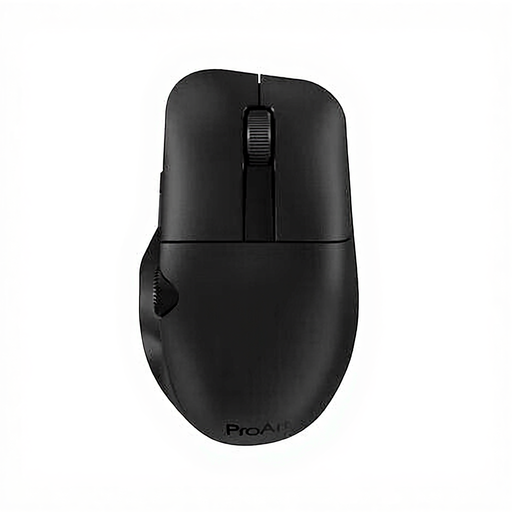
Why it suits this user: The MD300 combines RF wireless and Bluetooth with six programmable buttons. This makes it a good fit for creative professionals and people who work across multiple devices.
You’re not restricted to one type of connection. The built-in rechargeable battery means you won’t need to replace disposable batteries regularly.
4,200 DPI, six programmable buttons and an 800 mAh rechargeable battery.
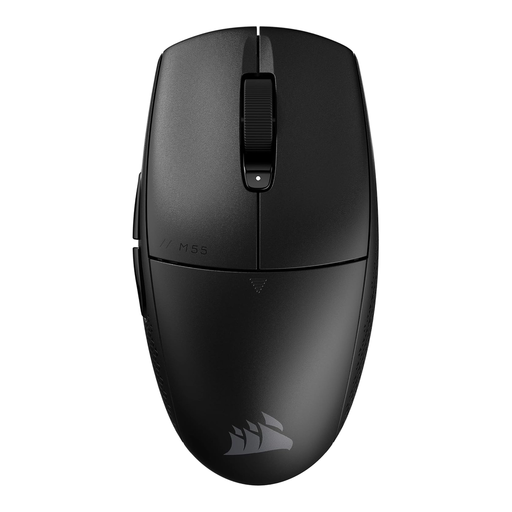
Why it suits this user: This right-handed gaming mouse offers RF wireless, Bluetooth and USB connectivity. Its six programmable buttons and adjustable sensor of up to 24,000 DPI are designed for gamers and productive multitaskers.
You can choose between wireless and wired use. Bear in mind that it requires an AA battery and that the product information doesn’t mention RGB lighting.
Three connection types, six programmable buttons and an optical sensor of up to 24,000 DPI.
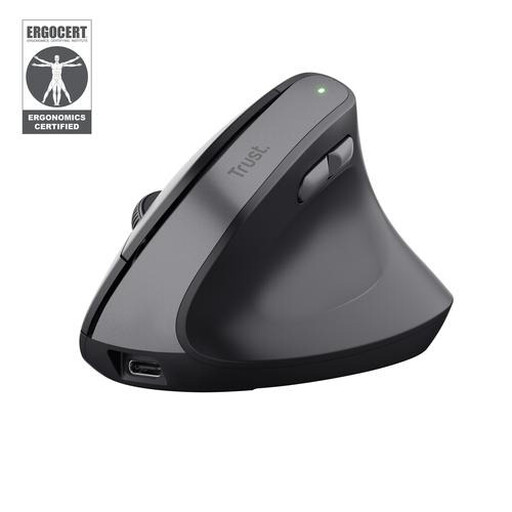
Why it suits this user: This wireless vertical mouse is designed for right-handed office and home workers who want to try a different hand position. It connects via a 2.4GHz USB receiver.
The vertical design makes its shape clear from the outset. According to the product information, this model has quiet buttons, a rechargeable battery and adjustable DPI.
57-degree vertical design, DPI from 800 to 2400 and battery life of up to three months according to the product information.
We’ve put together a complete, up-to-date list of products that meet these rigorous selection criteria and the applicable European safety regulations.
For working from home, a quiet mouse, comfortable shape and reliable connection are important. A Bluetooth mouse is useful with laptops, while a USB or RF model is suited to a permanent workstation. If you work for long stretches at a time, you could consider an ergonomic or vertical mouse.
That depends on its power supply. A model with an AA battery may last for up to 24 months according to its product specifications, for example, while a rechargeable mouse may last for several weeks or months between charges. Actual battery life depends on usage, connection and power management.
It can be, but not every gaming mouse is practical for office use. Programmable buttons and adjustable DPI can be useful, while RGB lighting, high sensitivity or a stiff cable may not be necessary for everyone. So, compare the shape, weight, noise level and connectivity options first.
