
Vandaag of morgen in huis

Kwaliteit gegarandeerd

Welkomstaanbiedingen ontgrendelen: GRATIS bezorging | Tot 80% korting | Gratis 30 dagen JoyPlus-proefperiode
Download de app
Buying a laptop seems straightforward until you start comparing specifications. Terms such as Ryzen 5, Core 5, SSD and Full HD only mean something once you know what you want to use it for. Browsing the internet, working on documents, video calls and streaming call for different specifications than demanding creative software or heavy multitasking.
There are practical pitfalls to watch out for, too. Some models are supplied without a charger, RAM may be fixed to the motherboard, and a large screen isn’t always convenient if you travel with your laptop every day. Use these checks to make a more informed choice.
A name such as AMD Ryzen 5 or Intel Core gives you a first impression, but the full configuration matters more. Check the number of cores, RAM, storage and graphics chip, too. Even a laptop with a modern processor can feel less responsive when lots of browser tabs are open if it has only 8GB RAM.
A laptop with an SSD will generally start up quickly and open files promptly. However, storage capacity determines how many files, photos and programmes you can keep. A 256GB SSD is suitable for basic use, but a 512GB SSD gives you more room for studying or working.
Several HP OmniBook models in this selection are not supplied with a charger as standard. Check before you buy. Also find out whether the RAM can be upgraded. On some laptops, including certain HP models with onboard memory, a later upgrade may not be possible.
A laptop with 8GB RAM is suitable for browsing the internet, email, word processing, video calls and streaming. If you’re a student who uses lots of browser windows, documents and online tools at the same time, 12GB or 16GB RAM can give you more breathing room.
Check the type of memory and whether it can be upgraded. Soldered memory can’t be replaced later. For example, the Lenovo IdeaPad Slim 3 with 16GB DDR5 gives you a good starting point for multitasking. The Lenovo IdeaPad Slim 5 in this selection has 16GB LPDDR5X memory, but according to the product specifications, it can’t be upgraded.
A 256GB SSD is suitable if you mainly work in the cloud and don’t save many large files locally. Choose 512GB if you keep photos, study projects, software or videos for offline viewing on your device. PCIe 4.0 NVMe storage is listed in the specifications for several models and is designed to give you quick access to your system and files.
A 14-inch laptop is practical for students and commuters. Its lighter weight and compact size make it easy to carry in a backpack. A 15-inch laptop gives you more room to work without becoming excessively large. A 17-inch laptop is best suited to home use or a permanent workspace. It offers a larger screen, but generally weighs more.
For documents and streaming, a Full HD laptop is a good starting point. Also check the screen’s aspect ratio. A 1920 × 1200 screen with a 16:10 aspect ratio gives you a little more vertical space for web pages and spreadsheets than a traditional 16:9 screen.
Check whether it’s a QWERTY laptop. The models below have an international or English QWERTY layout, which may differ from the Dutch keyboard layout. Also check for USB-C, HDMI, USB-A and the Wi-Fi version if you want to connect a monitor, mouse or docking station.
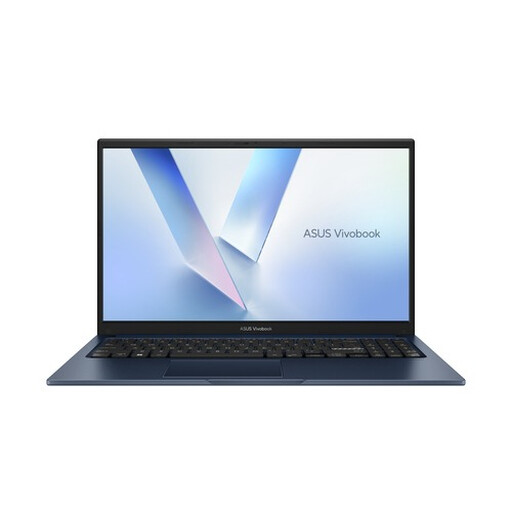
Why it suits this user: This 15.6-inch laptop is designed for everyday use at home, school and in the office. The Full HD display and full-size keyboard are practical for documents, online lessons and streaming.
The product specifications list 8GB DDR5 memory, a 256GB PCIe 4.0 SSD and Windows 11 Home. Before buying, check that this configuration meets your storage needs.
15.6-inch Full HD screen, anti-glare coating, webcam privacy shutter and Wi-Fi 6.
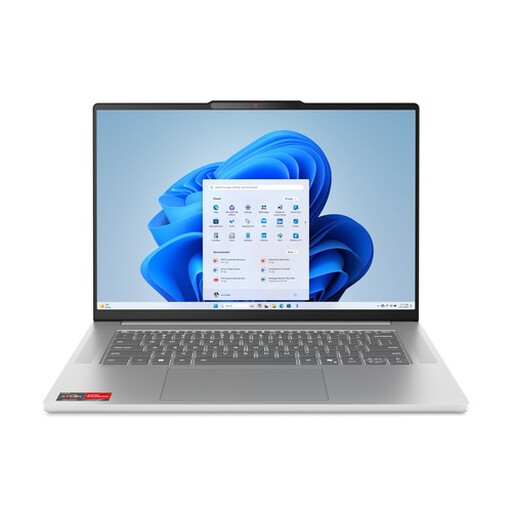
Why it suits this user: This 15.3-inch laptop combines a Ryzen 5 7535HS processor with 16GB LPDDR5X memory and a 512GB SSD. It’s a good fit if you work with spreadsheets, lots of tabs and communication software at the same time.
The configuration lists 16GB memory and a 512GB PCIe 4.0 NVMe SSD. Bear in mind that the RAM can’t be upgraded.
Ryzen 5 with 6 cores and 12 threads, 16GB LPDDR5X, 100% sRGB according to the product specifications, and a 70Wh battery.
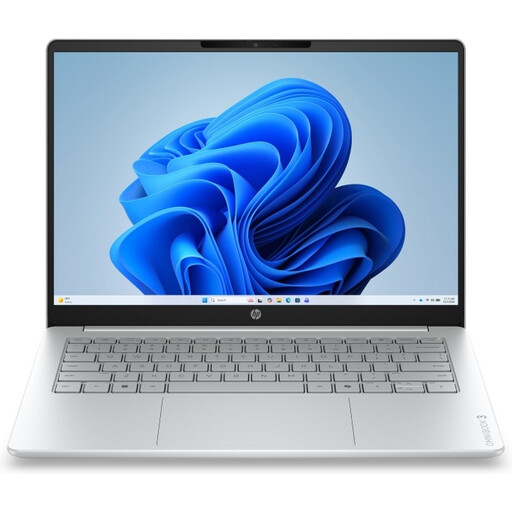
Why it suits this user: The 17.3-inch screen is well suited to a permanent workspace, managing paperwork, online learning and entertainment. The full-size QWERTY keyboard includes a numeric keypad for figures and spreadsheets.
The specifications clearly state that it has 8GB onboard memory and is supplied without a charger. Make sure you have a suitable USB-C charger, and don’t expect to be able to upgrade the RAM.
17.3-inch Full HD IPS screen, 512GB NVMe SSD, 1080p webcam and two USB-C ports with DisplayPort functionality.
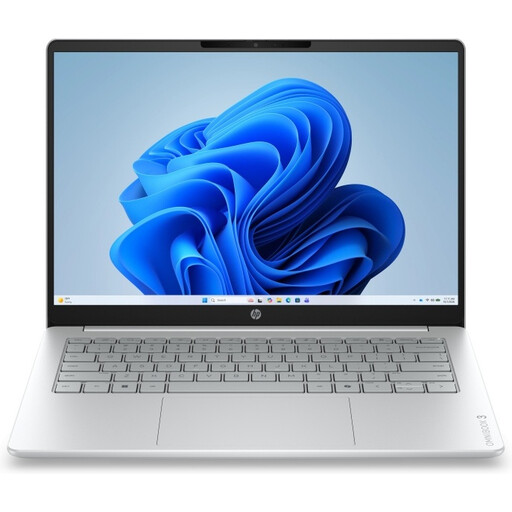
Why it suits this user: Weighing around 1.42 kg and featuring a 14-inch 16:10 screen, this model is designed for people who regularly take their laptop between home, school and the office.
The laptop has 12GB DDR5 memory and 512GB NVMe storage. According to the product specifications, the memory can’t be upgraded, and the laptop is supplied without a charger.
Ryzen 5 130 with 6 cores, 14-inch IPS screen with a 1920 × 1200 resolution, privacy shutter and USB-C with DisplayPort Alt Mode.
We’ve put together a complete, up-to-date list of products that meet these strict selection criteria and comply with current European safety regulations.
For word processing, email, video calls and a limited number of browser tabs, 8GB is often enough. If you use lots of programmes at once, 12GB or 16GB is a better choice. Also check whether the memory can be upgraded later.
How long it lasts depends on how heavily it’s used, the condition of the battery, updates and maintenance. A laptop used for browsing and documents has less demanding workloads than one used for video editing. That’s why it’s worth choosing enough RAM and storage from the outset, especially if the memory can’t be upgraded.
Power consumption is mainly affected by the processor, screen brightness, battery capacity and how long you use the laptop. A laptop generally uses less power for office work and streaming than it does under prolonged heavy use. An SSD has no moving parts and is energy efficient, but overall power consumption still depends on the full configuration.
