
Vandaag of morgen in huis

Kwaliteit gegarandeerd

Welkomstaanbiedingen ontgrendelen: GRATIS bezorging | Tot 80% korting | Gratis 30 dagen JoyPlus-proefperiode
Download de app
Buying a laptop seems straightforward until you start comparing specifications, keyboard layouts and accessories. For example, a slim design may offer fewer ports, while a larger screen adds extra weight. Terms such as AI laptop, fast processor and long battery life only tell you something useful once you check the underlying specifications.
As a Joybuy Product Recommendation Officer, I filter marketing claims down to practical information. This helps you avoid paying for features you will not use or having to buy essential accessories after your purchase.
Several modern laptops do not come with a mains adapter. This includes various Lenovo, HP, ASUS and Apple models in this overview. Always check:
A USB-C port does not automatically mean that every USB-C charger is suitable. Use a compatible adapter from a reliable brand and check the product specifications.
A 16GB laptop has RAM for active programmes and windows. A 512GB SSD laptop has storage space for Windows, apps, photos and documents. These components serve different purposes.
Also consider upgradeability. On many slim models, the RAM is soldered to the motherboard. In that case, an 8 GB laptop cannot be upgraded later. For studying, video calls, browser tabs and office work, 8 GB is usable, but 16 GB gives you more room for multitasking.
A laptop with a QWERTY keyboard is not always the same. Dutch QWERTY, international QWERTY, US QWERTY and Belgian AZERTY layouts differ in key labels and arrangement. Check this before ordering, particularly if you regularly use special characters, numbers or keyboard shortcuts.
A 13- or 14-inch laptop is usually practical for students, train journeys and home workspaces with limited room. A 15- or 16-inch screen provides more working space for spreadsheets and two windows side by side. A 17.3-inch model is mainly suitable if the laptop will usually stay in one fixed place.
Do not just look at the screen size in inches. A 16:10 screen offers more vertical space than 16:9, which is useful for documents and websites. Also check the brightness, screen finish and resolution. A matt screen can reduce reflections in a bright room. According to the product specifications, an OLED screen delivers deep blacks and high contrast, but it often has a glossy finish.
For a laptop for working from home, studying or administrative work, a modern processor, 8 or 16 GB of RAM and an SSD are usually sufficient. If you edit photos, open lots of browser tabs or work with large files, 16 GB will be more useful.
An integrated graphics chip is suitable for video streaming, presentations and everyday image editing. For demanding 3D software or intensive gaming, a dedicated graphics card is generally more suitable. Check your programmes first before paying extra for graphics performance.
A Windows 11 laptop works well with a wide range of office software, peripherals and study platforms. macOS may appeal to users who already have an iPhone or other Apple devices. If you want to buy a MacBook, make sure that any essential Windows programmes are also available for macOS.
On Windows laptops with Snapdragon processors, older programmes, drivers and specialist peripherals may work differently. Check compatibility with the software or accessory supplier. According to the manufacturer, an AI laptop with an NPU supports certain local AI features, but availability depends on Windows, the software, region and updates. Treat AI performance as an additional feature, not a guarantee that every programme will run faster.
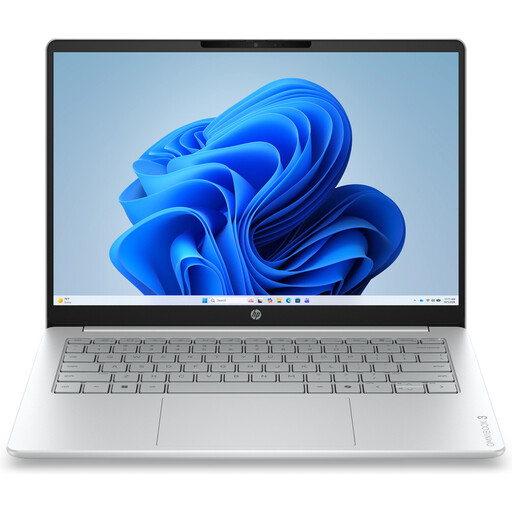
Why it suits this profile: This compact Windows 11 laptop is designed for browsing, documents, video calls and streaming. According to the product specifications, it weighs approximately 1.42 kg.
The 512GB SSD and 16:10 screen are clearly specified. However, note that it has 8GB of RAM and the charger is not included.
14-inch IPS screen, Full HD webcam, Wi-Fi 6, USB-A, USB-C and HDMI.
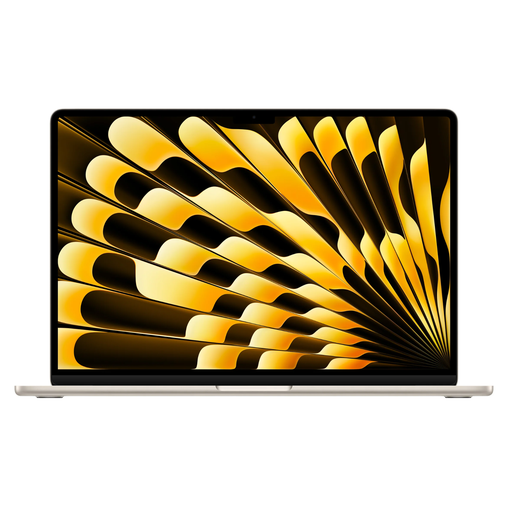
Why it suits this profile: The 15.3-inch screen, 16GB of memory and 512GB SSD are well suited to users who multitask frequently and want a larger workspace.
The storage and RAM are clearly stated. The laptop runs macOS and is supplied without a mains adapter, so a suitable USB-C adapter is required.
M5 chip, Liquid Retina display, two Thunderbolt 4 ports and a stated battery life of up to 18 hours according to Apple.
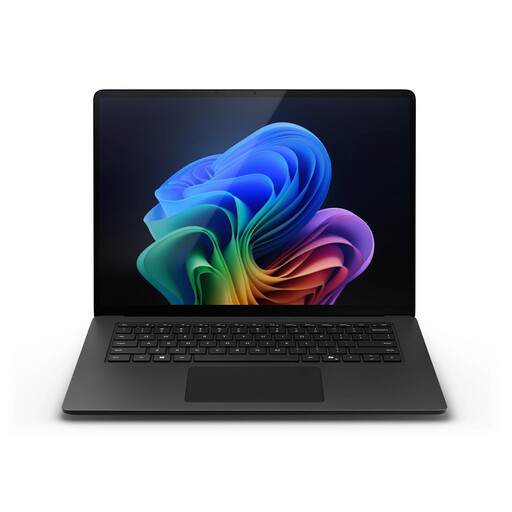
Why it suits this profile: For business users and creative workflows, 32GB of RAM, 1TB of storage and Windows 11 Pro provide extra capacity for large projects and numerous open applications.
The storage, RAM and Windows 11 Pro are clearly specified. However, check in advance that specialist x86 software is compatible with Snapdragon.
15-inch touchscreen, 3:2 resolution, 32GB LPDDR5X, 1TB SSD and Wi-Fi 7.
We have put together a complete, up-to-date list of products that fully meet these strict selection criteria and the applicable European safety regulations.
For documents, video calls and browsing, 8 GB is usable. 16 GB RAM is a more practical choice if you use lots of tabs, spreadsheets and programmes at the same time. Check whether the memory can be upgraded before ordering.
For studying, office work and streaming, 512 GB is often sufficient. Windows and pre-installed software already take up some space. If you work with large video files, photo libraries or lots of games, you may need additional cloud storage or an external SSD.
Allow for a possible charger, protective case, mouse, external storage and software subscriptions. With a model that does not include an adapter, a suitable USB-C Power Delivery charger is an immediate additional expense. Also check the warranty terms and the availability of service in the Netherlands.
