
Vandaag of morgen in huis

Kwaliteit gegarandeerd

Welkomstaanbiedingen ontgrendelen: GRATIS bezorging | Tot 80% korting | Gratis 30 dagen JoyPlus-proefperiode
Download de app
Buying a keyboard sounds simple, until you have to choose between mechanical, wireless, compact, US QWERTY or a model with a numeric keypad. Marketing terms such as RGB, Rapid Trigger and “ergonomic” may sound appealing, but they do not always tell you much about everyday use.
The most common buying mistakes usually come down to three things:
For Dutch users, US QWERTY and US International are common options. The letters are largely arranged in the familiar QWERTY layout, but the key shape and special characters may differ from a Dutch keyboard.
A US International keyboard can be useful if you regularly write English text or are used to the ANSI layout. However, using dead keys for Dutch accents can take some getting used to. Always check:
The layout determines how much space the keyboard takes up and which keys are immediately available.
A compact keyboard is not automatically more comfortable. If you enter figures every day, a keyboard with a numeric keypad is often more convenient than a 60% model. If you mainly game or have a small desk setup, you may benefit from the extra room for your mouse.
With a mechanical keyboard, each key generally has its own switch. The type of switch affects the key feel and noise level:
A hot-swappable keyboard allows you to replace compatible switches without soldering. However, check whether the model uses 3-pin, 5-pin or another system.
A membrane or scissor-switch keyboard may be quieter and simpler. Pay attention to the difference between “mechanical feel” and mechanical: according to the product description, the MageGee TS91 comes with membrane keys that mimic a mechanical feel. This is not the same as a genuine mechanical keyboard.
A wired keyboard works via USB and does not need batteries or charging. It is a logical choice for a fixed PC, gaming desk or office where a constant connection is preferred.
A wireless keyboard gives you more freedom of movement. When choosing a wireless model, check:
A keyboard and mouse set can be a cost-effective choice for a complete office setup. However, check whether both devices use the same receiver and whether the key layout matches your preference.
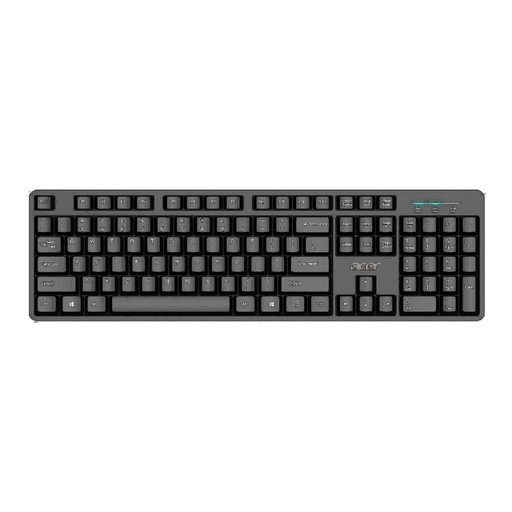
Why it suits this profile: This full-size wired keyboard is designed for everyday use at home or in the office. According to the product information, the USB connection works straight away without any additional software.
The product information clearly states the US International layout, USB connection and full-size format. This means you can check in advance whether the layout suits you.
105 keys, numeric keypad, 1.45-metre cable and a water-resistant design according to the description.

Why it suits this profile: The 75% layout combines compact dimensions with arrow keys and a function row. It is well suited to users who type, game and want to keep their desk tidy.
The specifications explicitly mention a US layout, Type-C wired connection, hot-swappable support and a 75% format. You therefore do not have to work these details out from the product photo alone.
PBT keycaps, volume knob, RGB lighting, gasket construction and compatibility with Windows and Mac according to the product details.
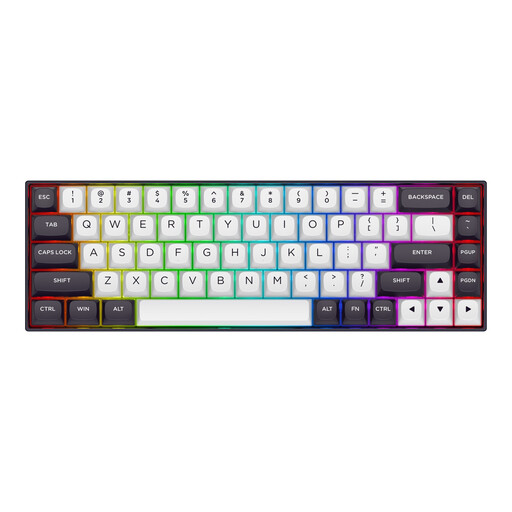
Why it suits this profile: According to the product description, this compact US-layout gaming keyboard is aimed at competitive PC gaming and users who need plenty of room for their mouse.
The product information states the 65% format with 68 keys, Hall Effect switches and adjustable actuation. Check in advance whether you actually need these features for your games.
Magnetic switches, Rapid Trigger according to the manufacturer, RGB lighting, aluminium top plate and detachable Type-C cable.
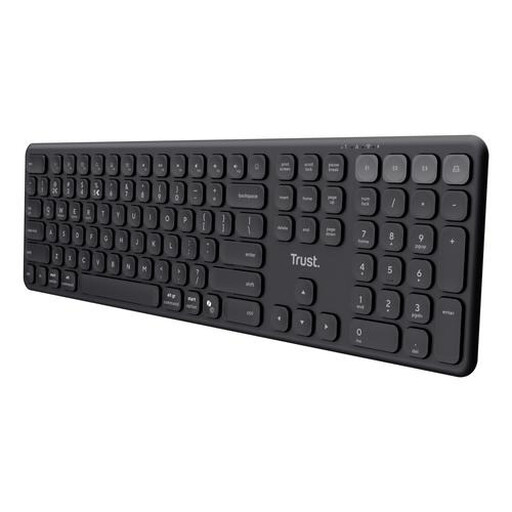
Why it suits this profile: The full-size US QWERTY layout, quiet scissor keys and support for four devices make it suitable for flexible workers and shared workspaces.
The product information makes clear that this is not a mechanical keyboard, but a low-profile model with scissor keys. It also specifies the four connection options and the US format.
USB receiver plus three Bluetooth channels, rechargeable battery, numeric keypad and compatibility with Windows, macOS, iOS and Android.
We have put together a complete, up-to-date list of products that fully meet these strict selection criteria and the applicable European safety regulations.
That depends on the switches and sound dampening. Linear switches are often quieter than clicky switches, but even a mechanical keyboard with dampening material will still make more noise than a quiet scissor or membrane keyboard. Also consider whether your colleagues are sensitive to typing noise.
A battery-powered model needs new batteries periodically. A rechargeable model uses a USB cable and can often continue to be used while charging. With a wireless keyboard offering multiple connection options, it is worth checking which devices you actually use; otherwise, the additional features may have little practical value.
Its lifespan depends on the switch type, usage, dust and moisture. Manufacturers sometimes state a number of keystrokes, but this is a product specification rather than a guarantee for every usage scenario. Keep the keyboard clean, do not pull on the cable and disconnect it before cleaning. With a hot-swappable keyboard, compatible switches can be replaced later, which may make maintenance easier.
