
Vandaag of morgen in huis

Kwaliteit gegarandeerd

Welkomstaanbiedingen ontgrendelen: GRATIS bezorging | Tot 80% korting | Gratis 30 dagen JoyPlus-proefperiode
Download de app
Buying a gaming laptop seems simple until you start comparing specifications. For example, a high refresh rate means little if the graphics card cannot deliver enough frames. A laptop with 16GB RAM may also appear suitable for gaming, but be less practical if the memory cannot be upgraded.
Pay particular attention to these three common pitfalls:
For modern games, the NVIDIA GeForce RTX graphics card is usually the most important graphics component. An RTX 5060 gaming laptop is designed for demanding games and creative software, while an RTX 5070 gaming laptop offers more graphics headroom, depending on the product configuration.
Performance also depends on:
A model with an RTX 5070 and a 115W TGP, such as certain Lenovo Legion configurations, has different capabilities from a laptop with the same GPU but a lower power limit. Always compare the full specification list.
For streaming, video editing and numerous browser windows, a modern multi-core processor is useful. The Intel Core 7 240H found in several models, for example, has 10 cores and 16 threads. The ASUS ROG Strix G18 uses an AMD Ryzen 9 8940HX, while Lenovo Legion models offer an Intel Core Ultra 7 255HX with 20 cores.
A 16-inch gaming laptop offers a practical balance between screen space and portability. A 16:10 display with 1920 × 1200 pixels provides extra vertical space for documents and websites. That is useful if you also use the laptop for studying or work.
A 17-inch gaming laptop or an 18-inch model is particularly appealing if you usually play at a desk. The larger chassis provides more screen space, but also often increases the weight. The MSI Cyborg 17 weighs approximately 2.4kg, for example, while a 16-inch ASUS V16 weighs around 1.95kg.
When choosing a gaming laptop with a 144Hz screen, consider the difference between the display specification and the actual in-game output. A 144Hz panel can display smoother motion, but only when the hardware produces enough frames. 144Hz can be useful for competitive games; for creative applications, resolution and colour coverage are often more important.
16GB RAM is a useful starting point for gaming, studying and multitasking. If you stream at the same time, use lots of browser tabs or edit video, upgradeable memory can be beneficial.
So check:
A gaming laptop with a 1TB SSD offers more space for large games and media files than a model with 512GB. Bear in mind that Windows and recovery files use some of the stated capacity. The ASUS V16 combines 16GB DDR5 memory, upgradeable to 32GB, with a 1TB PCIe 4.0 SSD. The MSI Cyborg 15 B13WFKG-804NL has 16GB RAM, an RTX 5060 and a 512GB SSD.
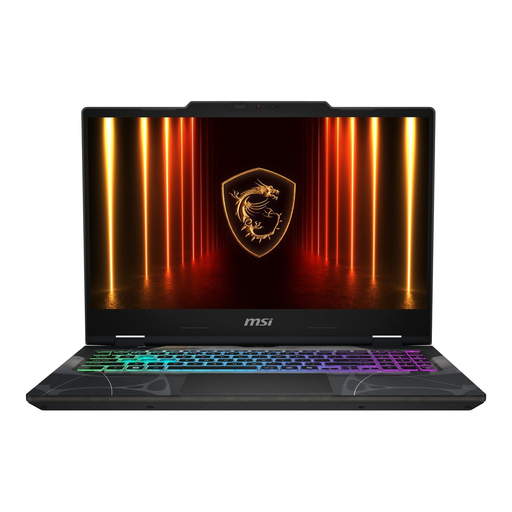
Why it suits this profile: An accessible choice for students and beginner gamers looking for a compact laptop for gaming, office work and everyday use.
The specifications clearly state 16GB DDR5, two memory slots and upgradeability up to 96GB. The 144Hz Full HD IPS display and RTX 5050 are also clearly specified.
15.6 inches, approximately 1.95kg, an RTX 5050 with 8GB video memory and Wi-Fi 6E. Check before ordering whether a suitable charger needs to be purchased separately.
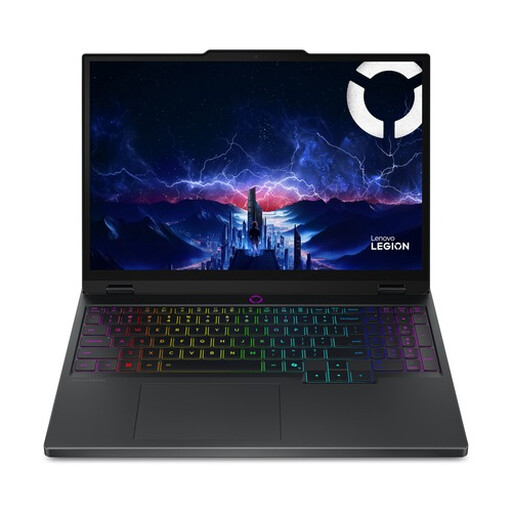
Why it suits this profile: Designed for users looking for a high-end combination of gaming, creative software and a high-resolution display.
The RTX 5070 is specified with 8GB GDDR7 and a TGP of 115W. This means you can see a relevant power figure alongside the GPU name.
15.1-inch WQXGA OLED, 165Hz, 100% DCI-P3, 16GB DDR5 and two memory slots supporting up to 32GB.
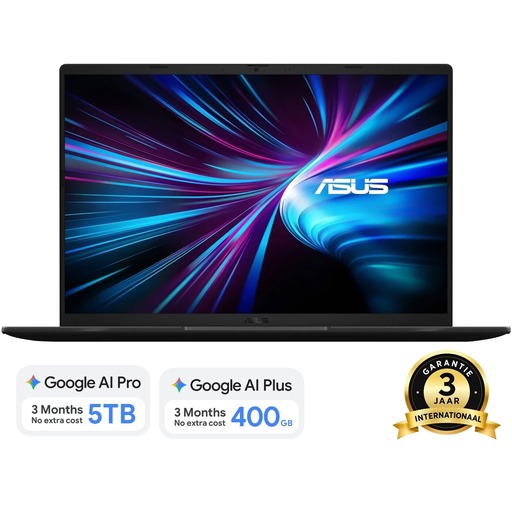
Why it suits this profile: Suitable for gamers who want to combine a 16-inch format with streaming, multitasking and graphically intensive applications.
The product information lists the RTX 5070 and 8GB GDDR7, along with the 70W CPU and GPU design power and 144Hz WUXGA resolution.
Intel Core 7 240H, 16GB DDR5 expandable to 32GB, 1TB SSD, 144Hz display and a weight of approximately 1.95kg.
Check the keyboard layout before completing your purchase. Some models have Dutch QWERTY, while others use International English QWERTY. Also check the warranty terms. Consumers in the EU are covered by statutory conformity rights; the exact claims process and any additional manufacturer’s warranty may vary by brand and seller.
A gaming laptop is generally most comfortable to use on mains power during demanding workloads. Use a suitable adapter, keep the ventilation openings clear and do not place the device on a bed or other soft surface. A laptop with a powerful GPU is also often heavier and noisier than a standard laptop designed for office work.
We have compiled a complete, up-to-date list of products that fully meet these strict selection criteria and the applicable European safety regulations.
16GB RAM is a practical starting point for many games and everyday multitasking. For streaming, video editing and demanding creative software, upgradeable memory is worth considering. Always check whether the RAM is soldered or can be replaced via SO-DIMM slots.
That depends on your games and graphics card. A 144Hz display can show smoother motion than 60Hz, but the benefit is most noticeable when the laptop produces enough frames. For creative applications, resolution, brightness and colour coverage may be more important.
Its lifespan depends on game settings, heat generation, maintenance and upgradeability. A model with a replaceable SSD and upgradeable RAM can remain practical for longer. Keep the ventilation clear, install updates and use the laptop on a hard surface.
