
Vandaag of morgen in huis

Kwaliteit gegarandeerd

Welkomstaanbiedingen ontgrendelen: GRATIS bezorging | Tot 80% korting | Gratis 30 dagen JoyPlus-proefperiode
Download de app
A desk may seem simple, but you’ll soon notice if you’ve made the wrong choice. A worktop that’s too small leaves little room for your monitor, keyboard and documents. A wobbly frame can be distracting when you’re typing or gaming. And with an electric sit-stand desk, cables, walls and accessories can restrict how far it moves.
Desk descriptions often focus on features such as a memory function, USB-C port or RGB lighting. So don’t judge a desk on looks alone. Check the dimensions, load capacity, construction and practical layout.
A 120 x 60 cm desk fits easily in a bedroom or compact home office. However, it may feel cramped if you use two monitors, a laptop and paperwork. A 160 x 70 cm or 160 x 80 cm desk gives you more room to work.
Don’t just measure the available wall space. Also consider:
A stated load capacity doesn’t automatically tell you how stable a desk will feel. The frame construction, joints and adjustable feet are just as important. A desk with a steel frame and extra crossbars may feel different in everyday use from a lightweight model with thin legs.
For a computer desk or worktable, also check whether the load capacity is given as a static figure. Don’t place heavy equipment all on one side of the desktop, and don’t exceed the stated capacity.
An electric sit-stand desk needs room to move up and down safely. Don’t place it right up against a wall, and check that cables can’t get trapped. According to the product descriptions for the JOYFURNOS and Ochama models, the overheat protection activates after two minutes of continuous movement. You then need to wait 18 minutes before adjusting the height again.
Keep electrical components indoors and away from liquids. When buying, also check the supplied adapter, maximum load and instructions for the collision sensor. A USB-C port is handy for charging compatible devices, but it won’t replace a complete charging solution for all your equipment.
Choose a size to suit your equipment and room:
A gaming desk often has extra features such as a monitor stand, headphone hook or PC holder. Check that these accessories suit your equipment and whether they take up permanent space on the desktop.
For a height-adjustable desk, the range matters more than simply having a motor. According to the product information, the models listed adjust from around 72 to 120 cm. Check that these heights suit your chair, height and monitor position.
A desk with a memory function can save your preferred heights. This is useful if several people share the same desk or if you regularly switch between sitting and standing. The feature doesn’t change the maximum load capacity: for the JOYFURNOS and Ochama models, this is 70 kg static load.
Pay attention to the materials and joints. The selected models use materials including particleboard, steel, plastic and Oxford fabric. Particleboard isn’t the same as solid wood, so keep it away from moisture and use a soft, dry cloth to clean it.
Cable management stops cords hanging over the edge. Look for cable grommets, an organiser or a hook, and check whether your extension lead will fit beneath the desktop. Cables and dust may stand out differently against a black or brown desk, so choose accessories that suit your décor.
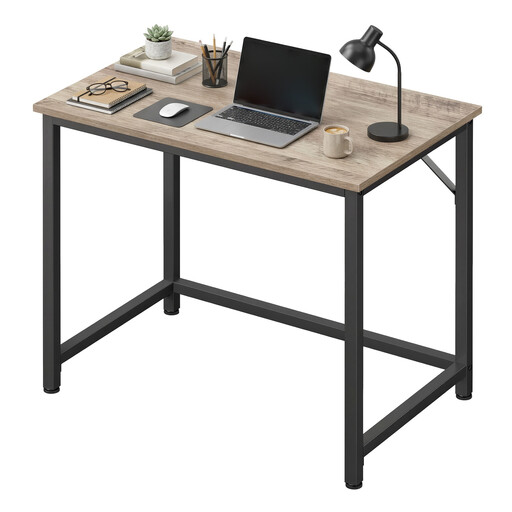
Why it suits this profile: Its compact size is a good fit for a small room, bedroom or simple study space. The desk is designed for work, study or gaming.
The dimensions and maximum static load of 50 kg are clearly stated. According to the product description, the adjustable feet help with positioning the desk on an uneven floor.
80 x 50 x 75.5 cm, steel frame, particleboard and adjustable feet.

Why it suits this profile: The spacious desktop is ideal for a home office, multiple screens, a printer or a large workstation without electric height adjustment.
The product description lists a steel frame, extra supports and adjustable feet. The stated capacity is 400 kg; always check the latest product information before use.
160 x 80 x 75 cm, adjustable feet and a powder-coated steel frame according to the product description.
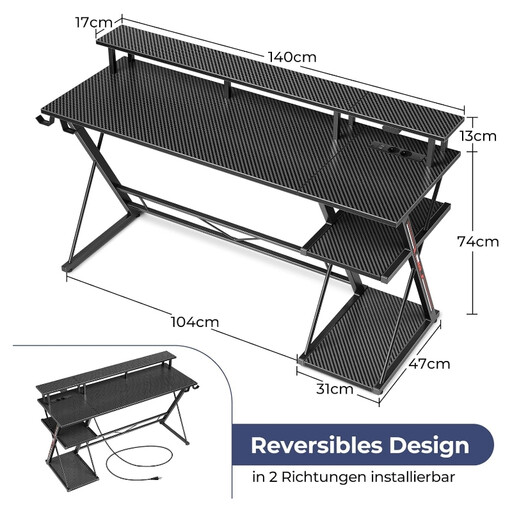
Why it suits this profile: Designed for gamers and users with peripherals. Features include RGB lighting, a monitor stand, headphone hook and PC holder.
The product information states that the desktop is made from particleboard and metal, not solid wood. It also includes warnings about load limits, liquids and using the desk on a level surface.
Two plug sockets, two USB ports, app-controlled RGB lighting and a CPU stand for towers up to 47 cm, according to the product description.

Why it suits this profile: This wide workspace combines electric height adjustment with a memory function, cable grommets and storage for everyday working from home.
The product description lists two cable openings, a lock function and a sensor. When assembling and using the desk, make sure the desktop has room to move freely.
160 x 70 cm, height range of 72 to 120 cm, memory function, USB-C port and maximum static load of 70 kg.
We’ve put together a complete, up-to-date list of products that meet these strict selection criteria and the applicable European safety regulations.
A 120 x 60 cm desk is often big enough for a laptop and one monitor. If you use multiple screens, documents or a printer, you’ll benefit from a width of 140 cm or a 160 x 70 cm desk. Measure the depth of your room and the space behind your chair beforehand, too.
Power consumption depends on the type of motor, how often you adjust the height and the standby mode. Only use the height adjustment when needed, and check whether the control panel has an energy-saving mode. With electric models, you’ll also need to protect the adapter and cables from liquids.
A desk’s lifespan depends on the load it carries, how it’s assembled, exposure to moisture and everyday use. Tighten the joints after a while if the instructions allow it, place the desk on a level surface and don’t exceed the maximum load. For an electric model, avoid forcing the moving parts and follow the safety instructions.
