
Vandaag of morgen in huis

Kwaliteit gegarandeerd

Welkomstaanbiedingen ontgrendelen: GRATIS bezorging | Tot 80% korting | Gratis 30 dagen JoyPlus-proefperiode
Download de app
Buying a 3D printer seems straightforward until you start comparing product specifications. Speeds of 500 or 600 mm/s, automatic bed levelling and multi-colour functions sound appealing, but they don't tell you everything about day-to-day use. The right choice depends on your material, desired print size, experience, and how much time you're willing to spend on settings and maintenance.
As Joybuy Product Recommendation Officer, I filter the most important information based on practical points. This way, you avoid paying for eye-catching marketing claims alone.
A manufacturer often states a maximum speed, for example 500 or 600 mm/s. That is a technical upper limit under certain conditions. The actual speed also depends on the model, layer height, filament, nozzle and the desired print quality.
A fast 3D printer therefore does not automatically have the shortest total print time. A printer that moves quickly but produces a lot of post-processing or failed prints can actually be less efficient in practice.
A 3D printer with automatic bed levelling measures the position of the print bed and helps set the first layer. This reduces manual work, but the print bed still needs to be clean and correctly mounted. The nozzle height, temperature and adhesion also remain important.
Automatic bed levelling removes one common adjustment step, but it does not replace basic maintenance.
On top of the purchase price come filament, spare nozzles, a suitable surface and possibly a filament dryer. Electricity consumption and failed prints also add up. So check in advance:
An FDM 3D printer melts filament and builds an object layer by layer. PLA is generally a practical choice for decorative models, prototypes and first prints. For parts that need to withstand more mechanical stress, PETG can be more interesting. The settings differ by material.
When choosing filament, don't just look at the colour, but also the diameter and recommended temperature. PLA filament 1.75 mm must match the printer's feed. A 1 kg spool is handy for regular use; store the spool dry and sealed.
For functional parts you could consider PETG filament 1 kg, for example. According to the product description from JOYBUY x ANYCUBIC, this material is intended for strong and durable prints and is vacuum-packed with desiccant. However, the final properties depend on printer settings, storage and model design.
The build volume determines how large a single object can be. A size of 220 × 220 × 220 mm suits many hobby projects and prototypes. For larger models or multiple parts in one print, a larger bed is more practical.
Also check the height separately. The Creality Ender-3 V3 KE is listed in the product specifications with a build volume of 220 × 220 × 240 mm, while the Anycubic Kobra X has a volume of 260 × 260 × 260 mm.
A higher maximum nozzle temperature can expand the choice of materials, but it doesn't mean every material is suitable without further adjustments. Look at the combination of:
Claims about, for example, 300 mm/s or 600 mm/s come from the manufacturer's product specifications. Treat them as an indication and always check the recommended settings for your filament.
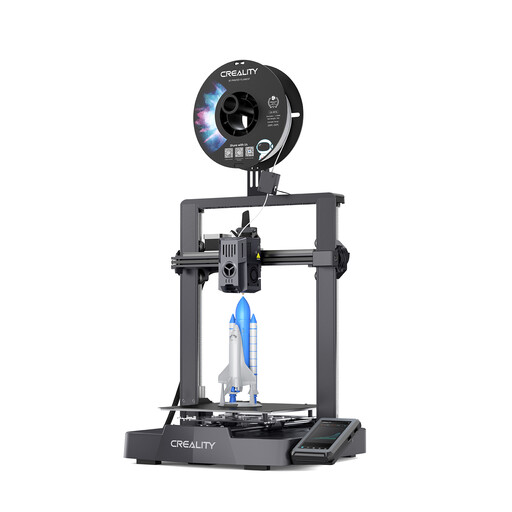
Why this fits the profile: A practical FDM 3D printer for home, study or hobby projects, with automatic calibration and support for several common materials.
The product specifications mention auto-levelling, filament detection and power-loss recovery. This reduces manual checks, although cleaning and correct settings are still needed.
According to the product specifications: up to 500 mm/s, build volume of 220 × 220 × 240 mm and support for PLA, PETG, ABS, TPU and ASA.
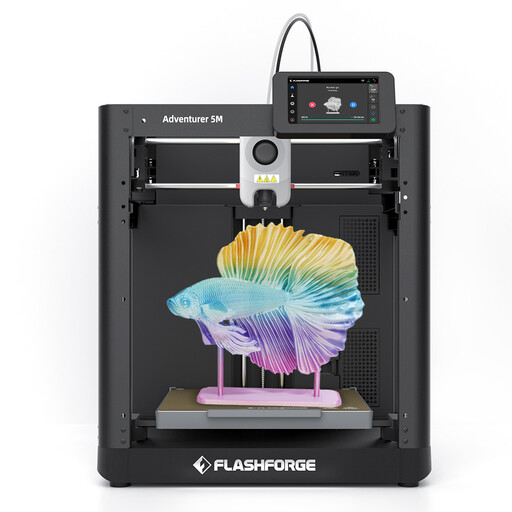
Why this fits the profile: Aimed at users who want to spend less time on manual adjustment and regularly print prototypes or models.
The manufacturer mentions automatic bed levelling and a direct extruder design. This helps you get started, without suggesting every print succeeds without preparation.
According to FlashForge: CoreXY construction, a maximum speed of 600 mm/s, 280 °C direct extruder and print volume of 220 × 220 × 220 mm.
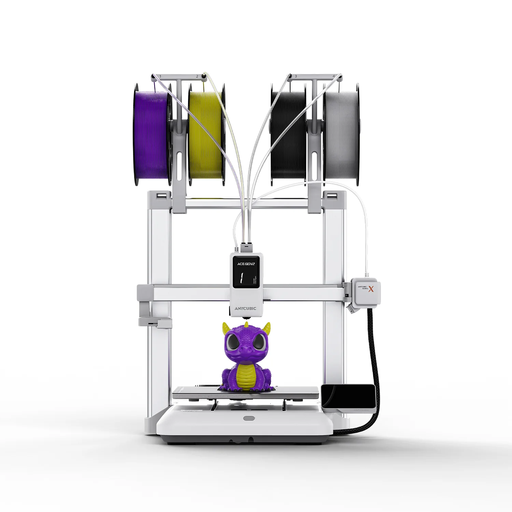
Why this fits the profile: A multi-colour 3D printer for makers, designers and small businesses who want to produce larger colourful models or multiple parts.
The four-colour setup makes the multi-colour function concrete. Check the filament consumption, switching strategy and available space for the printer in advance.
According to Anycubic: built-in four-colour printing, build volume of 260 × 260 × 260 mm and automatic Z-offset and bed levelling functions.
We have compiled a full, up-to-date list of products that fully meet these strict selection criteria and comply with current European safety regulations.
If you want to buy 3D printer filament, it's a good idea to first check the printer's material profile. For fast printers, a high-speed filament can be relevant, but the maximum speed of the filament depends, according to the manufacturer, on factors including nozzle, temperature and flow.
The eSUN PLA-Basic line is available as PLA filament 1.75 mm in, among others, black, white, yellow and Holly Green. According to eSUN, these variants are intended for high print speeds of up to 300 mm/s under specific conditions. That is no guarantee of the same speed on every printer.
For a simple start, PLA spools are often practical. For parts that need to withstand knocks or light loads, you could look at PETG. Don't leave filament open for long periods after use: moisture can affect processing and cause more visible print problems.
Yes, but choose a model with clear software, automatic bed levelling and a common filament size. PLA is usually an accessible first choice. Bear in mind basic tasks such as cleaning the print bed, loading filament and removing a cooled model.
In addition to the printer, you pay for filament, electricity and possibly spare parts. PLA and PETG are often sold per 1 kg spool. The cost per object depends on the weight, infill, supports, print duration and the number of failed prints. A slicer program can give an estimate of material usage in advance.
The lifespan varies depending on frequency of use, maintenance and parts. Clean the print bed and nozzle regularly, check moving parts and store filament dry. With intensive use, nozzles, transport wheels or other wear parts may need replacing sooner. Always consult the manual for your specific model when carrying out maintenance.
