
Vandaag of morgen in huis

Kwaliteit gegarandeerd

Welkomstaanbiedingen ontgrendelen: GRATIS bezorging | Tot 80% korting | Gratis 30 dagen JoyPlus-proefperiode
Download de app
The world of 3D printing is more accessible than ever. Whether you're a hobbyist looking to create unique designs, an engineer who needs prototypes, or a small business owner producing custom parts, there's a 3D printer for you. But with an abundance of choices, it's easy to fall into a trap. Many printers promise the world but leave you with frustration and wasted material.
As a Joybuy Product Recommendation Officer, I'll help you cut through the marketing jargon. We'll focus on what truly matters so you can choose a model that fits your projects, without any hidden flaws. Let's look at the two most common pitfalls:
To avoid buyer's remorse, there are a few technical specifications you can't ignore. These are the factors that make the difference between a reliable workhorse and an expensive dust collector.
The days of waiting all day for a small object are over. Modern printers have raised the bar significantly. A fast 3D printer is no longer a luxury but a standard expectation.
A perfect first layer is the foundation of every successful print. Manually calibrating with a piece of paper under the nozzle is a time-consuming and inaccurate process. An auto-levelling 3D printer completely automates this task. Using sensors, the printer measures the distance to the print bed at multiple points and automatically compensates for any unevenness. This not only saves time but also significantly increases the success rate of your prints.
Most consumer printers fall into two categories: FDM and Resin.
For most users, from beginners to professionals, a modern FDM printer offers the best balance of ease of use, versatility, and cost.
Below are a few models that score well on the above criteria, matched to different user profiles.
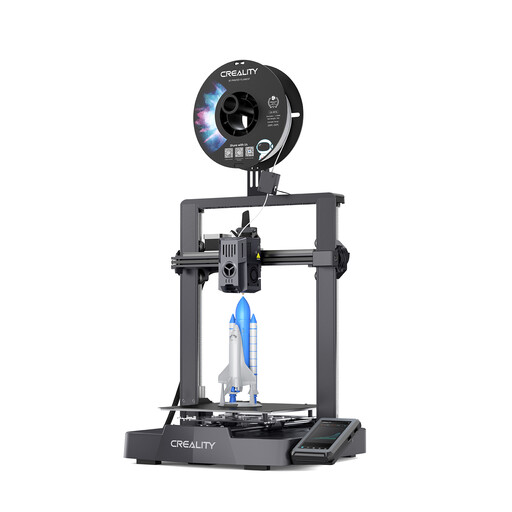
Why This Fits Their Persona: Ideal for those who want to start 3D printing without breaking the bank, but still expect modern features. You get speed and convenience, perfect for hobby projects and learning the ropes.
This printer tackles both pitfalls: it offers a high print speed of up to 500 mm/s and is equipped with CR Touch for fully automatic calibration. No frustration, just print right out of the box.
The combination of a 'Sprite' direct drive extruder and a nozzle that can reach 300°C makes it suitable for more than just PLA, including PETG and flexible TPU.
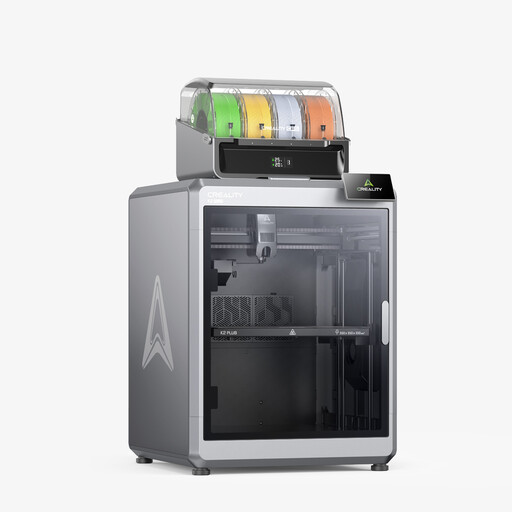
Why This Fits Their Persona: For the serious user who needs to print large, complex, and multi-colour objects. Perfect for prototyping, small-scale production, and ambitious projects where speed and volume are crucial.
This model is engineered for performance. With speeds up to 600 mm/s, a fully enclosed and heated chamber, and automatic calibration, this is a machine that delivers without the hassle.
The CFS (Color Filament System) enables multi-colour 3D printing with up to 16 colours. The large build volume 3D printer of 350x350x350 mm provides the space for serious projects.
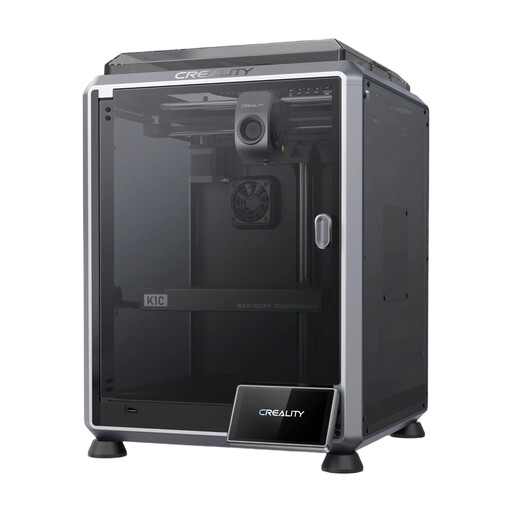
Why This Fits Their Persona: For the user who wants to print functional, high-strength parts with advanced materials. Think engineers, mechanics, or serious hobbyists making parts for drones, cars, or tools.
This printer is purpose-built for demanding materials. The enclosed chamber, 300°C hotend, and clog-free extruder prevent issues that standard printers face with these types of filaments.
The "Unicorn" tri-metal nozzle and direct extruder are designed for printing abrasion-resistant materials like carbon fiber filament (PLA-CF, PA-CF). The built-in AI camera monitors the print for errors.
A good printer is only half the battle. The quality of your filament is just as important. For high-speed printers like the models above, a special high-speed filament like Creality Hyper PLA is a great choice. This material is formulated to flow smoothly at high speeds, which reduces the risk of clogging and ensures a clean end result.
We've curated a complete, up-to-date list of products that fully meet these strict selection criteria and EU safety regulations.
An FDM printer (like most Creality 3D printer models) works by melting plastic filament and building it up layer by layer. This is ideal for functional parts, prototypes, and larger objects. A Resin printer uses UV light to cure liquid resin, resulting in highly detailed but often less durable objects. For most applications at home or in a workshop, an FDM printer is the most practical choice.
For standard materials like PLA filament, an open-frame printer is fine. But if you want to print with materials that are sensitive to temperature fluctuations and warping, such as ABS or carbon fiber filament, an enclosed chamber is essential. It maintains a stable temperature around the model, leading to better layer adhesion and a stronger final product.
Modern printers, especially those with auto-levelling, require significantly less maintenance. The main tasks are keeping the print bed clean for good adhesion and occasionally cleaning the nozzle to prevent clogs. If you don't use the printer for a while, it's wise to remove the filament and store it in a dry place to prevent it from absorbing moisture.
