
Vandaag of morgen in huis

Kwaliteit gegarandeerd

Welkomstaanbiedingen ontgrendelen: GRATIS bezorging | Tot 80% korting | Gratis 30 dagen JoyPlus-proefperiode
Download de app
Buying a new PC seems straightforward, until you have to choose between a desktop PC, mini PC, all-in-one PC, laptop or gaming PC. Manufacturers often emphasise a high turbo frequency, a modern case or a large storage capacity. But one specification rarely tells you enough about how well a computer will suit your needs.
Watch out for these three common pitfalls:
A modern mid-range processor is usually sufficient for email, word processing, video calls and browsing the internet. If you use lots of browser tabs, spreadsheets and business software at the same time, 16 GB RAM will make more difference than a higher turbo frequency alone.
An Intel Core PC can offer a range of performance levels. So check the full model name, the number of cores and the generation. For example, an Intel Core i7-14700T has 20 cores and 28 threads, while an Intel Core i5-14400 has 10 cores and 16 threads. That difference matters more than the i5 or i7 label alone.
8 GB RAM may still be adequate for light tasks, but 16 GB gives you more room for multitasking. If you’re buying a laptop, check whether the memory can be upgraded. Some models have soldered RAM.
An NVMe or PCIe SSD generally offers faster start-up and loading times than a traditional hard drive. As well as speed, consider the capacity:
A PC with an SSD isn’t automatically suitable for intensive video editing or modern games. Check the graphics card too. Integrated Intel or AMD graphics are suited to office work and media, while a gaming PC with a dedicated graphics card offers more for graphics-intensive software.
A mini PC takes up little space, and some models can be mounted behind a monitor using a VESA bracket. Check that it has enough HDMI, DisplayPort and USB connections.
An all-in-one PC combines the computer and screen in one case. This means fewer cables, but a faulty screen or internal component can be harder to replace than on a separate desktop. Consider the screen size too: a 23.8-inch Full HD screen is compact for a desk, while 27 inches gives you more working space.
For business use, Windows 11 Pro may offer features that aren’t included in Windows 11 Home, such as additional management and security options. Also check the keyboard layout. A laptop with an International English QWERTY keyboard is not the same as one with a Dutch QWERTY or AZERTY keyboard.
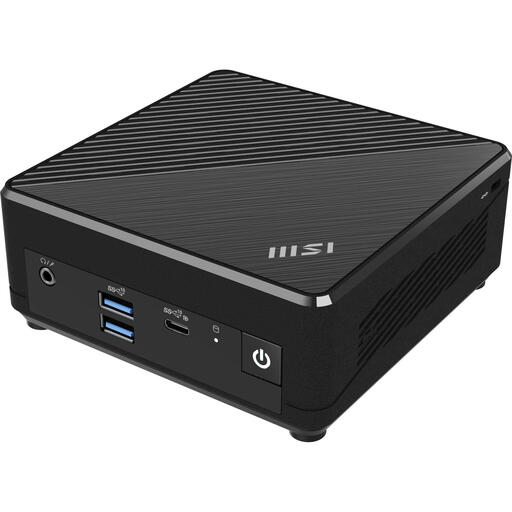
Why it suits this type of user: This compact mini PC is designed for basic tasks such as browsing the internet, email and working with documents. It weighs 540 grams and supports VESA mounting.
The product information clearly states that it has 4 GB RAM and a 128 GB SSD. So you won’t discover its limited capacity only after you’ve bought it. This configuration is less suitable for heavy multitasking.
Intel N100, 128 GB SSD, Windows 11 Pro, Wi-Fi 5, Bluetooth 5.0 and two Ethernet ports.
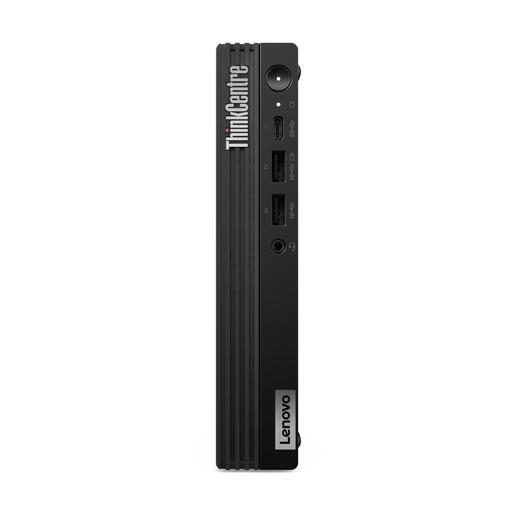
Why it suits this type of user: This business PC pairs a compact case with 16 GB DDR5 memory, 512 GB SSD storage and Windows 11 Pro. It’s well suited to office work and demanding multitasking.
The listed specifications make it easy to see how the processor, RAM and storage compare. Do note that, according to the product information, a charger isn’t included as standard.
20 cores, DDR5-5600, 512 GB PCIe 4.0 SSD, Wi-Fi 6E, two display outputs and VESA mounting.
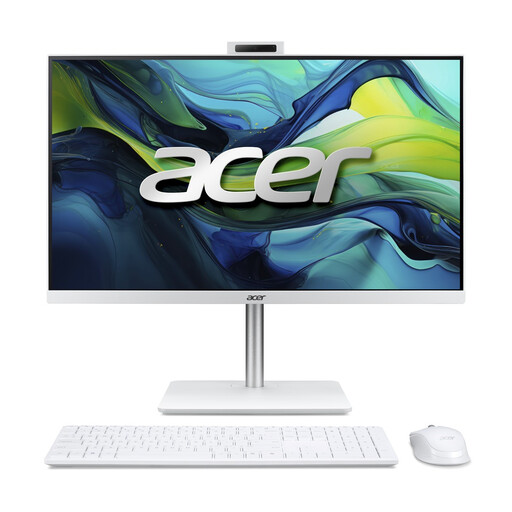
Why it suits this type of user: The 23.8-inch Full HD IPS screen, webcam, speakers, wireless keyboard and mouse make this a practical choice for working from home, studying and video calls.
The screen size, webcam and included accessories are all clearly listed. Check in advance that the fixed screen setup will suit your desk.
Intel Core 5 120U, 16 GB DDR5, 1 TB NVMe SSD, 5MP webcam, Wi-Fi 6 and IPS display.
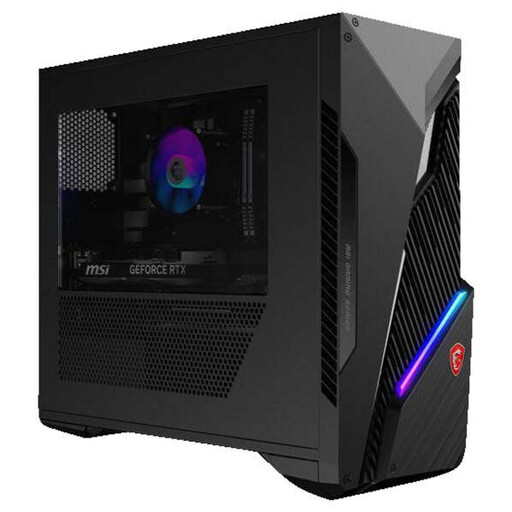
Why it suits this type of user: This gaming PC is designed for people who want to run graphics-intensive games or applications as well as their everyday tasks.
The dedicated RTX 5060 Ti graphics card is listed separately alongside 16 GB RAM and a 1 TB SSD. Compare these specifications with your monitor’s resolution and refresh rate.
Intel Core i5-14400F, RTX 5060 Ti 8 GB, 16 GB DDR5, 1 TB M.2 SSD and Wi-Fi 6E.
We’ve put together a complete, up-to-date list of products that meet these strict selection criteria and the applicable European safety regulations.
It depends on the configuration. A desktop PC often offers more room for connections and upgrades, while a laptop combines a screen, keyboard and battery. If you work both at home and on the go, a laptop may be the better choice. For a fixed workspace, a desktop or mini PC may be more practical.
8 GB may be enough for basic use, but 16 GB RAM is a sensible choice for multitasking, video calls and office software. More memory can be useful for demanding creative programmes, virtual machines or gaming. Always check the maximum memory capacity and whether it can be upgraded.
Energy use depends on the PC’s power consumption and how long you use it. A compact mini PC generally uses less electricity than a powerful gaming PC, but actual consumption varies depending on the workload. Check the power supply’s rated wattage, and switch the computer off or put it into sleep mode when you’re not using it.
