
Vandaag of morgen in huis

Kwaliteit gegarandeerd

Welkomstaanbiedingen ontgrendelen: GRATIS bezorging | Tot 80% korting | Gratis 30 dagen JoyPlus-proefperiode
Download de app
Looking to buy a keyboard for gaming, working from home, the office or your iPad? It’s tempting to focus mainly on RGB lighting, a low price or a familiar brand name. However, other features have a much greater impact on whether you’ll remain happy with your purchase.
Pay particular attention to these three common pitfalls:
Before ordering, check both the physical layout and the language description. An AZERTY keyboard is common among French-speaking users, while a QWERTY keyboard is often supplied in US International or English. QWERTY can be practical for Dutch users, but check that the keys for special characters match your preferences.
An ISO layout has, among other things, a different Enter key shape from ANSI. As a result, a keyboard can look similar in the product photo while the key positions differ in practice.
A full-size keyboard usually has a separate numeric keypad. This is useful for spreadsheets, accounting and administrative work. A TKL keyboard omits this section, saving space on the right-hand side. A 60% model is even more compact, but often uses key combinations for the arrow keys and navigation functions.
So don’t automatically choose a smaller model. Measure your desk and consider which keys you use every day.
A mechanical keyboard uses individual switches beneath the keys. Linear switches, such as red switches, have no tactile click. Other variants provide more feedback or produce more sound. The experience depends on the switch type, actuation and construction.
A membrane keyboard is often simpler and can be quieter. A quiet keyboard with low-profile membrane or scissor keys is better suited to a shared home office than a loud model. Also pay attention to the wording “mechanical feeling”: this does not automatically mean that the keyboard has mechanical switches.
A USB keyboard usually works as soon as it is connected and does not require a battery. This makes it suitable for a permanent desktop PC or gaming setup. A detachable USB-C cable is convenient for transport, but check whether the cable connects to USB-A or USB-C and whether your device has the appropriate port.
A wireless keyboard can work in two ways:
Also check the power source for wireless models. For example, the Trust Ody II runs on batteries, while the Trust Vaiya has a built-in rechargeable battery. Battery life depends on usage and settings, so treat stated figures as the manufacturer’s product specifications rather than a guaranteed real-world lifespan.
A gaming keyboard can offer features such as anti-ghosting, programmable keys, game mode and RGB lighting. Anti-ghosting helps register multiple simultaneous key presses, but the number of supported keys varies by model.
A keyboard with RGB lighting is mainly useful if you want to identify the keys more easily in a dark environment or adjust the lighting to suit your desk. Per-key RGB offers more customisation options than general backlighting. Check whether software is required for colour profiles, macros and key customisation.
A volume dial is practical, but it isn’t a reason to choose a layout that doesn’t suit you. Look at the keys, connection and compatibility first. Only then consider the extra features.
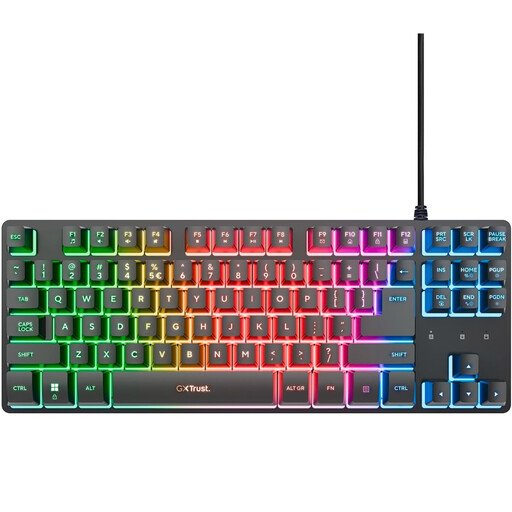
Why it suits this profile: This compact model is designed for users looking for a simple gaming keyboard with a USB connection and lighting. The QWERTY layout and TKL design are suitable when you don’t need a numeric keypad.
The specifications clearly state that this is a membrane model rather than a mechanical keyboard. They also indicate that the TKL format does not include a numeric keypad.
USB connection, 83 keys, RGB lighting and anti-ghosting for up to 10 simultaneous key presses according to the product information.
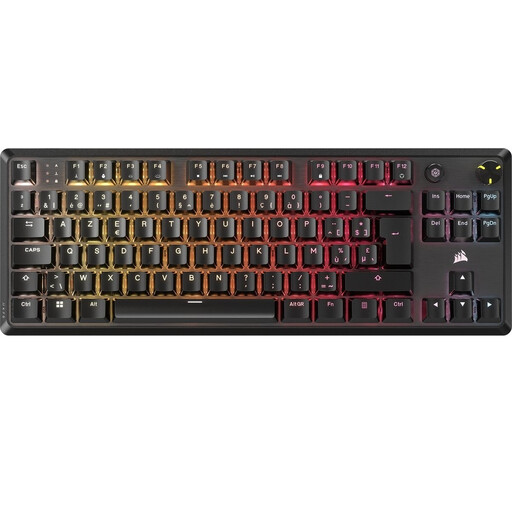
Why it suits this profile: This wired mechanical TKL keyboard is designed for users looking for a Belgian AZERTY layout, a compact casing and extensive customisation options.
The layout is listed as BE ISO AZERTY. This makes it less likely that you’ll order a US or French layout without noticing beforehand.
TKL format, linear MLX Red v2 switches, per-key RGB, aluminium top plate, NKRO and a detachable USB-C cable.
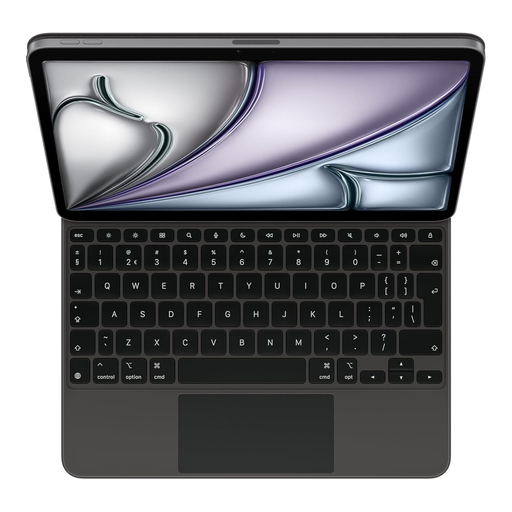
Why it suits this profile: This model is designed for iPad Air users who want to type on the go and are looking for an integrated trackpad, protective cover and Dutch QWERTY layout.
Compatibility is specifically linked to iPad Air and certain iPad Pro models. Therefore, check your exact iPad model before ordering.
Smart Connector, integrated trackpad, 14 function keys, adjustable floating position and USB-C pass-through for charging the iPad.
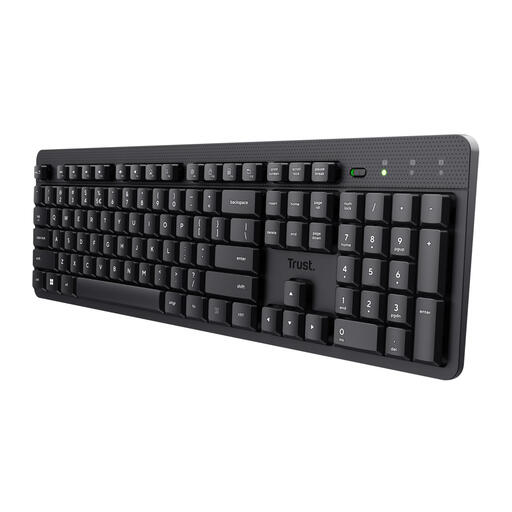
Why it suits this profile: This full-size wireless keyboard is designed for home workers and office professionals who want to type quietly and need a numeric keypad.
The product information explicitly mentions membrane keys, a US QWERTY layout and a USB receiver. So you know in advance that this is neither a Bluetooth nor a mechanical model.
Full-size layout with numeric keypad, quiet low-profile keys, multimedia functions and a range of up to 8 metres according to the product specifications.
We’ve put together a complete, up-to-date list of products that fully meet these strict selection criteria and the applicable European safety regulations.
That depends on your workspace. A USB keyboard is ready to use immediately and doesn’t require a battery. A wireless model gives you greater freedom of movement, but requires you to consider batteries, charging and the available connection. Choose Bluetooth for devices without a free USB port; choose a USB receiver if plug-and-play use on a PC is more important.
Lifespan depends on the construction, usage, dust and moisture. Manufacturers sometimes state a number of keystrokes, but this is a product specification rather than a guarantee for every user. Keep the keyboard dry, unplug it before cleaning and use a soft, dry cloth. Also check the statutory guarantee and any additional manufacturer’s warranty supplied with the product.
No. A mechanical model can offer specific feedback, rollover and customisation options, but a membrane model may be perfectly adequate for everyday gaming. Consider the layout, anti-ghosting, connection and available gaming features. For competitive use, adjustable actuation or Rapid Trigger can be interesting options, but only if you’ll actually use those features.
