
Vandaag of morgen in huis

Kwaliteit gegarandeerd

Welkomstaanbiedingen ontgrendelen: GRATIS bezorging | Tot 80% korting | Gratis 30 dagen JoyPlus-proefperiode
Download de app
Want to buy a keyboard, but finding it hard to tell the difference between wireless connections, layouts and extra features? A low-profile design, backlit keys or a wide range of connection options may sound appealing, but they do not automatically make a keyboard suitable for your needs.
Most disappointing purchases result from three common mistakes:
Below, we set out the most important points to check. We then look at some popular choices for different uses.
First, check which device you will be using the keyboard with. A wireless keyboard can connect via Bluetooth, a USB receiver or both. Bluetooth is convenient for laptops, tablets and smartphones, while a USB receiver is often suitable for computers without a reliable Bluetooth connection.
A Bluetooth keyboard will only work if the device supports the correct Bluetooth profile. Also check the operating system: Windows, macOS, iPadOS and Android may use different function keys.
For a tablet keyboard, the connection is particularly important. According to the product information, an Apple Magic Keyboard with Smart Connector uses a direct magnetic connection and does not require Bluetooth pairing or separate keyboard charging. This differs from a universal model that works via Bluetooth.
With a Microsoft Surface keyboard, you should also check the exact Surface Pro model. The magnetic connection and dimensions are not automatically suitable for every Surface generation.
The layout determines where symbols such as @, quotation marks and punctuation are located. A QWERTY keyboard with a US layout is not the same as a Dutch or international layout. Therefore, always check whether it says “US English”, “International English”, “Dutch” or “French AZERTY”.
Choose the size based on how you work:
A smaller model is not automatically more convenient. If you regularly enter amounts, addresses or figures, you may actually lose time without a numeric keypad.
A mechanical keyboard uses individual mechanical switches. This can provide more distinct feedback and customisation, but the model may also be louder and heavier. Some versions support hot-swappable switches, allowing you to replace compatible switches without soldering. Check which type of switch is included beforehand.
Scissor keys are low-profile and often resemble laptop keys. They are a good choice for office work, studying and quiet typing. A backlit keyboard is practical in low ambient light, but not every model includes lighting. For example, the Trust Vaiya explicitly states that it does not have backlighting or programmable keys.
For wireless models, check the battery method. Manufacturers and product listings sometimes give a usage time of “up to” a certain number of months. This figure depends on lighting, connection method and intensity of use. Treat the stated period as a guideline rather than a guaranteed runtime.
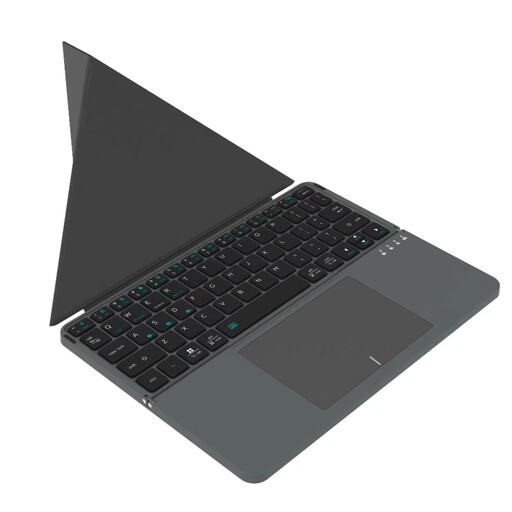
Why it suits this profile: This foldable Bluetooth model is designed for users looking for a keyboard for their tablet, smartphone and computer without having to carry a large desk keyboard around.
The compact design prevents you from paying for a numeric keypad or features you do not use while travelling. However, check compatibility with your device beforehand.
63 keys, a touchpad, Bluetooth and a folded size of 152 × 97 × 12 mm according to the product details.
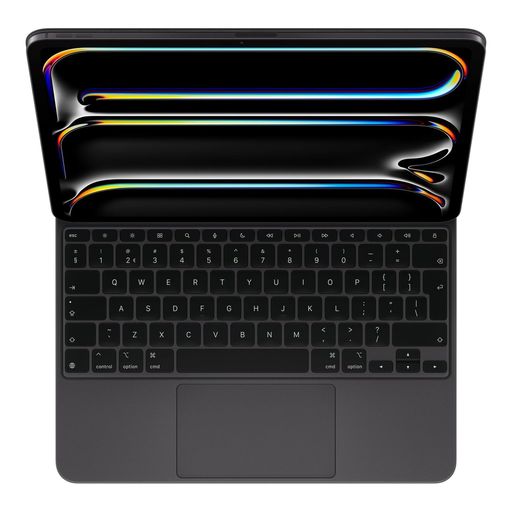
Why it suits this profile: Suitable for iPad Pro users looking for a fixed keyboard case with a touchpad, an adjustable viewing angle and a direct connection.
The product details state compatibility with iPad Pro models and Smart Connector. This makes the connection clearer than with a universal Bluetooth model.
Integrated touchpad, backlighting, 14 function keys, USB-C pass-through and adjustable positions according to the product specification.
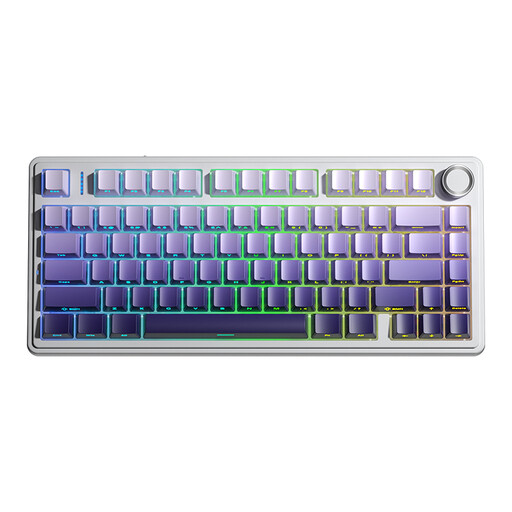
Why it suits this profile: For gamers and users looking for a mechanical keyboard with multiple connections, a compact layout and customisable features.
The 75% format saves desk space without leaving out the arrow keys. However, bear the US QWERTY layout in mind if you are used to a Dutch layout.
Tri-mode connection via cable, Bluetooth and 2.4 GHz; plus hot-swappable switches, RGB lighting and a 4000mAh battery according to the product listing.
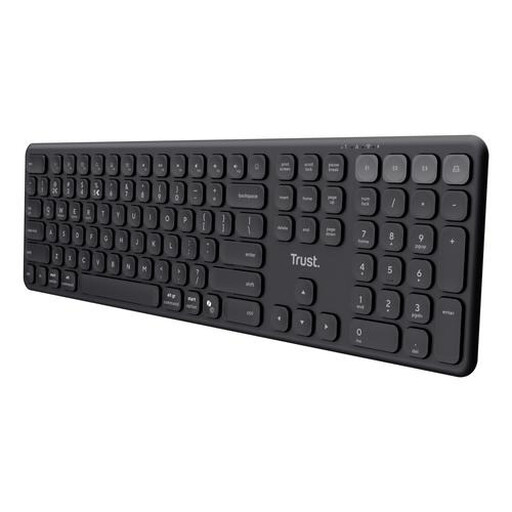
Why it suits this profile: A practical choice for anyone who wants to control a laptop, tablet and phone from one full-size keyboard.
The product listing specifies the US QWERTY layout and that backlighting is not included. You therefore know in advance which layout and features you will get.
Four connected devices, a numeric keypad, quiet scissor keys and USB-C charging according to the product specifications.
We have put together a complete, up-to-date list of products that fully meet these strict selection criteria and the applicable European safety regulations.
It can be, as long as both the keyboard and the iPad support Bluetooth and the layout suits you. An iPad keyboard with Smart Connector works differently: it connects directly to the tablet and, according to the product information, does not require Bluetooth pairing. Always check the exact iPad model.
Its lifespan depends on the battery, charging habits, switches used and build quality. Manufacturers sometimes state a battery life of up to several months, but backlighting and intensive use will shorten this period. A model with USB-C and the option to use it while charging can be practical for a permanent workstation.
That depends on the noise level and your working environment. Mechanical switches offer a different typing feel, but may be more audible than scissor keys. For shared workspaces, quiet low-profile keys are often the more sensible choice. Also consider whether you genuinely need a numeric keypad, backlighting or programmable keys.
