
Vandaag of morgen in huis

Kwaliteit gegarandeerd

Welkomstaanbiedingen ontgrendelen: GRATIS bezorging | Tot 80% korting | Gratis 30 dagen JoyPlus-proefperiode
Download de app
A keyboard may seem like a simple purchase, until you find yourself dealing with the wrong keys, limited connectivity or an awkward layout every day. If you want to buy a keyboard, it is therefore worth looking beyond colour, lighting or a low price. The keyboard layout, size and connection method are particularly important in determining whether a model remains comfortable to use.
Three common pitfalls deserve extra attention:
@, € and quotation marks may differ. So do not just check whether it says “QWERTY”; also make sure it is US International.For many Dutch users, a QWERTY keyboard is suitable, but the exact variant makes a difference. A US QWERTY keyboard or US International model uses an ANSI layout and may have a different Enter key and different symbols from a Dutch ISO version.
Before buying, check:
If you work with figures, accounts or spreadsheets, choose a keyboard with a numeric keypad. For word processing and general office work, a full-size model may be easier to use. Gamers often choose a compact keyboard because it leaves more room for mouse movements.
A USB keyboard usually works via plug and play: connect the cable and the system recognises the device. A wired connection requires no batteries and is practical for a desktop computer or gaming PC. Do check that the cable is long enough for your setup. For example, the Acer USB Wired Keyboard has a 1.45-metre cable.
A wireless keyboard usually connects via Bluetooth or a 2.4GHz USB receiver. Bluetooth is useful for laptops, tablets and phones, while a USB receiver is suitable for devices without Bluetooth or for straightforward installation. Look at:
A multi-device keyboard is useful if you switch between, for example, a laptop, desktop and tablet. According to the product information, the Rapoo 9010M supports connections via 2.4GHz and Bluetooth 4.0/5.0 and can switch between up to four devices.
A full-size keyboard usually uses a 100% layout and has a numeric keypad. A compact keyboard with a 75%, TKL or 60% layout saves desk space. Check in advance which keys are missing or available via a function key.
The switch type also affects the experience:
A quiet keyboard is particularly practical in a shared office, during video calls or at home when others are sleeping. However, “quiet” does not automatically mean silent. A low-profile, membrane or scissor mechanism can reduce noise, but the surface underneath and the way you type also make a difference.
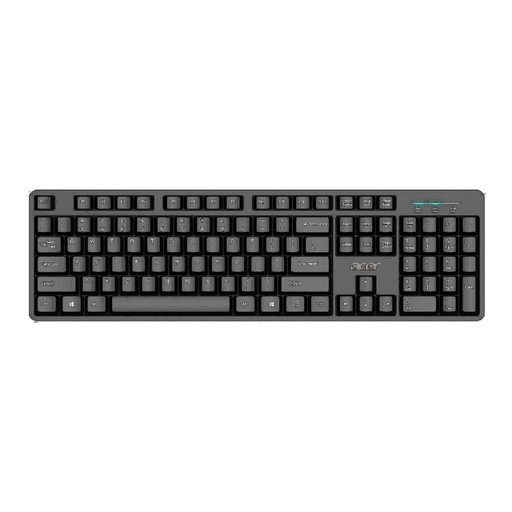
Why it suits this profile: This full-size USB model is designed for home and office use. The QWERTY US International layout, 105 keys and plug-and-play connection make setup straightforward.
The wired USB connection avoids the hassle of batteries or pairing. However, check beforehand that the US International layout suits the way you type.
Full-size design, numeric keypad, 1.45-metre cable and a water-resistant product description.
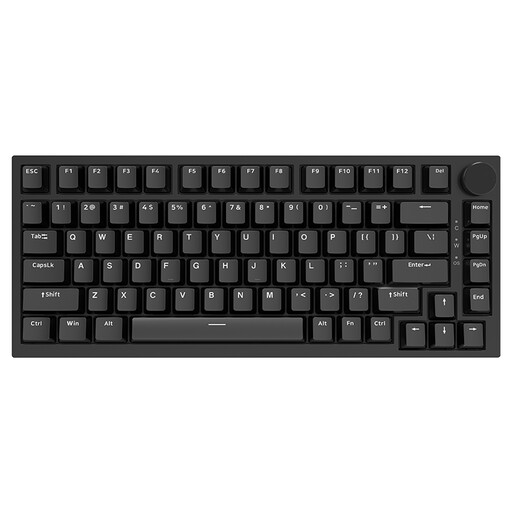
Why it suits this profile: This mechanical keyboard combines a 75% layout with hot-swappable switches, PBT keycaps, a volume knob and RGB lighting. It is ideal for users who want to customise their keystrokes and layout.
The specifications clearly state the size, number of keys, PBT keycaps and Type-C wired connection. This shows you in advance what you are sacrificing compared with a full-size model.
Hot-swappable design, volume knob, gasket construction and compatibility with Windows and Mac according to the product information.
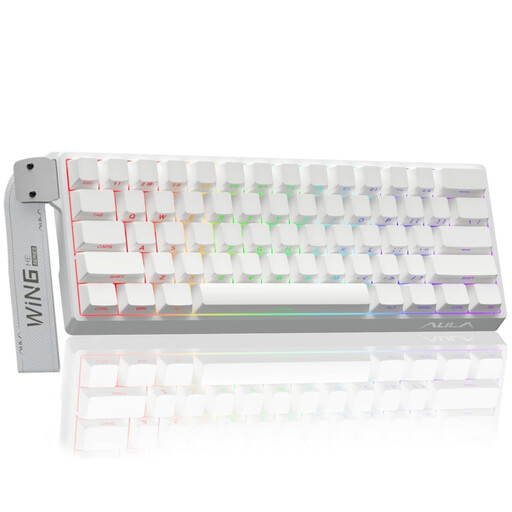
Why it suits this profile: This compact gaming model is designed for players who want to free up desk space and use adjustable actuation. The product information lists Hall-effect magnetic switches, Rapid Trigger and an 8K polling rate.
The specifications make it clear that this is a 60% model. It therefore has no numeric keypad, helping to prevent the wrong choice for users who enter lots of figures.
RGB lighting, mechanical magnetic switches and adjustable actuation down to 0.01 mm according to the product listing.
We have put together a complete, up-to-date list of products that fully meet these strict selection criteria and the applicable European safety regulations.
Yes, provided you have enough USB ports or Bluetooth and take batteries or charging into account. A multi-device model is practical if you use several devices. If you work exclusively at a desktop, a USB keyboard offers a simpler connection.
Its lifespan depends on usage, construction and maintenance. Manufacturers sometimes state a key lifespan, such as millions of keystrokes, but this is a product specification rather than a guarantee of the keyboard’s total lifespan. Keep the keyboard dry, do not pull on the cable and remove dust carefully with a soft cloth or a suitable air blower.
A battery-powered model generally uses little power during normal office work, but actual battery life depends on usage, connection and battery type. A built-in rechargeable battery needs to be charged periodically. Check whether the stated battery life comes from the brand’s product information and whether you can continue typing while the keyboard is charging.
