
Vandaag of morgen in huis

Kwaliteit gegarandeerd

Welkomstaanbiedingen ontgrendelen: GRATIS bezorging | Tot 80% korting | Gratis 30 dagen JoyPlus-proefperiode
Download de app
Buying a new keyboard seems simple until you see the overwhelming number of options. The market is flooded with marketing jargon and flashy designs that say little about quality. Many people overpay for features they don't need or buy a model that becomes frustrating after just a few months. Before you make a decision, it's wise to understand the most common pitfalls.
RGB keyboard with an aggressive design isn't automatically a good gaming keyboard. Often, the lighting conceals a standard membrane mechanism that feels mushy and has slow response times, while the price is unnecessarily high.mechanical keyboard, the switch type determines the entire typing experience. Without knowing whether you're buying a loud 'clicky', a quiet 'linear', or a 'tactile' switch, there's a high chance the feel or sound won't suit you at all, especially in a shared office space.You don't need to be a tech expert to avoid a bad purchase. Pay attention to a few key specifications that determine if a keyboard is right for your needs.
The mechanism under the keycaps defines how typing feels and sounds.
Razer, this results in an even faster response time, which can be an advantage in competitive gaming.The size of a keyboard directly impacts ergonomics and functionality.
TKL keyboard omits the numeric keypad. This makes it more compact, giving you more space for your mouse. A popular choice for gamers.A wireless keyboard creates a clean desk, but pay attention to the connection type. Bluetooth is versatile, while a 2.4GHz dongle often provides a more stable and faster connection, which is important for gaming. A wired model offers the most reliable connection without worrying about a dead battery.
Finally, check the layout. In the Netherlands, QWERTY US is the most common layout. Always verify this to avoid ending up with the wrong key arrangement.
Below are a few models suited for different user profiles, selected based on their specifications and how they avoid the pitfalls mentioned earlier.
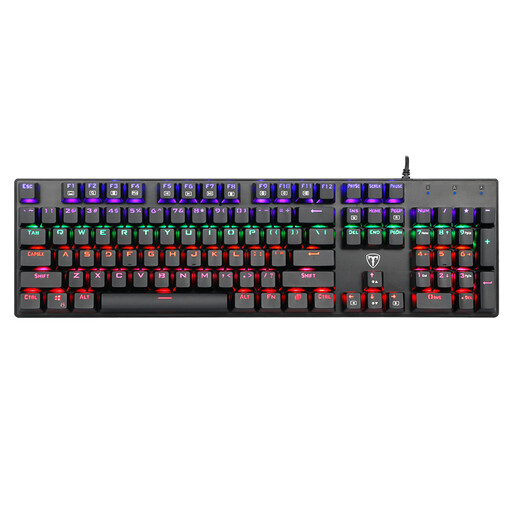
Why This Fits Their Persona: Offers a true mechanical typing experience without the premium price tag. Ideal for anyone who wants to discover if a mechanical keyboard is right for them, for both typing and gaming.
This isn't a membrane board with just lights. It's a full-fledged mechanical keyboard with 'clicky' blue switches that provide clear, audible feedback with every keystroke.
Full-size layout with a numeric keypad and anti-ghosting, which means all keystrokes are registered correctly, even when you press several at once.
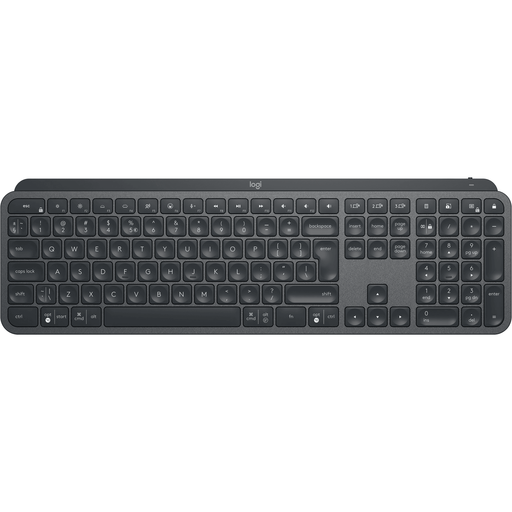
Why This Fits Their Persona: Designed for productivity and comfort during long workdays. The quiet keys and professional look make this a popular office keyboard.
Avoids the loud 'clicks' of many mechanical boards, which is ideal for an open office. The focus is on functionality, like smart backlighting and multi-device connectivity, not on flashy effects.
Stable, quiet keys with a slight indentation for comfort. Can seamlessly switch between three different devices via the reliable Logi Bolt technology or Bluetooth.
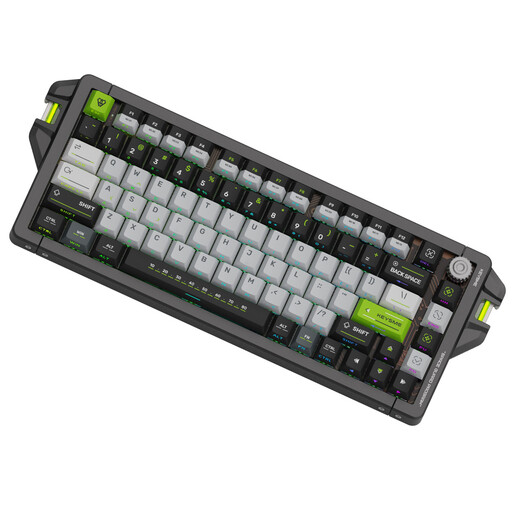
Why This Fits Their Persona: Built for maximum speed and precision. The specifications are entirely focused on competitive performance, from the switches to the connection's response rate.
No empty marketing claims. The specifications, like the 8kHz polling rate and adjustable magnetic switches, are objective and performance-oriented. The CNC aluminum body guarantees durability and stability.
Instantaneous response thanks to the high polling rate and Gateron Magnetic Jade switches with an adjustable actuation point from 0.1 to 4.0 mm. This gives the user extreme control over every keystroke.
We have compiled a complete, up-to-date list of products that fully meet these strict selection criteria and local regulations.
A membrane keyboard uses a rubber layer under the keys. This feels soft and mushy and is relatively quiet. A mechanical keyboard has a separate switch for each key, which provides clearer feedback (tactile and/or audible) and a longer lifespan. The choice is personal: membrane is often quieter and cheaper, while mechanical offers more precision and a better typing experience.
Mechanical switches are designed for durability. Most manufacturers rate their lifespan at 50 to 100 million keystrokes per switch. For comparison, membrane keyboards typically last for 5 to 10 million keystrokes. A mechanical model is therefore an investment that can last for many years with normal use.
Yes, the QWERTY US layout (also known as ANSI) is the most widely used and sold keyboard layout in the Netherlands. It features a wide, horizontal Enter key and a long left Shift key. Although other layouts exist, this is the standard that most people in the Netherlands have learned to type on.
