
Vandaag of morgen in huis

Kwaliteit gegarandeerd

Welkomstaanbiedingen ontgrendelen: GRATIS bezorging | Tot 80% korting | Gratis 30 dagen JoyPlus-proefperiode
Download de app
Owning your own 3D printer opens up a world of possibilities, from printing spare parts and handy gadgets to bringing creative projects to life. But the market is flooded with models that make lofty promises. Before you buy a 3D printer, it's crucial to know what to look for. Many buyers fall for marketing traps and end up with a device that causes more frustration than joy.
As a Joybuy Product Recommendation Officer, I'm here to help you cut through the hype. We'll look at the specifications that truly matter, so you can make an informed decision that fits your needs and budget.
Manufacturers often use impressive numbers and jargon to promote their products. Unfortunately, these don't always tell the whole story. Here are the traps to watch out for:
To choose the right FDM 3D printer, focus on the specifications that actually impact performance and ease of use.
Below are a few models selected based on their specifications and how they align with different user profiles.
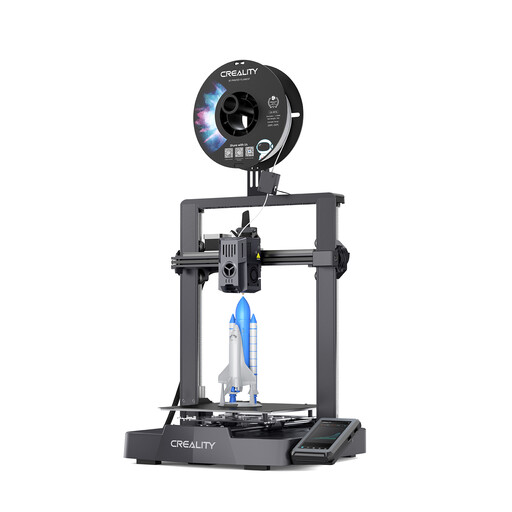
Why This Fits Your Persona: The Ender 3 series is legendary. This model offers an excellent balance between price and modern features. It's ideal for those who want to start 3D printing without paying a premium, yet still want the convenience of recent technology.
This model features a CR Touch sensor for reliable auto-levelling, which eliminates the frustration of manual calibration. It's an open system, so you're free to use any brand of PLA filament.
High print speed (up to 500 mm/s) for its price point and an intuitive colour touchscreen. The Sprite Direct Extruder is reliable and can also handle flexible materials.
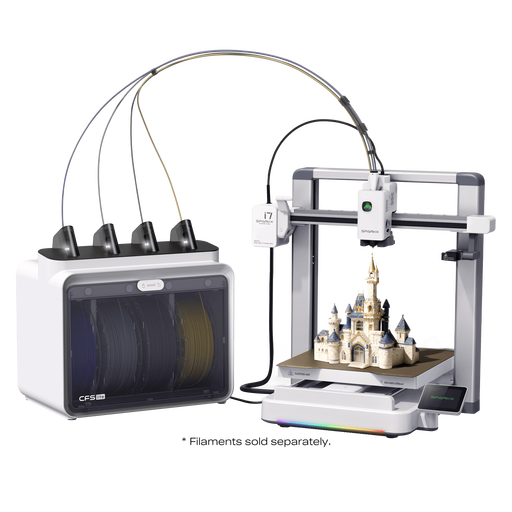
Why This Fits Your Persona: For the maker who wants to print colourful objects without the hassle of manual filament swaps. This printer is designed for ease of use and creative freedom, making it ideal for visually appealing models.
It offers an integrated multi-colour 3D printer experience out of the box. You don't need to install complex upgrades. According to Creality, the printer is ready to use within 5 minutes, lowering the barrier to entry for beginners.
Standard 4-colour printing and smart features like AI camera detection. The manufacturer claims its AI function can convert photos into 3D models, simplifying the creative process.
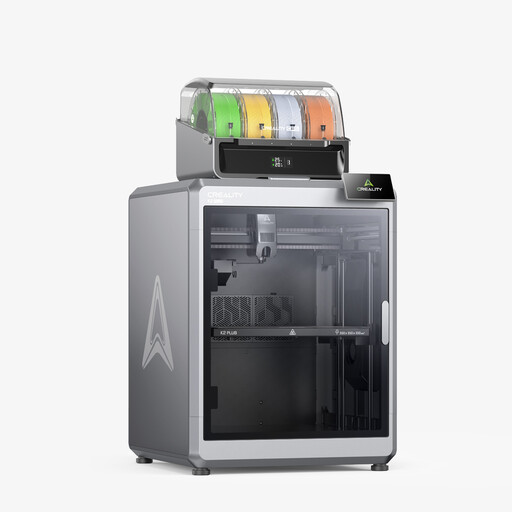
Why This Fits Your Persona: For the prosumer, engineer, or small business that needs a workhorse. This model combines a very large build volume with high speed, multi-colour/multi-material capabilities, and an enclosed chamber for demanding projects.
It actually delivers high performance thanks to its robust construction. It's a large-format 3D printer (350x350x350 mm) with active chamber heating (up to 60°C), allowing you to print with engineering-grade materials like ABS and PA-CF without warping.
Massive build volume, expandable to 16 colours with the CFS unit, and a hotend that reaches up to 350°C. The dual AI cameras help detect print failures, saving time and material.
We have compiled a complete, up-to-date list of products that meet these strict selection criteria and local regulations.
The cost of a 3D print is mainly determined by the price of the 3D printer filament and, to a lesser extent, power consumption. A 1 kg spool of PLA filament typically costs between €15 and €25 and can be used to print a large number of objects. A small, 20-gram object will therefore only cost you €0.30 to €0.50 in material. Power consumption is comparable to that of a desktop computer.
The learning curve has flattened considerably in recent years. Models from well-known brands like Creality 3D printer and Anycubic 3D printer often come partially pre-assembled. Features like auto-levelling, touchscreens, and filament runout sensors make the onboarding process much simpler. With a little patience and by watching a few online tutorials, almost anyone can make their first successful print within a day.
For beginners, PLA filament (Polylactic Acid) is the recommended choice. It's easy to print, doesn't require a heated print bed (though it helps), resists warping, and is biodegradable. It's available in countless colours and variants. For printers that support high speeds, a specially formulated filament like Creality Hyper PLA is a great option to maintain print quality at speed.
