If you mainly review PDFs or drawings in a suitable viewer, choose a laptop with enough screen space and check that the measuring or annotation features you need work; you won’t necessarily need a powerful workstation. If you use AutoCAD or Revit locally, check the requirements for your software version and projects before weighing up a quieter, lighter laptop against a more powerful workstation.
Who is this guide for?
PDF plan reviewer
You mainly review exported plans and want to read the details comfortably on a practical screen. Check separately whether you need to measure or annotate: Adobe says measuring in Acrobat Reader is only possible if the PDF creator has enabled it.
DWG reviewer
You receive editable drawing files and need to decide whether a browser-based viewer will do or whether you need AutoCAD installed locally. Autodesk offers viewers for different drawing formats, so check that your chosen viewer supports your files and the tasks you need to do.
BIM model reviewer
You work in Revit with models whose size may affect the configuration you need. Autodesk gives different memory guidelines for Revit 2026, depending on the configuration and model size.
What should you consider when choosing?
Viewing PDFs and supported drawings
A good fit when: viewing, zooming in or annotating is your main task and the viewer supports the file format.
Trade-off: check the screen size and features you need; a fanless design doesn’t mean that every file or programme will be suitable.
Using AutoCAD locally
A good fit when: you’re installing AutoCAD on the laptop to view or edit drawings.
Trade-off: compare the exact configuration with the requirements for your version of AutoCAD; a GPU or screen specification on its own doesn’t prove that the laptop will run quietly.
Using Revit and more complex BIM models locally
A good fit when: you run Revit yourself rather than simply viewing a shared model in a browser.
Trade-off: for Revit 2026, Autodesk gives 16 GB RAM as an entry-level guideline and 32 GB or more for a configuration focused on value for money; the workload varies by model.
| Consideration |
What to look for |
Who should consider it? |
| File format and software |
Make a note of the file extensions, the tasks you need to do and the software version; then check that the viewer and operating system are suitable. |
If I receive files in different formats, I want to know whether I’ll just view them or edit them locally too. Around 36% of consumers consider software compatibility their top priority. |
| Screen space |
Compare the screen size and resolution of the exact model; also check the connection you’ll need if you want to use an external monitor. |
If I spend a long time reviewing details on my laptop screen, I want enough room to view the drawing without constantly zooming in. Around 29% of consumers prioritise screen space. |
| Noise during use |
Check whether the design is fanless; for other models, ask for noise measurements under a workload similar to yours. |
In a quiet study, I don’t want to rely on the product name alone. Around 21% of consumers say noise is their main concern. |
| Large local BIM models |
Check your Revit version and model size against the system requirements; verify the RAM, GPU and storage for the exact configuration. |
If I work with large models locally, I want to match the configuration to that workload rather than just to viewing files. Around 14% of consumers prioritise capacity for demanding models. |
Common buying mistakes
-
Choosing a laptop for PDFs as if you were going to edit large Revit models
Viewing drawings in a viewer and running Revit locally are different use cases. Revit’s system requirements therefore don’t automatically apply to viewing a PDF or a file in a browser.
First, work out which file formats you receive and what you need to do with them. Only check the requirements for the relevant software version if you need to run that application locally.
-
Assuming ‘quiet’ means a particular fan noise level without checking
Apple describes the MacBook Air with M5 as fanless. By contrast, a workstation’s screen or GPU specification doesn’t tell you how much noise it makes under your workload.
Check whether a model is genuinely fanless. For other laptops, ask for noise measurements under a workload similar to yours.
-
Assuming you can always measure dimensions in a PDF
According to Adobe, the measuring tool in Acrobat Reader is only available if the PDF creator has enabled measuring.
Test a representative plan and check that the measuring and annotation features you need work with it.
-
Confusing the manufacturer’s warranty with all your rights when buying as a consumer
According to the Dutch government, a manufacturer’s warranty or an additional warranty you’ve purchased sits alongside your statutory rights if a product is faulty; the retailer remains your point of contact.
Compare any additional cover with your statutory rights and the service you actually need.
Relevant brands to consider
Apple
The MacBook Air with M5 is a macOS option for a quiet workspace, provided the files and software you need work on macOS or in a browser.
- Apple describes the design as fanless and lists 13- and 15-inch models; the 15-inch model gives you more built-in screen space.
- Autodesk specifies Windows for a local installation of Revit 2026. So a fanless design doesn’t automatically make a MacBook Air suitable for running Revit on Windows.
Dell
The Pro Precision and Pro Max ranges offer different sizes and configurations for those working with design software locally.
- Dell lists the Pro Max 16 Plus as model MB16250, with configurable components.
- The configuration depends on the model. Being a workstation doesn’t prove that it will run quietly under your workload.
Lenovo
The ThinkPad P range is a workstation option for local CAD or BIM workflows, with a larger built-in screen.
- Lenovo lists an anti-glare 16-inch screen and a dedicated professional GPU for a ThinkPad P16 Gen 3 configuration.
- These features apply to the specified configuration, not automatically to every P16 Gen 3. They also don’t tell you how much noise the laptop makes.
HP
The ZBook X range offers 16-inch mobile workstations with configurations for users who want to match graphics hardware and memory to their projects.
- For model E3HX9EA#ABH, HP lists 32 GB RAM, a 16-inch WUXGA screen and an NVIDIA RTX PRO 1000 Blackwell with 8 GB.
- These specifications and the listed service apply to this model; they don’t prove that other ZBooks have the same configuration or that this model is quiet.
Joybuy products for viewing building plans and local CAD use
This selection includes laptops for reviewing plans on the built-in screen, with options for both a quiet viewer-based workspace and local CAD use. For each model, check that the operating system, configuration and noise profile suit your files and software.
 No image available
Acer Aspire Go 15 AG15-72P-58MP, 15.6-inch
The listed configuration has a 15.6-inch matte IPS screen for reviewing plans on the laptop screen.
Core 5 120U, 16 GB DDR4 and 512 GB SSD; the screen has Full HD resolution.
View at Joybuy
 No image available
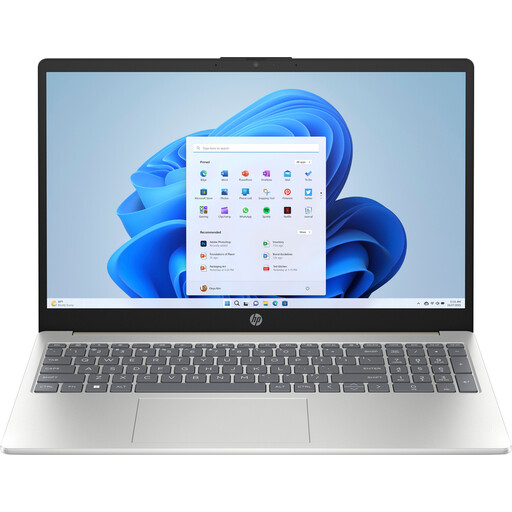
HP Laptop 15-fd1253ndx, 15.6-inch
This 15.6-inch matte Full HD model is an option if you want to view plans on the built-in screen.
Core 5 120U, 8 GB DDR5, 512 GB SSD and Windows 11 Home.
View at Joybuy
 No image available
MSI Stealth 16 AI+ B3WF-011NL, 16-inch
The listed configuration combines a 16-inch screen with dedicated graphics, for anyone looking for a Windows laptop with these features.
The screen has a resolution of 2560 × 1600; the configuration includes an NVIDIA GeForce RTX 5060 Laptop GPU, 16 GB DDR5, 1 TB SSD and Windows 11 Home.
View at Joybuy
 No image available
Apple MacBook Air 15-inch M5, 16 GB, 512 GB
The product description lists a fanless design and a 15.3-inch screen for a quiet workspace, provided your files and software work on macOS or in a browser.
The model described has 16 GB memory and 512 GB storage. According to the product description, the power adapter isn’t included; a USB-C adapter of 35 W or higher is required.
View at Joybuy
 No image available
Lenovo IdeaPad Slim 5 15ARP10, Ryzen 7
The 15.3-inch IPS model described has a built-in screen for viewing plans.
1920 × 1200 resolution and a 16:10 aspect ratio; Ryzen 7 7735HS, 16 GB LPDDR5x, 512 GB SSD and Windows 11 Home. According to the product description, the power adapter must be purchased separately.
View at Joybuy
Frequently asked questions
Do I need to install AutoCAD or Revit for every building drawing?
No, not if you can view the files in a suitable viewer. Autodesk offers viewers for DWG and RVT files, among others, and separate viewer software is available for PDFs. First, identify the file format and decide whether you just want to view it or also measure, annotate or edit it.
Can I measure dimensions on a plan in a PDF viewer?
Not always: according to Adobe, the measuring tool in Acrobat Reader can only be used if the PDF creator has enabled measuring. Also check that the scale of the plan you’ve been given is suitable for your needs.
Can I use an external monitor instead of just the laptop screen?
Yes, if the laptop supports the connection and display configuration you need. Check this for the exact model and, if you’re considering a MacBook Air with M5, check Apple’s stated support for external displays.
What happens if a product is faulty or I want to return it after buying online in the Netherlands?
If a product is faulty, the retailer is your point of contact for the statutory guarantee, according to the Dutch government; there is no single statutory guarantee period for all products. For online consumer purchases, you generally have a 14-day cooling-off period after delivery, subject to legal exceptions. The cooling-off period and the rules for faulty products are separate matters.
Can I upload confidential building plans to an online viewer without checking first?
Don’t assume that you can. If files contain personal data and your organisation processes it, the Dutch Data Protection Authority says your organisation must assess the risks and decide on appropriate security measures. Check the arrangements with the parties involved before uploading files too.


