What should you look for when choosing?
First decide whether you want to keep the number pad. Then compare the key noise, controls and connection on the exact version you’re considering.
| What to consider |
What should you check? |
Who is this important to? |
| Key noise |
Compare the exact switch version. Don’t treat a manufacturer’s ‘quiet’ description as a directly comparable noise measurement. |
If I’m playing with a headset while my microphone is on or someone is sitting nearby, I want to know how much noise the keys make. Around 33% of consumers say keeping key noise down is their top priority. |
| Shortcuts and media controls |
Check whether the extra keys and media controls suit the functions you use; the usefulness of macro keys depends on your game settings. |
I want to control building commands and adjust the volume without interrupting my game. Around 27% of consumers say shortcut or media controls are their top priority. |
| Mouse space or number pad |
Consider whether you use the number pad, and check whether the version on offer is TKL or full-size. |
If I need more room for my mouse, I can do without the number pad; otherwise, I want to keep it. Around 20% of consumers say mouse space is their top priority. |
| Connection and layout |
Check the connection and physical layout, such as ANSI or ISO. Don’t rely on the model name alone. |
If I need a specific connection or key layout, I want to know which version I’m choosing before I buy. Around 20% of consumers say connection or layout is their top priority. |
Keyboards at Joybuy
The Joybuy products shown include compact and full-size gaming keyboards with different layouts, connections and control options.
 Image unavailable
GXTrust Thado wired TKL gaming keyboard, QWERTY
A TKL model with media controls could suit you if you can do without a number pad and want to control functions while you play.
Membrane keys; media keys for volume and playback; registers up to 10 simultaneous keystrokes; wired; QWERTY.
View at Joybuy
 Image unavailable
Corsair K55 CORE TKL, US QWERTY
A TKL model to consider if you can do without a number pad and want media controls on your keyboard.
Quiet membrane keys and four dedicated media keys; wired via USB. This version has a US QWERTY layout.
View at Joybuy
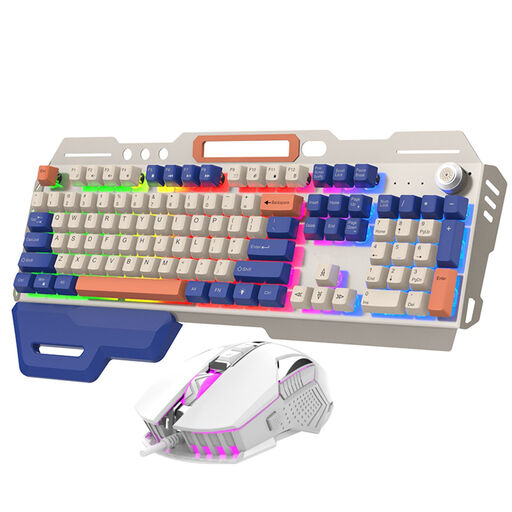 Image unavailable
NAXSIR wired gaming keyboard and mouse set, 104 keys
A keyboard and mouse set to consider if you want a number pad and a volume dial on your keyboard.
104 keys; wired; RGB lighting; volume dial; the product name also mentions a phone holder.
View at Joybuy
 Image unavailable
AULA F75 MAX, 75%, US QWERTY, Reaper switches
A compact mechanical model to consider if you’re looking for a smaller size and want to switch between wired and wireless connections.
75% layout; wired, Bluetooth and 2.4 GHz; US QWERTY layout; Reaper switches.
View at Joybuy
 Image unavailable
Ticktype DP104 full-size, 108 keys, US layout, linear switches
A full-size model to consider if you want to keep the number pad and having a choice of wired or wireless connection matters to you.
Mechanical; hot-swappable switches; 2.4 GHz, Bluetooth and USB-C; 108 keys; US layout; linear switches.
View at Joybuy
Frequently asked questions
Do you need a number pad for a building game?
Not just because of the game genre. Check your key settings and how else you use your keyboard: choose full-size if you use the number pad, or TKL if you want more room beside your keyboard and can do without it.
Do media keys automatically control your headset’s volume?
This isn’t guaranteed to work with every headset and application. Connect your headset and test whether the media keys control the audio output you want in your setup.
What should you check if you want custom shortcuts?
This varies by model and software. Logitech G lists G HUB for KEYCONTROL, Razer lists Synapse, and Keychron lists the Launcher web app. Check that the features you want work with your operating system and find out which software you’ll need.
Does a headset make a keyboard quiet for other people?
No. A headset doesn’t affect how much key noise a microphone or someone else in the room picks up. Compare the exact switch version and, if possible, test the noise in your own setup.
What if a keyboard bought online isn’t right for you or breaks soon after purchase?
For online consumer purchases, ACM ConsuWijzer states that you have a statutory 14-day cooling-off period after delivery, with some exceptions. Your statutory guarantee is separate from any manufacturer’s guarantee: if a product doesn’t meet what you could reasonably expect when used normally, the seller is responsible for offering an appropriate solution.


