For bridge drawings with multiple references, choose a tablet based on the files you need to use and how much material you want to see at once: a larger screen gives you more room to work, while a smaller model is easier to carry around. Then check the window layout, stylus and what’s included with the exact model. If you need specific desktop software, first confirm that it works on your chosen tablet and, for Windows on Arm, with the specific processor architecture.
Who is this choice relevant to?
Readers working with multiple references
You want to keep a bridge drawing and other sources visible at the same time, so consider both the screen space and how your apps arrange their windows. Apple Support explains how to use multiple apps or windows at once on an iPad.
Students annotating drawings
You want to add comments to plans or PDFs, then save or share the edited version. Check the stylus, app and options for saving or exporting files as a complete document.
Students who need specific design software
If your course requires specific files or design software, check the exact app and device architecture. Autodesk Support describes ways to view DWG files on mobile devices; that alone doesn’t confirm that all the desktop features you need are available.
What should you look for?
Your choice mainly depends on how much material you want to see at once, how you make notes, and which software or files your course requires.
| What to consider |
What to look for when buying |
Who is this important for? |
| Screen space for drawings and references |
Compare screen sizes and try a real drawing alongside a reference in your preferred window layout. |
If I want to read a bridge drawing and a reference at the same time, both need to remain clearly visible. Around 31% of consumers say screen space for documents is their top priority. |
| Annotating drawings |
Check that the stylus works with the exact tablet model and that your app can save or export files. |
When I want to annotate plans by hand, I need to know that the stylus, app and file export work well together. Around 25% of consumers put annotation at the top of their list. |
| Files and required study apps |
Check the required file formats and features. For Windows on Arm, also confirm that any required plug-ins and drivers are compatible. |
If my course requires specific apps or file formats, I check that they work on the exact tablet first. Around 19% of consumers make software and file compatibility their main priority. |
| Taking it between study locations |
Compare the weight and dimensions of the exact model, including the accessories you plan to carry. |
If I often travel between study locations, I want a tablet that’s easy to carry, even if that means choosing a smaller screen. Around 13% of consumers say portability is their top priority. |
| Complete set |
Check what’s included with the exact model and whether any essential stylus or other accessories are sold separately. |
When I need a complete working setup, I don’t want to assume that a stylus or keyboard comes with every model. Around 12% of consumers put the overall bundle contents first. |
Things to watch out for
-
Choosing a large screen without trying your own documents
A large screen and support for multiple windows don’t guarantee that details in your drawings will be easy to read in your preferred layout.
Before choosing, open a representative drawing and at least one real reference in the apps you plan to use.
-
Assuming Windows supports all design software
The Surface Pro 12 inch (2nd Edition) uses an Arm processor. The fact that apps can be emulated doesn’t automatically mean every required driver or plug-in will work.
Ask someone to check the exact application, plug-ins and any peripherals against the configuration you’ve chosen.
-
Comparing the tablet on its own
What’s in the box or bundle varies by model. Microsoft says that the Slim Pen and keyboard for the Surface Pro 12 inch (2nd Edition) are sold separately.
Compare everything included with the exact model, including the accessories you need for the way you work.
You may need to buy a compatible stylus or keyboard separately if you want to use one.
Brands to consider
Apple
According to Apple, the iPad Air M4 range comes in 11- and 13-inch models and supports Apple Pencil for use with iPad apps and windows.
- Apple lists support for Apple Pencil Pro and Apple Pencil (USB‑C) across this range.
- Apple doesn’t list a Pencil as included in the box. According to Apple, the 13-inch Wi-Fi model weighs 616 grams, compared with 464 grams for the 11-inch Wi-Fi model; accessories add extra weight.
Samsung
The Galaxy Tab S10 FE+ is an Android option for anyone who wants to combine documents and notes on a large screen.
- Samsung lists a 13.1-inch screen and S Pen support for the Galaxy Tab S10 FE+.
- Check what’s included with the exact model and whether your chosen document app works with your files and workflow.
Lenovo
The Idea Tab Pro Gen 2 is available in 13-inch models, including a bundle that Lenovo describes as coming with a stylus and folio.
- For the 256GB bundle described, Lenovo lists a 13-inch screen with a resolution of 3504 × 2190 pixels, and includes the stylus and folio as bundle items.
- Don’t assume every model comes with the same accessories; check what’s included in the bundle you’ve chosen.
Microsoft
The Surface Pro 12 inch (2nd Edition) is a Windows 2-in-1 for anyone who needs a compatible Windows workflow.
- A Windows device may suit you if the software you need works on your chosen configuration.
- Microsoft says the Slim Pen and keyboard are sold separately. Windows on Arm can emulate some apps, but kernel drivers must support Arm64. So check your specific software, plug-ins and peripherals.
Joybuy tablets for studying and drawing
This selection includes tablets with enough screen space for studying documents, as well as models that come with a stylus for making notes. For each model, check that your apps and file formats work and that the listed accessories are included with the version you’ve chosen.
 No image available
Apple iPad Air 13 inch, Wi-Fi, 128 GB, Space Grey (2026)
The 13-inch model gives you room for drawings and references. Check that your apps support your preferred window layout.
Specifications: Wi-Fi, 128 GB storage and a 13-inch screen. Apple Pencil support is listed, but the Pencil isn’t listed as included.
View at Joybuy
 No image available
TECLAST T65 Plus, 13.4 inch, 120 Hz
The 13.4-inch screen suits anyone who wants a large area for viewing drawings and references. Check beforehand that your preferred apps and files work.
Specifications: Android 15, 120 Hz screen, Dual SIM, 4G LTE and 5G Wi-Fi. Check separately that it supports the features you need for your study apps.
View at Joybuy
 No image available
Lenovo Yoga Tab ZAG60028PL, 11.1 inch, 3.2K, with Tab Pen Pro
The included Tab Pen Pro is handy for making notes. Check that your annotation app works with the stylus and your files.
Specifications: 11.1-inch screen, 3.2K, 144 Hz, 8 GB RAM, 256 GB storage and Wi-Fi 7. The product name lists Android 15 and the Tab Pen Pro.
View at Joybuy
 No image available
Lenovo Idea Tab Plus Wi-Fi, 12.1 inch, 2.5K, 256 GB, with stylus, Rose
The listed stylus and 12.1-inch screen are well suited to studying documents and annotating. Check that the stylus works with your annotation app.
Specifications: 8 GB RAM and 256 GB storage. The product description lists a 2.5K screen and an included stylus.
View at Joybuy
 No image available
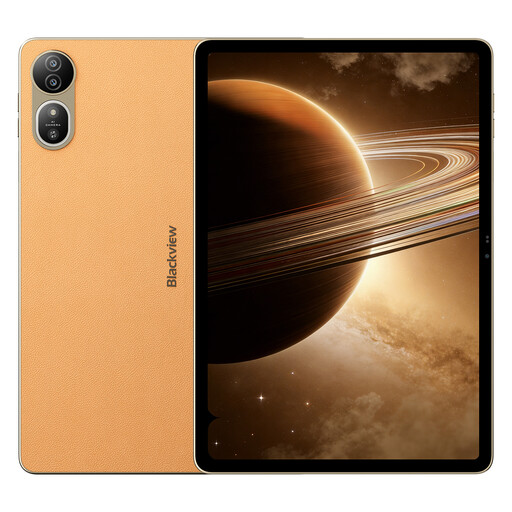
Blackview MEGA 12, 12.2 inch, 2.4K, 120 Hz, gold
The 12.2-inch screen gives you room to view study materials. Check that your preferred apps and file formats work on this model.
Specifications: 2.4K screen with 120 Hz, 36 GB memory (12 + 24 GB) and 256 GB storage. The product description lists Android 16.
View at Joybuy
Frequently asked questions
How do I put a drawing next to a reference on an iPad?
Apple explains that you can use multiple apps or windows at once on an iPad. Check that your drawing and reference apps support your preferred window layout, then try it with your own files.
Can I open a DWG file on a tablet?
Yes. Autodesk Support describes mobile options for viewing DWG files on Android and iPad. Check separately whether the available editing features, sign-in requirements and any costs meet your course requirements.
Are the stylus and keyboard included with a Surface Pro?
Not according to Microsoft for the Surface Pro 12 inch (2nd Edition): the Slim Pen and keyboard are sold separately. Check what’s included with the exact version or bundle sold by the retailer.
What rights do I have when buying a tablet online from a business in the Netherlands?
According to the Dutch government, when you buy at a distance, you usually have a 14-day cooling-off period. You’re also entitled to a product that meets the required standard; in the Netherlands, there’s no fixed statutory warranty period of two years. Contact the seller if a product is faulty.


