What should you look for?
Choose based on what you photograph most: low-light specifications for fading light, the wide-angle setting for a broad view and optical reach for distant boats.
| What to consider |
What should you check? |
Who is this important for? |
| Photos in low light |
Compare sensor size and maximum aperture at the zoom setting you use. The lens aperture changes as you zoom. |
If I also want to take photos in overcast conditions or later in the day, I factor low-light specifications into my choice. Around 36% of consumers put fading light first. |
| Getting the whole harbour in the frame |
Check the 35 mm equivalent wide-angle setting and look at the stated aspect ratio. |
I want to capture a wide view from the quay, even when I can’t move further back. Around 29% of consumers prioritise this kind of harbour view. |
| Distant boats |
Compare the optical range in 35 mm equivalent millimetres; don’t count digital zoom as optical reach. |
When I’m taking photos from a fixed position, I want to bring distant boats closer. Consumers who prioritise optical reach for distant subjects account for around 21%. |
| Controls and file format |
Check whether the model you want supports JPEG and, if required, RAW, and review its controls and what’s included in the box. |
If I value a simple workflow more than maximum telephoto reach, I look for controls and file formats that suit the way I edit photos. Around 14% of consumers put this preference first. |
Joybuy product picks
These Joybuy picks are digital cameras whose product titles mention optical zoom. For each model, check whether the stated features, controls and conditions of use suit taking photos by the water.
 No image available
Komery W6, 12× optical zoom, 4K
The product title lists optical zoom, so you can adjust your framing from one spot.
The title mentions 12× optical zoom and 4K video.
View at Joybuy
 No image available
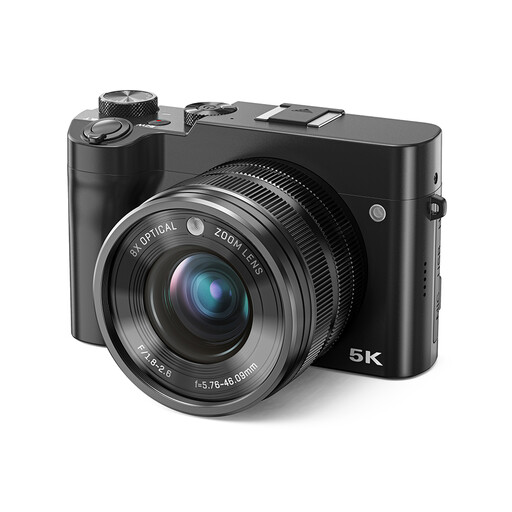
Songdian digital camera, 8× optical zoom, black
The product title lists optical zoom for adjusting your framing; bear in mind the stated warning about damp environments when taking photos by the water.
The title mentions 8× optical zoom, 5K video, 64 MP and a dual-lens design.
View at Joybuy
 No image available
Songdian digital camera, 10× optical zoom, black
The product title mentions optical zoom and front and rear cameras; check that this design suits the kind of photos you want to take.
The title lists 10× optical zoom, 5K video, 56 MP and front and rear cameras.
View at Joybuy
Frequently asked questions
Does image stabilisation help with every photo as it gets darker?
No, image stabilisation doesn’t guarantee that every photo will be sharp. Stabilisation helps counter camera shake, but if a boat is moving, the shutter speed you need also matters.
What should I check before taking photos from the quay?
Check how to charge the battery, whether you need a memory card and whether the model has the JPEG or RAW setting you want. When near water or rain, use the camera in line with the conditions specified for that particular model; don’t assume it’s water-resistant just because it has optical stabilisation.
Who can help if a camera bought online turns out to be faulty?
According to the Rijksoverheid, the seller must provide a solution if there’s a problem; the manufacturer’s warranty does not replace your statutory rights. For distance purchases from a business, you will also usually have a 14-day cooling-off period, subject to statutory exceptions.
Can I publish a harbour photo online if people are recognisable?
Not automatically. According to the Autoriteit Persoonsgegevens, recognisable people in an image count as personal data. Keeping the photo private or sharing it with a very limited group falls under a different exception from publishing it publicly; if you’re sharing it more widely, check the applicable privacy rules. This is neither a general ban on harbour photography nor blanket permission to publish photos.


