Who is this choice for?

Sellers of books with glossy covers

You want the title to be easy to read while showing the book’s true condition. So don’t think about the camera alone: your lighting set-up also affects reflections and how clearly surface details appear. The Canadian Conservation Institute describes lighting from two directions for an even result.

Sellers photographing wear and spines

For corners, spines and small areas of damage, you’ll want to check the focus and exposure for each shot. Look at the focusing distance at the zoom setting you actually plan to use, as this can vary between models and settings.

Sellers photographing lots of books in one go

A fixed camera angle and consistent framing help you photograph a series of books consistently. Canon Europe describes using a tripod to keep the background in product photos consistent.

What should you look for when buying?

Start with your lighting set-up and how you plan to photograph details. Then check whether the model you’re considering suits your filter requirements, working distance and any need to take a series of shots.

What to consider What should you look for? Who is this most relevant to?
Reflections and condition Try out the lighting position on a glossy book. If you want to use a polarising filter, check the filter thread size and fitting for the exact camera model. If I sell books with glossy covers, I want to keep the text readable without hiding signs of wear; around 36% of consumers prioritise controlling reflections.
Small details Check the focusing distance at the zoom setting you’ll use for a spine, corner or damaged area. If I want to show wear or small lettering clearly, I look for a camera that can focus at my working distance; around 29% of consumers give condition details top priority.
A fixed photo set-up Check the tripod mount, whether you can see the screen from your camera angle and whether there’s room to swap books. If I photograph lots of books in one go, I don’t want to keep realigning the camera; around 21% of consumers prioritise repeatable shots for a series.
Features you’ll use Check whether you need RAW, a suitable filter or the option to take photos outside your book set-up. Then compare the model version and included accessories. If I’m mainly looking for a straightforward camera for photographing books, I don’t want to choose features I won’t use; around 14% of consumers prioritise a simple purchase that suits their needs.

Things to watch out for when buying

  • Making maximum zoom your main priority for photographing books

    A long telephoto range won’t prevent reflections on a book cover. For a book on a table, lighting, filter compatibility and focusing at your chosen working distance are more directly relevant.

    Start by assessing a test shot and checking whether you can fit the filter you want. Consider a super-telephoto range mainly if you also plan to photograph subjects at a distance.

  • Assuming the macro focusing distance applies at every zoom setting

    With the Panasonic LUMIX FZ82D, the stated 1 cm focusing distance applies at the wide-angle setting; Panasonic lists 150 cm for telephoto. Kodak gives a macro distance of 1 cm for the AZ528 only at the wide-angle setting.

    Check the focusing distance at the zoom setting you’ll actually use to photograph a spine, corner or damaged area. This helps avoid being unable to focus when you’ve framed the shot you want.

    Changing your working distance or reframing can take extra time.

  • Removing all the shine from your only condition photo

    Lighting that reduces reflections can also make texture or damage less visible. So a photo that’s easy to read won’t always show the book’s full condition.

    As well as the cover photo, take a separate shot with raking light if needed to show signs of wear. The Canadian Conservation Institute explains that lighting which reduces glare can also reveal dirt and discolouration, while making damage seem less noticeable.

  • Assuming all accessories are included

    Nikon Netherlands states that a charger is not included with the COOLPIX P1100. What’s in the box and which filter accessories you need can vary by model and version.

    Before ordering, check with the specific seller what’s included, which accessories come with the camera, how it can be charged and whether your filter will fit.

Camera brands to compare

Sony

The RX10 IV is worth considering if you want to combine book photography with other types of photography.

  • Sony Netherlands specifies a Type 1.0 sensor, RAW and a 72 mm filter diameter for the RX10 IV.
  • These specifications alone don’t show how well the camera photographs glossy books. Also check that the camera and tripod will work together with your set-up.

Panasonic

The LUMIX FZ82D may suit anyone looking for RAW and the option to use a filter.

  • Panasonic Netherlands lists a 55 mm filter size and a 1 cm focusing distance at the wide-angle setting.
  • Panasonic specifies a Type 1/2.3 sensor and a telephoto focusing distance of 150 cm. So the short wide-angle focusing distance doesn’t apply throughout the zoom range.

Kodak PIXPRO

The AZ528 is an option to consider if you use JPEG and filter compatibility matters to you.

  • KODAK PIXPRO specifies a compatible filter diameter of 52 mm and JPEG photo files.
  • The stated macro distance of 1 cm applies only at the wide-angle setting. Check the focusing distance and filter compatibility for your intended use.

Canon

The PowerShot SX70 HS may be worth considering if an adjustable screen would help with your camera angle and you’re assessing a specific example.

  • Canon Netherlands specifies a Type 1/2.3 sensor and 65× optical zoom.
  • Canon Netherlands lists the model as discontinued and no longer available in its shop. Filter compatibility for book photography has not been confirmed; check the condition and accessories of the specific camera.

Nikon

The COOLPIX P1100 is most relevant if you photograph subjects at a distance as well as books.

  • Nikon Netherlands lists 125× optical zoom, macro close-up and 77 mm filter accessories.
  • The extra telephoto range won’t reduce reflections on book covers. Nikon also states that a charger is not included; check which charging option and accessories you’ll need.

Cameras at Joybuy

These Joybuy cameras list optical zoom in the product title and are worth considering for framing book photos. Optical zoom alone doesn’t tell you how well reflections are controlled or whether a filter will fit.

Komery W6 digital camera with 12× optical zoom, 4K and 64MP

Komery W6, 12× optical zoom, 4K, 64 MP

The product title lists optical zoom, which lets you adjust the framing. That doesn’t tell you how reflections on a glossy cover will appear.

The title lists 4K, 64 MP and Wi-Fi.

Joybuy
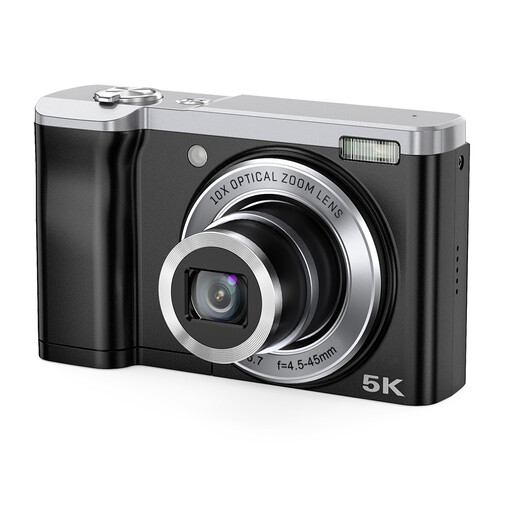
Songdian 5K digital camera, 56MP, 10× optical zoom, black

Songdian 5K, 56 MP, 10× optical zoom, black

The product title lists optical zoom, which can help you frame a book to fit. It doesn’t determine whether the camera will capture glare or small signs of wear clearly.

The title lists 5K, 56 MP and a front and rear camera.

Joybuy

Frequently asked questions

Should I always use a polarising filter to photograph a glossy cover?

No, try changing the position of the camera and the lighting first. A polarising filter can reduce unwanted reflections, but taking a separate photo with low-angle raking light can help show surface damage.

Will a tripod help if I’m photographing lots of books in one go?

Keeping the tripod in a fixed position helps you maintain the same framing and background, and reduces camera shake. Before you start, check that you can see the screen from that position and swap books without moving the camera.

What warranty applies when I buy a camera as a private individual in the Netherlands?

When you buy as a consumer, the product must meet the standard you could reasonably expect. ACM ConsuWijzer states that the seller is responsible for providing an appropriate free remedy if a product is faulty; a manufacturer’s warranty does not replace this legal right. If you use the contract mainly or exclusively for business, these consumer protections do not necessarily apply.

Can I always return a camera bought online within 14 days?

Not always. For consumers, distance purchases from a business generally come with a 14-day cooling-off period, but the Dutch government lists exceptions and distinguishes these purchases from buying from a private individual. If you’re buying mainly for business, you can’t automatically assume that consumer rights apply.

Can I use another seller’s cover photo in my book listing?

Don’t assume you’re free to reuse the photo. The Dutch government states that permission is generally required to use copyright-protected photos; if you’re unsure about the rights to a particular cover photo, seek advice on your specific situation.
