Who is this choice relevant to?

Book sellers with a dedicated photo table

If you photograph lots of covers in a row, you’ll want consistent framing and straightforward operation without having to keep moving the camera. Canon Netherlands explains how a tripod can help you maintain consistent framing and a consistent background.

Sellers who photograph details of a book’s condition

If you want to show small text, wear or damage separately, check the focusing distance at the zoom setting and working distance you’ll actually use. Panasonic Netherlands and Sony Netherlands describe focusing and focus features on specific models.

Sellers working in changing light

If the lighting or time of day varies, the sensor, lens and additional lighting are all worth considering. The Consumers’ Association discusses the importance of the sensor and lens for image quality.

What should you look for?

For a fixed book-photography setup, the main things to consider are consistent framing, detail, lighting and the equipment you’ll need for your photo area.

What to consider What should you check? Who is this most important for?
Consistent framing Check that the largest cover fits from your fixed camera position. Also look for a stable mount and remote operation. I want to leave the book and camera in the same place so every cover has the same framing. Around 36% of consumers prioritise consistent framing.
Text and condition details Compare the focusing distance at your chosen zoom setting, and check small print and the corners from your actual working distance. If I want to show spine text or small areas of damage clearly, I need to assess sharpness from my actual working distance. Around 29% of consumers prioritise detail.
Even lighting Consider the sensor and lens together, and check the lighting on both light and dark covers. When the lighting varies between shots, I want better control over shadows and colours. Around 21% of consumers prioritise even lighting.
Equipment needed Check which memory card and accessories are included with each version. For second-hand listings, also check the condition and terms. I want to know in advance what I’ll need to get my photo area ready. Around 14% of consumers give the equipment needed the most weight.

Common buying mistakes

  • Making extreme zoom range your main consideration

    A wide zoom range alone won’t tell you whether the largest cover will fit in the frame from your fixed position.

    First work out the framing and working distance you need, then compare zoom ranges.

  • Assuming the shortest macro distance applies at every zoom setting

    The minimum focusing distance can change when you zoom in. Sony Netherlands lists different distances for wide-angle and telephoto on the RX10 IV.

    Compare the distance at the framing you want to use, and check where the measurement starts.

  • Treating the FZ82 and FZ82D as the same version

    Similar model names don’t prove that they’re the same version.

    Check the full model code and compare the specifications of the specific listing.

  • Assuming the camera comes with everything you need for a complete photo setup

    For a fixed setup, you may need a memory card, tripod or lighting as well as the camera.

    Check what’s included with each model. The JK Imaging / Kodak PIXPRO quick-start guide states that an SD card is not included with the AZ528.

    You’ll need to arrange an SD card separately for the AZ528; you may also need a tripod for a consistent setup.

Relevant brands to consider

Canon

The PowerShot SX70 HS has features that may be useful for a fixed photo setup, including a vari-angle screen, Remote Live View and manual focusing.

  • Canon specifies a minimum macro distance of 0 cm at the wide-angle setting, measured from the front of the lens. This figure doesn’t automatically apply at other zoom settings.
  • Canon Netherlands lists the PowerShot SX70 HS as discontinued and no longer available from its Dutch shop.

Panasonic

The LUMIX FZ82D may be worth considering if you want to photograph specific details of a book’s condition and compare focus features.

  • Panasonic Netherlands lists a macro distance from 1 cm and Focus Stacking for the FZ82D.
  • A short macro distance doesn’t prove that a full cover will fit in the frame from the same distance. Check the full model code too: the FZ82D shouldn’t automatically be treated as the same model as the FZ82.

Sony

According to Sony, the RX10 IV, also known as the DSC-RX10M4, has a type 1.0 sensor and specified focusing distances for different zoom settings.

  • Sony Netherlands specifies around 3 cm at wide angle and around 72 cm at telephoto, both measured from the front of the lens.
  • A larger sensor alone doesn’t guarantee better results for book photos; the lens and lighting matter too.

Nikon

The COOLPIX P1100 is most relevant if you also want to use the same camera to photograph distant subjects.

  • Nikon Netherlands specifies 125× optical zoom and a weight of around 1.4 kg for the P1100.
  • The usefulness of that telephoto range for a book on a fixed table hasn’t been demonstrated. Nikon lists the P1000 and P950 on discontinued product pages.

Kodak PIXPRO

The AZ528 is a bridge camera to include in your comparison if you want to check what’s included and what equipment you’ll need in advance.

  • The JK Imaging / Kodak PIXPRO quick-start guide confirms the AZ528 model name.
  • According to the guide, an SD card is not included. The cited sources don’t provide an independent test of text sharpness or the workflow for book photography.

Joybuy product picks

The Joybuy picks below are digital cameras with optical zoom. Check whether the version, focusing controls and framing suit your fixed setup for photographing second-hand books.
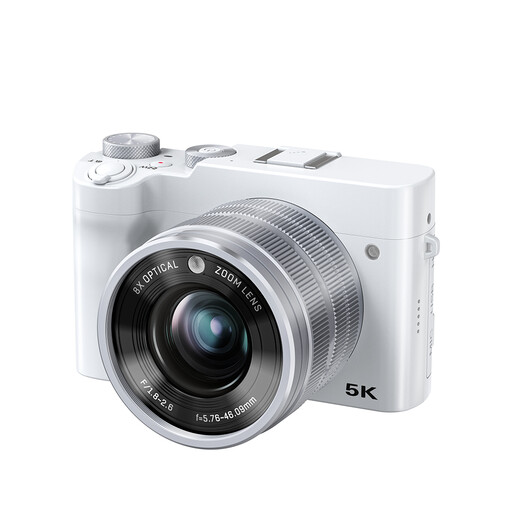
Songdian 5K 64MP dual-lens camera with 8× optical zoom, white

Songdian 5K 64MP dual-lens camera, 8× optical zoom, white

May suit anyone who wants to choose the focus area for close-up shots; check sharpness at the working distance you use for your books.

The product description mentions autofocus, manual focusing and adjustable focus areas. The title lists 8× optical zoom, 5K, 64 MP and a dual-lens design.

View at Joybuy
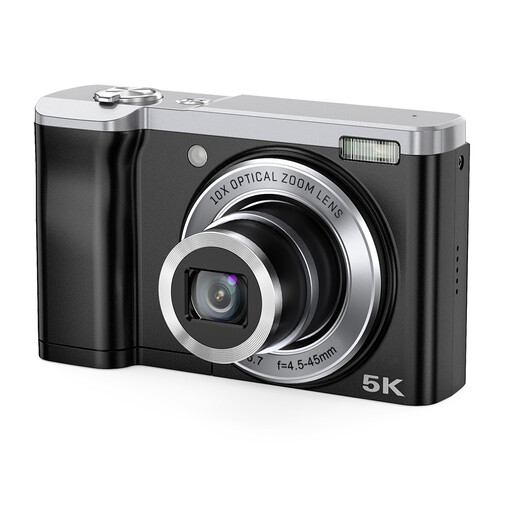
Songdian 5K 56MP digital camera with 10× optical zoom, black

Songdian 5K 56MP camera, 10× optical zoom, black

The 10× optical zoom may be useful if you want to try different crops from the same position. Check that small text looks sharp from your chosen distance.

The product description mentions a 2.8-inch screen and front and rear cameras. The title lists 10× optical zoom, 5K and 56 MP.

View at Joybuy

Frequently asked questions

Do you need to move the camera each time you photograph covers and damage?

Not necessarily. Keep the framing consistent for the main shot, and check whether the smallest details are sharp and large enough from that position. A second frame may be more practical for individual areas of damage; try both with a book of the size you sell.

Is a macro distance of 0 or 1 cm enough to photograph a whole book?

No. That distance describes focusing under certain lens settings; it doesn’t tell you whether the whole cover will fit in the frame. Canon specifies 0 cm at wide angle, while Sony lists different distances at wide angle and telephoto for the RX10 IV.

How can you keep a series of book photos consistent?

Mark the positions of the book and tripod, take a test shot of a large cover, then keep the framing and lighting the same. Canon Netherlands explains that a tripod can help maintain consistent framing; this is practical advice, not a guarantee for a particular camera model.

What rights do you have when buying a camera?

When you buy as a consumer in the Netherlands, you’re covered by the statutory guarantee: according to the Dutch government, the seller, not the manufacturer, must resolve problems with faulty products. When you buy online from a business, you’ll usually have a 14-day cooling-off period, including for second-hand products. This distance-selling rule doesn’t apply when you buy online from a private individual.
