For a whole loaf with some of the table setting, a kit zoom lens is a sensible starting point. For highly magnified crust or crumb details, a separate close-up or macro lens is worth considering. Check the lens included in the exact kit and try framing your shot from your own shooting position. Manufacturer specifications and food photography tips can point you in the right direction, but they are not a comparative real-world test.
Who is this choice relevant to?
The baker with a small table
You want to photograph a whole loaf and a few props without the frame extending beyond your available set-up. Check the lens, shooting position and what’s included in the kit. The Canon, Nikon and FUJIFILM kit descriptions offer specific examples of standard zoom lenses.
The crust-detail photographer
You want to fill the frame with crumb, crust or seeds. So look beyond the camera body and consider the lens’s magnification, focusing distance and working distance too. Canon and Sony describe separate macro lenses for this purpose.
The baker who takes bread photos regularly
You photograph several loaves or recipes and want to keep colour, lighting and angle consistent between shots. Canon and Sony’s food photography tips cover factors including window light, reflections and using a fixed set-up.
What should you look for when choosing?
Kit zoom for bread and table settings
Choose this if: you want to frame a whole loaf, a sliced loaf and part of the table in different ways.
Bear in mind: a standard zoom is not automatically a separate macro lens for highly magnified details.
Separate close-up or macro lens
Choose this if: you want crust, crumb or seeds to fill the frame, and the lens is compatible with your camera body.
Bear in mind: this is an additional lens to choose, and a short working distance can limit the space available for your camera and lighting.
Improve the lighting and set-up
Choose this if: your current framing works, but the lighting, shadows or angle vary between photos.
Bear in mind: a stable set-up won’t change the lens’s magnification or angle of view.
| What to consider |
What should you look for? |
Who is it important to? |
| Framing on the table |
Compare the focal length range of the included zoom lens and test the framing from your actual shooting position. |
If you want to fit a whole loaf and props on a small table, framing is your first concern; around 33% of consumers prioritise this above all else. |
| Crust details |
Check both the maximum magnification and the focusing or working distance of the exact lens. Canon lists a maximum magnification of 1:2 for its separate RF 35mm lens; Sony lists 1:1 and a working distance of 2,4 cm for its separate E 30mm macro lens. |
If you want to magnify crumb, crust or seeds clearly, magnification and the space in front of the lens matter; around 25% of consumers give detail shots top priority. |
| Colour and exposure |
Try diffused light and a reflector, and check the white balance when the light changes. A tripod can help in low light or with a fixed composition. |
If you want to take a series of bread photos with consistent colour, shadows and angles, lighting and repeatability matter; around 25% of consumers prioritise these. |
| Complete set-up |
Check which lens is actually included in the kit and whether any lens you buy later will fit the camera mount. |
If you want to assess the camera body, the lens you need and any supporting equipment as a single purchase, check the complete bundle; around 17% of consumers prioritise having the whole set-up. |
Common buying mistakes
-
Looking only at the camera body or megapixel count
The lens and angle of view both help determine whether you can frame your bread and table setting from the position available to you. A camera body and a separate macro lens also serve different purposes.
Before choosing, compare the exact bundle with both your wide shot and the detail shot you want.
-
Assuming a short focusing distance means macro magnification
Focusing distance, working distance and maximum magnification describe different properties. The focusing range of the FUJIFILM XC15–45mm zoom also varies depending on the zoom setting.
Check the magnification and distances for the exact lens and zoom setting, and try a test shot if possible.
-
Choosing a new camera to solve a lighting problem
The direction of the light affects how the texture of the bread appears. Changing window light can also cause colour and brightness to vary between shots.
First try diffused light, a reflector, white balance settings and a repeatable camera position. Then decide whether you still need a different lens or camera.
Camera brands to consider
Canon
The EOS R50 kit with an RF-S 18–45mm zoom is an option for wider shots; the RF 35mm F1.8 MACRO IS STM is a separate lens for close-ups.
- Canon specifies a 24,2-megapixel APS-C sensor for the EOS R50.
- The EOS R50 does not have in-body image stabilisation. Canon lists a maximum magnification of 1:2 for the separate RF 35mm lens; it is not included in the kit mentioned.
Nikon
The Z50II kit with a NIKKOR Z DX 16–50mm f/3.5–6.3 VR includes a standard zoom for framing bread and the table in different ways.
- Nikon lists lens stabilisation and a minimum focusing distance of 0,2 m for this zoom.
- This does not automatically make it a macro kit system; assess any separate lens and the framing you want independently.
FUJIFILM
The X-S20 kit pairs the camera body with the XC15–45mm F3.5–5.6 OIS PZ zoom.
- FUJIFILM lists RAW shooting and in-body image stabilisation for the X-S20 body.
- For the zoom, FUJIFILM gives a focusing range from 13 cm at the wide-angle end and 35 cm at the telephoto end, with a maximum magnification of 0,24× at the wide-angle end. These figures do not guarantee that every shot you want will fit from your table position.
Sony
The E-mount system is worth considering if you’re looking at a separate lens for small bread details as well as a lens for wider shots.
- Sony specifies a 1:1 magnification ratio and a minimum focusing distance of 9,5 cm for its separate E 30mm F3.5 Macro lens.
- The working distance in front of the lens is 2,4 cm. Check the E-mount and lens contents of the camera body or bundle you choose; the short working distance can limit the space available for lighting.
Joybuy camera options
Explore these Joybuy camera options for different ways to adjust your framing. Check the exact lens and kit contents for each model, and test whether the framing works with your table set-up.
 No image available
Komery W6 digital camera
The stated optical zoom gives you different framing options to try with your table set-up.
The product name lists 12× optical zoom, 4K and 64MP.
View at Joybuy
 No image available
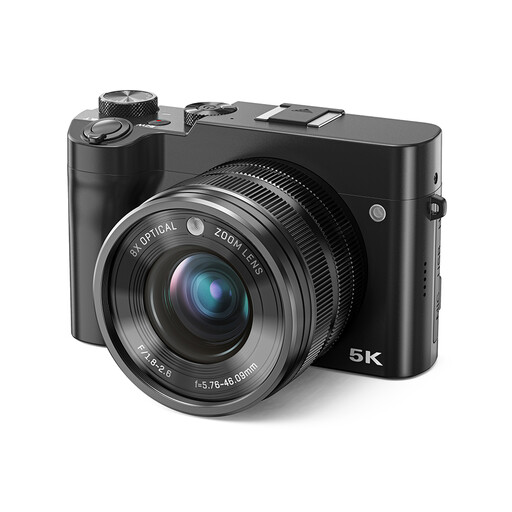
Songdian digital camera with 8× optical zoom
Use the stated zoom to try different framing options from your table set-up.
The product name lists 8× optical zoom, 5K and 64MP.
View at Joybuy
 No image available
Sony ZV-E10 with 16–50mm zoom lens
The kit name lists a camera with a zoom lens; try different focal lengths to find the right framing.
The lens listed is an E PZ 16–50mm zoom lens.
View at Joybuy
 No image available
Sony Alpha A6100 with 16–50mm lens
The listed zoom lens offers different focal lengths to try framing options for your table set-up.
The product name lists a 16–50mm f/3.5–5.6 OSS II lens.
View at Joybuy
Frequently asked questions
How can you check whether the whole loaf will fit in the frame?
Arrange the loaf and any props you want on the table, then decide where you can position the camera. Compare the framing with the exact zoom lens from that position; simply having a focal length range listed does not prove that your shot will fit.
Do you need a macro lens straight away to capture crust texture?
Not for every photo: first try to get the detail shot you want with the kit lens. If you want small textures to fill the frame, compare the maximum magnification and working distance of a compatible separate lens. Canon lists 1:2 for its separate RF 35mm lens; Sony lists 1:1 for its separate E 30mm macro lens.
How can you make a small set-up work with window light?
Try soft, side-on light and, if needed, white card to soften shadows. Check the white balance when the light changes. Canon recommends a tripod to help with a fixed composition, low light or extreme close-ups. Canon also warns that dust can be attracted to the sensor when you change lenses.
What purchase terms and rights should you check in the Netherlands?
First check whether the lens is included in the kit on offer and which terms apply to your purchase. According to the Netherlands government, many online purchases come with a 14-day cooling-off period. The government also states that there is no fixed statutory guarantee period in the Netherlands; the rights that apply depend on the circumstances and the product.


