
Vandaag of morgen in huis

Kwaliteit gegarandeerd

Welkomstaanbiedingen ontgrendelen: GRATIS bezorging | Tot 80% korting | Gratis 30 dagen JoyPlus-proefperiode
Download de app
Bose QuietComfort headphones can be a great choice for train journeys, working from home, studying or long listening sessions. Still, it’s worth looking beyond the brand name or a special offer. Differences in fit, battery life, connections and noise cancellation can determine whether a model really suits the way you use it.
Active noise cancellation, often called ANC, mainly reduces constant background sounds such as train engines, aircraft noise or ventilation. Voices, sudden sounds and traffic may still be audible. A transparency mode, such as Aware Mode, lets some surrounding sounds through instead.
So don’t use terms such as “noise cancelling” as your only buying criterion. Check which listening modes are available and whether you can adjust the noise cancellation.
Manufacturers usually quote a maximum playback time under specific conditions. Using extra features can reduce it. For example, the Bose QuietComfort Headphones (2nd Gen) are listed with up to 24 hours of battery life, while the product information gives up to 18 hours with TrueSpatial audio. The Bose QuietComfort Ultra Headphones (2nd Gen) are listed with up to 30 hours, or up to 23 hours with immersive audio.
So don’t compare just the highest figures. Consider charging time, quick-charge features and whether you can keep listening with a wired connection.
Wireless over-ear headphones cover your whole ear. That can be comfortable during long working days, but they take up more space than earbuds and may feel warmer. Consider the weight, the shape of the ear cushions and the pressure from the headband.
The Bose QuietComfort Headphones (2nd Gen) weigh around 230 grams, according to the product specifications. Some product listings give the Ultra version’s weight as around 380 grams. That difference may matter if you wear your headphones for hours at a time.
Check whether the model offers:
According to Bose’s product description, the QuietComfort Headphones (2nd Gen) has Quiet, Aware, Immersion, Cinema Mode and ANR off. The Bose QuietComfort Ultra Headphones (2nd Gen) also includes features such as Immersion and Cinema Mode, according to the product information. These features are particularly useful for films, video calls and music with a spatial soundstage.
Bluetooth 5.3 or 5.4 provides a modern wireless connection, but check the practical connection options too. Some models include an audio cable for listening without Bluetooth. The QuietComfort Headphones (2nd Gen) also supports lossless audio via USB-C, according to the product specifications.
Built-in microphones are important if you work from home. The QuietComfort Headphones (2nd Gen) has six microphones, positioned inside and outside the earcups, according to the product details. How clearly you’re heard also depends on your surroundings, the app you’re using and your internet connection.
If you’re looking for headphones with long battery life, compare these figures:
Earbuds get extra capacity from their charging case. For the QuietComfort Earbuds, the product description lists a case that provides up to 2.5 additional charges. Always check whether wireless charging, a USB-C cable and a charging case are actually included with the version you’re choosing.
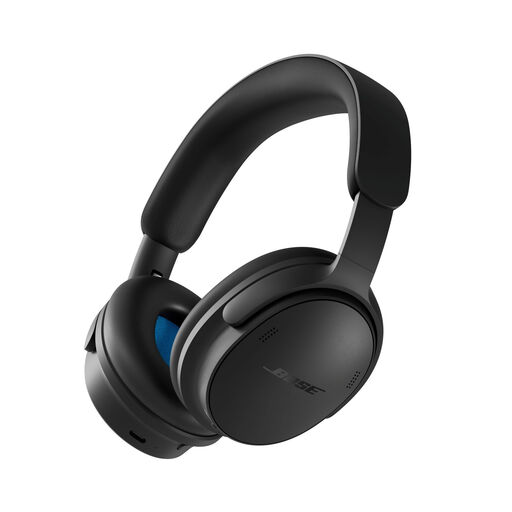
Why it suits this profile: Versatile Bose noise-cancelling headphones for everyday travel, studying and work, without going straight for the most fully featured version.
The specifications list Quiet and Aware, as well as Immersion, Cinema Mode and ANR off. This lets you choose a listening mode to suit travel, video or a quiet workspace.
Up to 24 hours of battery life, Bluetooth 5.4, USB-C, a carry case included and a weight of around 230 grams.
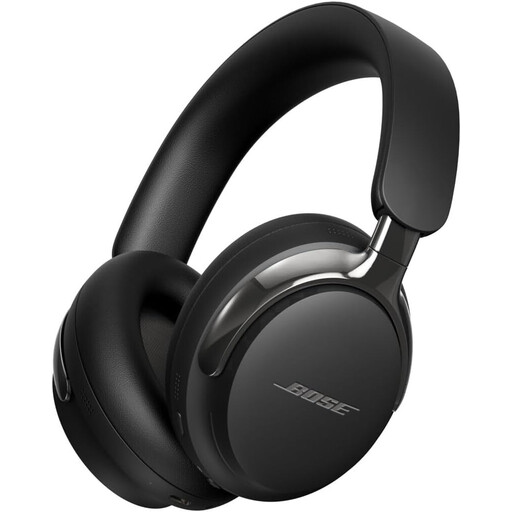
Why it suits this profile: Designed for listeners who value spatial audio, a wide range of modes and longer battery life for music and films.
The quoted battery life is specified both with and without immersive audio. That makes it easier to choose based on the features you’ll actually use.
Bluetooth 5.4, active noise cancellation, Cinema Mode, USB-C and up to 30 hours of listening, according to the product description.
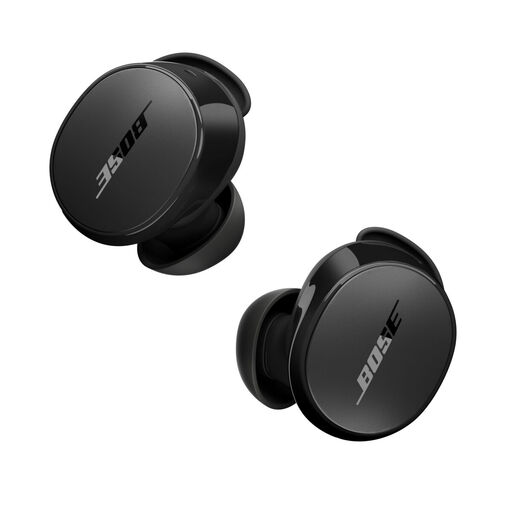
Why it suits this profile: Handy for commutes when you’re not cycling, workouts, short trips and situations where compact Bose QuietComfort earbuds are a better fit than headphones with a headband.
You can customise the fit with ear tips in three sizes and stability bands. The IPX4 rating protects against splashes and sweat, but not immersion.
Up to 8.5 hours of playback, Bluetooth 5.3, Quiet and Aware Mode, and a charging case with extra charging capacity, according to the product description.
We’ve put together a complete, up-to-date list of products that meet these strict selection criteria and the applicable European safety regulations.
Switch on the headphones and press and hold the Bluetooth button until pairing mode is active. Then open the Bluetooth settings on your phone and select the Bose model. The Bose app can help with settings, firmware updates and adjusting listening modes.
According to the product specifications, the over-ear models discussed offer around 24 to 30 hours of battery life, depending on the model and the features you choose. The device’s overall lifespan depends on charging habits, use, storage and wear to the ear cushions and battery. Keep the headphones in the supplied case and avoid extreme heat and moisture.
Yes, earbuds take up little space and have Quiet and Aware modes. Check the playback time per charge, though, and take the case with you fully charged. For long-haul flights, over-ear headphones may be more practical thanks to their longer battery life and larger ear cushions.
