
Teacher filming from above
You want to capture the whole work surface without your hands obscuring the folding or cutting line. Canon Europe discusses using fill light on the other side of the subject to reduce shadows.


Start by considering where your camera and workpiece will be positioned. Two panels are a good fit if you can safely place one on each side to help reduce hand shadows, while a single COB light is better suited to a fixed setup with a compatible modifier. A compact light is mainly an option for a small filming area or as a supplementary light. Before filming a full class, make a test recording with your chosen light and camera, using the paper, workshop lighting and movements you’ll actually be working with.
You want to capture the whole work surface without your hands obscuring the folding or cutting line. Canon Europe discusses using fill light on the other side of the subject to reduce shadows.
You need a setup that won’t get in anyone’s way and can be put away after class. Bear in mind the need for secure mounting, cable management and clear walkways. Arboportaal stresses that artificial lighting must not create a risk of accidents.
You want to capture the differences between paper and covers clearly. Adobe notes that changing ambient light can affect exposure and colour balance, so test with your own materials and the lights that will be on in the workshop.
Choose this if: you’re filming the whole work surface and have safe space for lights on both sides. Use one panel as the key light and set the other to a lower brightness as fill light.
Bear in mind: two stands and their cables take up space. For the set reviewed, NEEWER lists two panels, diffusers, stands and mains adapters; NP-F batteries are not included.
Choose this if: you have a fixed spot for a stable stand and want to set up a directional light source with a suitable modifier. According to Aputure, the amaran 100x S has a Bowens mount.
Bear in mind: a single key light may cast shadows on the other side of your hands; fill light or a reflector can help. Aputure lists active cooling, so check whether its noise will be audible in your recording.
Choose this if: you need to clear the workspace after class or are mainly filming small details. A 1/4-inch mount may work with a suitable holder.
Bear in mind: check that the light reaches the whole book. Elgato lists four hours of use at 50% brightness for the Key Light Mini and states that mounting accessories are not included; battery life will vary with the settings you use.
| What to consider | What to check before buying | Who is this most important for? |
|---|---|---|
| Clear view of hands and workpiece | Make a test recording with your hands in their usual working position; assess the key light and fill light. | When I’m filming folding, gluing and cutting, I want to see that my hands aren’t obscuring the action. Around 33% of consumers prioritise a clear view of their hands and workpiece. |
| Safe, temporary placement | Measure the available workbench and walkway space; check that the stand or holder fits securely and plan the cable route. | At a shared workbench, I want to be able to put my light away after class without getting in anyone’s way. Around 27% of consumers prioritise safe, easy-to-clear placement. |
| Accurate-looking material colours | Check whether the colour temperature is adjustable, and film your own paper and covers under the existing lighting. | When working with paper in subtle shades, I want the camera to capture those differences clearly. Around 20% of consumers prioritise the colours of their materials. |
| Power and flicker | Compare the length of your class with battery life at your intended brightness; test with all the workshop lights on. | If I want to film a whole class in one take, I don’t want an unexpected interruption or bands of light in the shot. Around 20% of consumers prioritise uninterrupted use and flicker-free footage. |
A quoted figure on its own won’t tell you whether your hands will cast shadows across your work surface. Measurements are only meaningful to compare when they’re taken on the same basis, such as at the same distance.
Make a test recording in your actual workspace, and only compare specifications taken under the same measurement conditions.
Bundles vary in the power supplies and mounting equipment they include. For the set reviewed, NEEWER lists mains adapters and stands but no NP-F batteries; Elgato says that mounting accessories are not included with the Key Light Mini.
Check what’s included in the exact version on offer, and plan the power supply and cable route for the full class.
Lighting for the camera won’t necessarily be sufficient or safe for everyone working in the workshop.
Keep the general lighting and walkways clear, and arrange cables so they don’t get in anyone’s way. The Netherlands Food and Consumer Product Safety Authority requires CE marking on electrical video lights sold as consumer products in the Netherlands. Check the specific light and, if one is included, its mains power supply.
The NL660 set with two bi-colour panels may suit you if you have room for stands on both sides of a larger work surface.
The LEDP260C is a standalone panel for those looking for adjustable white light in a focused setup.
The 100x S is a COB option for a fixed setup with a suitable modifier.
The Key Light Mini is a panel for a small filming area or a setup you can put away after use.
The VL49 RGB is a small rechargeable light for details or supplementary lighting. First check whether it can adequately light your entire work surface.
The products below range from portable RGB lights to a COB video light and a small light for close-up filming. Compare the mounting options and power supply, and consider how you want to light the whole work surface.
 No image available
This portable RGB light is a handy option if you want to move the light around easily. Make a test recording to check that it reaches the whole work surface.
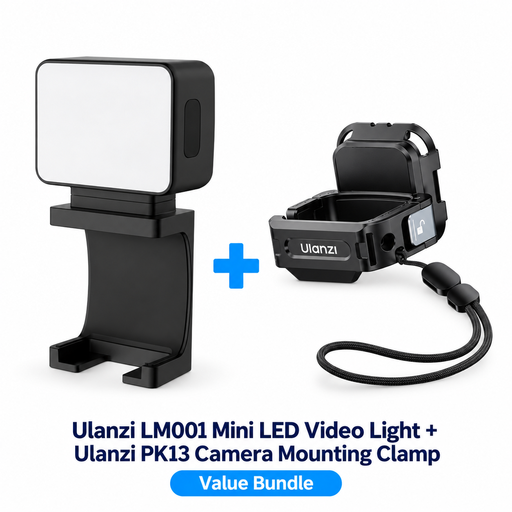 No image available
This bundle may suit you if you’re looking for an extra light for a DJI Osmo Pocket 3; the camera clamp mentioned is specifically for that model.
 No image available
This portable COB light may suit a setup where you want adjustable white or coloured light. Check which modifier and power supply you’ll need for your use.
The product title lists a built-in 59 Wh battery, 2700–6500 K, bi-colour and full colour.
 No image available
The zoom head may suit you if you want to direct the light at a specific task. Check that the beam is wide enough for your filming area.
The product title lists 2000–5500 K, four brightness settings, a 2000 mAh battery and a weight of 187 g. Don’t shine the light directly into anyone’s eyes from close range, and keep the battery away from heat and water.
 No image available
This small supplementary light may suit close-up filming. Make a test recording to see whether it can also light the whole book.
The product title lists a 2000 mAh battery and a magnet on the back. Avoid looking directly into the bright LED.
Before the class, make a short recording while folding, gluing and cutting in your usual position. Move the key light or add a lower-level fill light on the other side if your hand obscures the action.
Test with the workshop lights on. For a 50 Hz power frequency, Sony suggests a shutter speed of 1/50 or 1/100 second as a possible way to reduce flicker; check what works with your own camera and light source.
Check what’s included in the exact version on offer, and plan the power supply, mounting and cable route for the whole class. The NEEWER set reviewed includes mains adapters and stands but no NP-F batteries; Elgato says mounting accessories are not included with the Key Light Mini.
Yes. The Netherlands Food and Consumer Product Safety Authority requires CE marking on electrical consumer products sold in the Netherlands. Check the marking and product information for the specific light and, if one is included, its mains power supply.
If you’re filming identifiable visitors, colleagues or pupils on behalf of a business or organisation and publishing the footage, the Dutch Data Protection Authority says you need a legal basis. Avoid capturing identifiable people unintentionally, and decide in advance on the purpose and legal basis. Different rules may apply to filming solely for personal use.