
Teacher with a fixed workbench
Mainly films hands, paper and bookbinding techniques from above. IPEVO lists a maximum capture area of 440 × 330 mm for the V4K PRO 120; compare this with the book and the space you need for your hands.


If you mainly film one work surface using a computer, a document camera is a straightforward option. For changing camera angles, consider a mirrorless camera with a suitable lens or a camcorder with zoom. If you move around while demonstrating, a compact handheld camera may be a better fit, but it won’t replace a fixed overhead setup. Whichever you choose, test the framing and focus at the actual recording distance, and check the clarity of your spoken instructions separately.
Mainly films hands, paper and bookbinding techniques from above. IPEVO lists a maximum capture area of 440 × 330 mm for the V4K PRO 120; compare this with the book and the space you need for your hands.
Wants to check the spoken instructions as well as the footage. The Consumers’ Association highlights an external microphone as something to consider with camcorders for video creators; check the audio connection on the model you’re considering too.
Wants to switch between wide shots and close-ups, or move the camera during the class. Canon, Panasonic and DJI describe different options for lens choice, optical zoom and mobile filming; see which one suits your setup.
First decide whether you need a fixed view of the work surface or a setup that lets you change position during the class. Then work out how you’ll record your instructions.
A good fit if: you mainly film one work surface from above and use a compatible computer and recording app. IPEVO lists a maximum capture area of 440 × 330 mm for the V4K PRO 120.
Bear in mind: the stated dimensions don’t guarantee that both the book and your hand movements will fit in shot from your mounting height.
A good fit if: you want to shoot more than just an overhead view. Canon specifies an RF mount and autofocus for video on the EOS R50 V.
Bear in mind: the lens helps determine the framing; check what’s included in the kit and how you’ll mount the camera securely above the table.
A good fit if: you want to switch between wide shots and close-ups from one position without changing lenses. Panasonic lists 24× optical zoom for the HC-VX3.
Bear in mind: zoom doesn’t tell you whether the whole work surface will fit in shot from your position or whether small details will appear sharp.
A good fit if: you move between workbenches during the class and also film handheld. DJI lists the Osmo Pocket 3’s weight as 179 g.
Bear in mind: the fixed lens and digital video zoom give you less flexibility over the framing; a gimbal isn’t a fixed overhead setup.
| What to consider | What should you look for? | Who is this important for? |
|---|---|---|
| Work surface and details | Measure the book and the space needed for hand movements; test the framing and focus at the planned mounting height. | If I want to show small bookbinding techniques clearly, I’ll first check that the whole work surface fits in shot. Around 36% of consumers prioritise seeing the work surface and details. |
| Clear spoken instructions | Make a test recording during normal workshop use and check the microphone options on the exact model. | If I talk through the process while binding, I want to be able to hear my voice over the workshop noise. Around 29% of consumers give clear instructions top priority. |
| Recording a full class | Match the power supply, storage and recording workflow to your chosen settings and planned class length; test everything beforehand. | If I want to keep a recording of a full demonstration, I’ll check in advance that my setup can handle the class length. Around 21% of consumers prioritise recording a full class. |
| Moving around or reframing | Decide whether you’ll be walking around, zooming from one position or using a fixed overhead view; then check the lens, zoom and mounting options. | If I move between workbenches, I want to be able to move the camera without losing track of my lesson setup. Around 14% of consumers value freedom of movement most. |
A high video resolution doesn’t tell you whether the book and your hands will fit fully in shot and appear sharp from the available camera position.
Test the framing and focus at the actual recording distance. If you’re buying a mirrorless camera, also check which lens comes with that version.
IPEVO describes noise reduction as a feature of the V4K PRO 120, but that doesn’t prove how clearly your voice will come through in a shared workshop. The Consumers’ Association highlights an external microphone as something to consider with cameras for video creators.
Record a trial lesson while the workshop is in normal use, then listen back before you decide.
Depending on your setup, you may need a separate microphone or a different audio arrangement.
A lightweight camera or stabilisation while moving doesn’t determine whether you can position the camera directly above the book.
First decide whether you’ll be moving around or need a repeatable overhead view. Then check the framing and mounting options for your workbench.
A manufacturer’s warranty and your statutory rights if a product is faulty are not the same thing. ACM ConsuWijzer explains that statutory warranty in the Netherlands does not have a fixed two-year term.
Discuss any potential fault with the seller. What you can expect from a product depends in part on the product itself and normal use.
The V4K PRO 120 is designed for a defined work area in a computer-based teaching setup.
The EOS R50 V is a mirrorless camera for anyone who wants to create the right framing with a suitable RF lens.
The HC-VX3 is a camcorder option for anyone who wants to switch between wide shots and close-ups from one position.
The Osmo Pocket 3 is a compact camera for classes where the person filming moves around.
The product picks below range from a webcam and compact cameras to a mirrorless camera and a handheld camera. Above all, check that your chosen setup frames the book and your hands clearly from the actual filming position.
 Image unavailable
The rotating lens may help you choose different camera angles; test whether it also gives you a useful overhead view from your planned mounting height.
The product name lists 4K video, autofocus and a 330° rotating lens. The product description warns that 18× digital zoom may reduce image quality.
 Image unavailable
This webcam may suit a computer-based recording setup; check in advance how you’ll position it for the overhead view you want.
The product name lists 4K video, autofocus, two built-in microphones and a privacy shutter.
 Image unavailable
The kit zoom lens lets you switch between different framings from one camera position; test whether the whole work surface fits in shot at your recording distance.
The product description says that a 16–50mm lens is included. It also states that a compatible SD card and adapter/charger are not included.
 Image unavailable
This compact handheld camera is an option if you move around during the class; for a fixed overhead view, you’ll need to make sure your setup is suitable.
The product name lists 4K/120fps video, 3-axis stabilisation and an included microphone. The lens is fixed and video zoom is digital, so check the framing from your filming position.
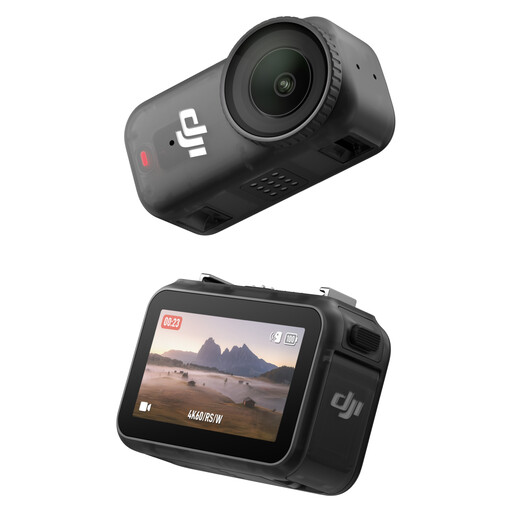 Image unavailable
The product name describes a camera for wearable POV recording; consider whether that perspective is right for showing the book and your hands.
The product name lists 4K/60 video and a 143° field of view. According to the product description, the ultra-wide view may make small hand movements look relatively small.
Lay out the book and tools as you would during the class, leaving enough room for your hands too. Compare the whole work surface with the camera’s capture area from the planned camera height. IPEVO specifies a maximum of 440 × 330 mm for the V4K PRO 120, but this doesn’t guarantee that your entire setup will fit.
Take extra care if people can be recognised in the footage. The Dutch Data Protection Authority explains that identifiable images are personal data covered by the GDPR. Decide in advance who might appear and how you’ll use the recording; avoid filming identifiable bystanders where possible, and discuss the filming beforehand.
The IPEVO V4K PRO 120 reviewed here uses a computer-based workflow with its USB-A/UVC connection. Before choosing, check that the connection, recording app and available storage suit your setup.
Beforehand, make a test recording for the planned duration using the settings you intend to use in class. Check the power supply, storage and recording workflow; DJI lists recommended microSD cards for the Osmo Pocket 3, while IPEVO specifies a USB connection for the V4K PRO 120.
You may be, as statutory warranty in the Netherlands does not have a fixed two-year term. ACM ConsuWijzer explains that what you can expect from a product depends in part on the product itself and normal use. Discuss any potential fault with the seller; the assessment depends on the specific circumstances.