
Keeper of a bound family archive
You scan albums, registers or bound letters and want to handle the bindings and pages with care. Compare an overhead scan with a book-friendly flatbed scanner before prioritising speed.


If you’re mainly scanning fragile or bound documents that you don’t want to place on a flatbed, compare overhead scanners. For loose letters and photos up to A4, a flatbed scanner may be more practical. Also consider the space you’ll need while scanning, how the scanner connects to the shared computer, the software available and your preferred file formats. OCR can make text searchable, but it doesn’t guarantee accurate handwriting recognition.
You scan albums, registers or bound letters and want to handle the bindings and pages with care. Compare an overhead scan with a book-friendly flatbed scanner before prioritising speed.
You’re collecting letters, certificates and photos, and want clear files without more equipment on your desk than necessary. The size of your originals will determine whether an A4 flatbed is suitable.
You want to clear the scanning area after use and be able to find your files again. So pay particular attention to storage, connectivity, OCR and where scans are saved.
Start with your most fragile documents and largest original. Then compare how the scanner needs to be set up and stored.
Choose this if: you’d rather not place bound or fragile documents on a flatbed. CZUR describes the ET series as an overhead scanner that doesn’t press down on the spine.
Consider: you’ll need space beneath the camera as well as for the open document. Check the lighting and page curvature with a test scan.
Choose this if: you want to scan text close to the book’s spine and can place the book carefully on the glass. Plustek describes the OpticBook 4800 as having a narrow book edge.
Consider: you’ll still need to position the book and turn the pages. This method won’t suit every fragile binding.
Choose this if: you mainly scan loose letters, documents and photos up to A4. Canon specifies a scan area of 216 × 297 mm for the LiDE 400.
Consider: larger originals won’t fit in a single scan, and bound documents need to be placed on the glass. Storing it upright, as Epson describes for the V39II, doesn’t change the scanning method.
| What to consider | What should you check? | Who should consider this? |
|---|---|---|
| Bound or fragile originals | Measure the open document and check how far it can safely be opened. Test-scan text near the spine. | If you mainly scan albums or bound letters, you’ll want to know how the original is supported while scanning. Around 29% of consumers say handling bound documents with care is their top priority. |
| Loose letters and photos | Measure your largest document and compare a test scan of small text and a photo with the original. | If you mainly scan loose family papers, you’ll want to know whether the scan area can accommodate those sizes. Around 24% of consumers say suitability for loose documents and photos matters most. |
| Finding text later | Check whether the exact model supports searchable PDFs, and test typed text and handwriting separately. | If you want to search files for names or dates later, check how well the OCR output works with your documents. Around 18% of consumers put searchable text at the top of their list. |
| Shared desk | Measure the space for setting up and storing the scanner, and check that its connection and software work with the shared computer. | If you want to clear the workspace quickly after scanning, bear in mind that reconnecting and storing the scanner matter too. Around 18% of consumers prioritise these practical workspace requirements. |
| Private files | Check where the software saves files and who has access. Review documents before sharing them outside your household. | If your scans contain personal data, you’ll want to be able to check where they’re stored and who you share them with. Around 11% of consumers prioritise control over storage and sharing. |
A stand can make storage easier, but a bound original still needs to be placed on the glass.
Choose based on how you want to scan your original, and treat storage as a separate requirement.
An OCR feature doesn’t guarantee accurate handwriting recognition.
Test a representative letter and keep an image of the original scan so you can check the recognised text.
Allow time for manual checks and corrections.
With an overhead scanner, the open document also needs to fit beneath the camera. An A4 flatbed limits the scan to the size of its scan area.
Measure the space for the scanner, the open document and storage separately.
IRIS describes several IRIScan Desk overhead models for books and documents.
The OpticBook 4800 is a book-friendly flatbed scanner for originals that can be placed carefully on the glass.
The CanoScan LiDE 400 is an A4 flatbed scanner for loose documents and photos.
The Perfection V39II is an A4 flatbed scanner for loose photos and documents.
CZUR describes the ET series as an overhead option for bound books, with features to correct curved pages.
This selection includes a flatbed and ADF scanner, a document camera for flat sheets, and sheet-fed models for loose documents and slim booklets. Scanning methods vary by model; a sheet-fed scanner isn’t a contactless book scanner.
 Image unavailable
The combination of a flatbed and document feeder is useful if you scan both books and loose documents; bound material needs to be placed on the glass.
A4; 600 × 600 DPI; 50-sheet ADF; duplex scanning; export to editable PDF.
 Image unavailable
This document camera is designed for flat documents up to A3 and may suit you if you want to use OCR on text.
Maximum flat sheet size: A3; the product description lists OCR software for converting text into an editable format.
The product description advises against scanning glossy materials, such as glossy photos and magazines.
 Image unavailable
This sheet-fed scanner is designed for loose documents and booklets within the specified thickness limit, not for contactless scanning of fragile books.
A4; 600 × 600 DPI; the product description lists support for booklets up to 5 mm thick.
 Image unavailable
This sheet-fed model is designed for documents and booklets within the specified thickness limit; it doesn’t capture bound material from above.
A4; 600 × 600 DPI; the product description lists support for booklets up to 5 mm thick.
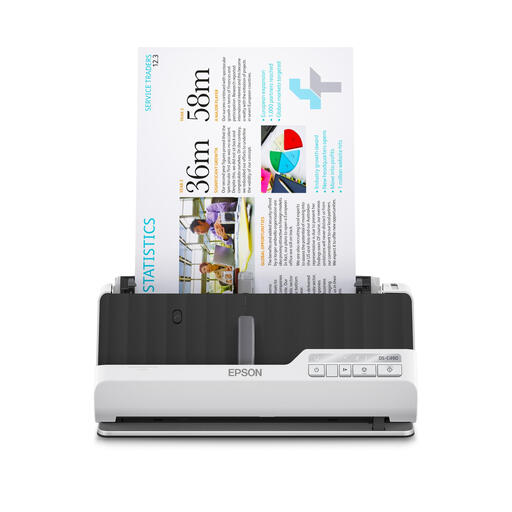 Image unavailable
This model is designed for loose documents and brochures within the specified thickness limit, not for contactless scanning of fragile books.
A4; 600 × 600 DPI; the product description lists support for brochures up to 5 mm thick and automatic duplex scanning.
Not necessarily. If your largest documents are within 216 × 297 mm and you mainly scan loose papers, you could compare an A4 flatbed such as the Canon CanoScan LiDE 400. If you also have fragile bound documents, assess that need separately.
Check the operating systems and software supported by the exact model against the computer you want to use. Plustek lists separate downloads for Windows and Mac for the OpticBook 4800; check the support available for other models too.
Check every scan for legibility and missing edges, keep track of the order of the originals, and save an image of each document alongside any OCR text. The Dutch National Archives cites improved access to information as one reason to digitise; check recognised text against the original.
When you buy as a consumer in the Netherlands, you’re protected by statutory consumer rights if a product doesn’t meet the standard you could reasonably expect; there’s no fixed statutory warranty period. The seller remains responsible for providing an appropriate solution. Factors such as normal use and expected lifespan are taken into account; the Dutch government explains that a manufacturer’s warranty is additional protection.
According to the Dutch Data Protection Authority, the GDPR doesn’t apply to the processing of personal data for personal or household use. This exception isn’t blanket permission to make other people’s information public; consider sharing outside private use separately.
First find out why the recipient wants a copy and what information they need. According to the Dutch Data Protection Authority, organisations may be legally entitled to request a full copy in certain cases, but not in every situation. The information you can redact therefore depends on the purpose and legal basis.