Who is this choice relevant to?

People looking after delicate bound notes

They want to capture pages without breaking the binding, so they pay particular attention to how clearly text near the spine comes out. Product information from CZUR, Plustek and VIISAN describes features for capturing books or correcting curved pages.

Volunteers creating a searchable archive

They need OCR they can check and practical PDF output, not just a high camera specification. IRIS, Plustek and VIISAN mention OCR or searchable PDF features; recognition also depends on the quality and layout of the original.

Groups with lots of scanning to do

They want a repeatable routine for turning pages, checking scans and saving files. A quoted capture speed alone does not tell you how long the whole process will take: alignment and checking the results matter too.

What should you look for?

Overhead scanner with book mode

A good fit if: you want to keep the binding intact and regularly scan open double-page spreads. CZUR, IRIS and VIISAN describe models with features for correcting curved pages.

Bear in mind: check the capture format, available workspace and a test scan around the spine. Automatic correction and OCR may need some further editing.

Book-focused flatbed scanner

A good fit if: the notes can lie sufficiently flat and you want to scan one page at a time on the glass. Plustek says the OpticBook 4800 has a 2 mm book edge and an A4 scanning area of 216 × 297 mm.

Bear in mind: you need to position the book for every scan, and pages larger than the stated scanning area will not fit in a single scan. Don’t force a delicate binding flat to reach text near the spine.

Concern What should you check? Who is this important for?
Keeping the binding intact and the spine readable Take a test scan of densely printed text near the spine and check that none of it is cut off. When I digitise delicate bound notes, I want to keep the binding intact and be able to read text near the spine. Around 36% of consumers say preserving the binding and keeping the spine readable are their main buying priorities.
A searchable digital copy Check the output format and search a test scan for words from pages with small text or a tricky layout. When volunteers need to find passages in a group archive, I want to check the OCR results rather than rely on page images alone. Around 29% of consumers prioritise searchability.
Processing lots of pages Test a representative chapter and assess page turning, alignment, page order and saving as well. When we process a large set of notes together, I want to know whether the whole scanning routine is manageable, not just how quickly one scan is captured. Around 21% of consumers give processing time the highest priority.
Cost and compatibility Check the operating system, included software and whether the scanning area is large enough for the notes. When the group uses different computers, I want to check in advance that the required software is compatible and whether any extra features are needed. Around 14% of consumers prioritise cost and compatibility.

Common pitfalls

  • Assuming OCR or automatic flattening will produce perfect text

    VIISAN says recognition depends on the quality and layout of the original. Automatic image correction can also go wrong if a page is poorly positioned.

    Test a few representative pages, including one with text close to the spine, before scanning the whole set.

    Allow time to check scans for missing edges and recognition errors, and correct them where necessary.

  • Looking only at the stated scanning speed

    When scanning repeatedly, you also need to allow for turning pages, aligning them, checking the results and reviewing the page order.

    Try out the full process with a chapter rather than comparing capture speeds alone.

    Allow time to check files and put the pages in order.

  • Assuming private-copy or educational rules automatically allow sharing with a group

    Whether you can share protected content depends on the content, the rights holders and the terms that apply.

    Find out who created the notes and, where necessary, get permission before sharing a file with group members.

Brands to consider

CZUR

The ET series is designed for contact-free capture of bound materials.

  • CZUR says the ET series offers curved-page correction and OCR for searchable PDFs.
  • Check the exact model and local terms of sale; terms on a US brand page do not automatically apply to a purchase in the Netherlands.

IRIS

The IRIScan Desk 7 Pro is an overhead scanner with book capture and OCR.

  • IRIS lists an 18 MP sensor, curved-edge correction and OCR with text-to-speech.
  • These claims do not guarantee perfect recognition of handwritten or densely printed notes, so check a test scan.

Plustek

The OpticBook 4800 is a book-focused flatbed scanner for material that can lie sufficiently open on the glass.

  • Plustek lists a 2 mm book edge, searchable PDF and an A4 scanning area of 216 × 297 mm.
  • The stated scanning area does not mean that larger pages will fit in a single scan.

VIISAN

The VK16 is an overhead scanner for bound pages, with book mode and OCR.

  • VIISAN says the VK16 can split double-page spreads and digitally flatten curved pages.
  • VIISAN recommends checking scans for missing edges and readable text; OCR also depends on the quality and layout of the original.

Scanners for booklets and documents

This selection includes models whose product information mentions booklets up to 5 mm thick, as well as an A3 document scanner. That does not mean they are confirmed to support delicate bound notes with curved pages. Before choosing, check how the material is fed in, whether text near the spine will be readable and what software is included.

EPSON ES-C380W ADF + Sheet-Fed Scanner, 600 × 600 DPI, A4, Black

EPSON ES-C380W ADF + Sheet-Fed Scanner, 600 × 600 DPI, A4, Black

Consider this model only if your notes, as a booklet up to 5 mm thick, can pass through the feeder; check this with the exact set of notes before scanning.

The product name lists 600 × 600 DPI and A4.

View at Joybuy

EPSON DS-C330 ADF + Sheet-Fed Scanner, 600 × 600 DPI, A4, Black, White

EPSON DS-C330 ADF + Sheet-Fed Scanner, 600 × 600 DPI, A4, Black, White

If your notes, as a booklet up to 5 mm thick, fit through the feeder, this model may be worth considering. Check how the material feeds through before you buy.

The product name lists 600 × 600 DPI and A4.

View at Joybuy

Epson WorkForce DS-6500 Power PDF

Epson WorkForce DS-6500 Power PDF

Consider this model for your notes only if the booklets are compatible with the stated feeding method and thickness. Also check that the required software works on the group’s computers.

View at Joybuy
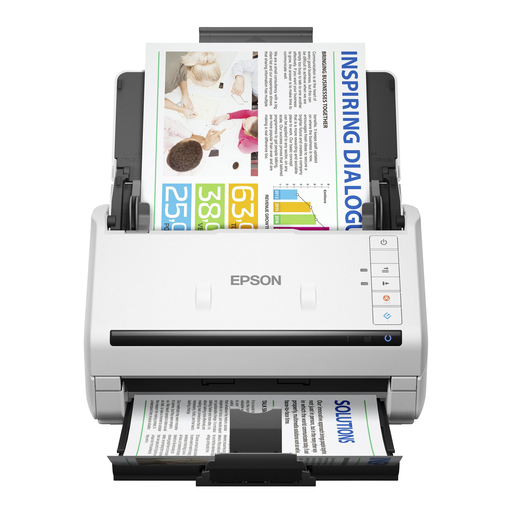
EPSON DS-770 II Sheet-Fed Scanner, 600 × 600 DPI, A4, White

EPSON DS-770 II Sheet-Fed Scanner, 600 × 600 DPI, A4, White

The product name describes this model as a sheet-fed scanner. Before choosing it for this task, check that your bound notes can be fed in as intended.

The product name lists 600 × 600 DPI and A4.

View at Joybuy

CZUR Shine 800 A3 Pro Document Camera

CZUR Shine 800 A3 Pro Document Camera

If you also want to digitise flat documents, this A3 model may be an option. Check separately whether it is suitable for scanning bound notes.

The product information mentions OCR; check the recognised text on representative pages before relying on searchable output.

View at Joybuy

Frequently asked questions

Can our group share scans of bound lecture notes with one another?

That depends on who created the content and what rights or permissions apply. The Dutch Government distinguishes between making copies for personal use and businesses or organisations copying and sharing copyright-protected publications. Don’t assume that an educational exception applies to an independent community group: check the rights for the specific content and, if needed, get permission before distributing the scans.

What if the notes include names or other personal data?

Before sharing, check whether the scans contain personal data and limit who can access them. According to the Dutch Data Protection Authority, an organisation needs a valid GDPR legal basis to process personal data. The exception for purely personal or household use does not automatically apply to sharing within a group.

How can you stop text disappearing after automatic book correction?

Start with test scans around the spine and along the page edges, then check the full text. VIISAN recommends checking scans for missing edges and legibility; ScanSnap support also highlights the importance of alignment when correcting book images. These recommendations are not specifications for other scanner models.

What can you expect if a scanner bought from a Dutch retailer is faulty?

When you buy as a consumer, a product must meet reasonable expectations. If it is faulty, contact the retailer to discuss a solution. The Dutch Government says there is no fixed statutory warranty period in the Netherlands. A manufacturer’s warranty is in addition to your statutory rights.
