Who is this guide for?

Discussion leader with guests around the table

You want people around the table to be able to speak directly to online participants too. So first decide whether a microphone for one person will be enough. Jabra describes the Speak2 55 as a speakerphone with microphones that pick up sound from different directions.

Discussion leader speaking to online participants

You’ll be doing most of the talking and want to lead the discussion without sound from a loudspeaker feeding back into the microphone. Zoom points out that multiple devices with active audio in the same room can cause echo.

Host with a simple laptop setup

You’ll be staying at the table and want to connect, mute and test your headset before the discussion. Check your computer’s port and the controls on the version you choose.

What should you look for when choosing?

Headset for the discussion leader

Choose this if: you’ll be doing most of the talking to online participants and can repeat questions from people around the table if needed.

Bear in mind: a personal microphone is not a confirmed solution for picking up everyone’s voice around the table.

Conference speaker for multiple speakers

Consider this if: several people regularly want to speak directly to online participants.

Bear in mind: placement and acoustics. Test the setup in the room and avoid having several devices play conference audio at the same time. Jabra’s description of the Speak2 55 is a manufacturer’s claim, not a test carried out at your kitchen table.

What to consider What should you check? Who is this important for?
Everyone around the table can be heard Check whether you need a personal microphone or a shared setup. If several people will be speaking, test the microphone from different seats. If people around the table want to speak directly to online participants, a microphone for one wearer may not be enough. Around 36% of consumers prioritise making sure everyone around the table can be heard.
Clear speech and echo Check the microphone controls and avoid having multiple devices in the same room play active conference audio at the same time. Zoom lists the latter as a possible cause of echo. If you’ll mainly be leading the discussion, you’ll want online participants to hear you clearly, without disruptive feedback. Around 29% of consumers prioritise their own speech and echo reduction.
Connection and version Compare the USB port and full model number with your computer. Also check that the device on offer has the correct CE marking, as required for electrical and electronic equipment in the Netherlands by the Dutch Authority for Digital Infrastructure. If you’ll be staying at your laptop and want to connect quickly, you won’t want to find that the headset has a different port or is a different version. Around 21% of consumers mainly choose a simple connection.
Freedom to move and wearing comfort Check the fit and the exact mono or stereo version. If you choose Bluetooth, check the pairing and charge level before the discussion too. If you want to stand up while leading the discussion or will be wearing the headset for a long time, freedom to move and comfort matter. Around 14% of consumers give these factors top priority.

Common buying mistakes

  • Choosing a personal headset when everyone needs to join in

    A microphone worn by the discussion leader won’t necessarily pick up everyone’s voice around the table.

    Before buying, decide who will be speaking directly to online participants. If several people will be speaking, compare shared microphone setups and test them from different seats.

  • Using multiple devices with active conference audio

    Multiple devices in the same room can cause echo. Zoom lists active audio on several computers in one meeting room as a possible cause.

    Test your setup in advance and don’t have conference audio active on every device at once. According to Zoom, muting just a microphone may not always be enough.

  • Assuming the model name tells you exactly which version it is

    The Jabra Evolve2 30 SE comes in different mono, stereo and USB versions. Trust uses the name Ayda for more than one USB headset.

    Check the full model or product number, connection and box contents before ordering.

  • Assuming the manufacturer’s warranty covers all your legal rights

    A voluntary manufacturer’s warranty does not replace your statutory right to a product that is fit for purpose.

    Keep your proof of purchase and contact the seller if something goes wrong. The Dutch government states that there is no fixed statutory warranty period for every product in the Netherlands.

Brands to consider

Trust

The Ayda USB-ENC 25089 is a wired PC headset for a discussion leader who’ll be staying at their laptop.

  • Trust lists on-ear volume controls and a flip-up microphone that mutes when raised.
  • Check the product number: the Ayda name is also used for another USB version. Noise-cancellation claims are not an independent test carried out at a kitchen table.

Jabra

The Evolve2 30 SE is a personal wired headset. The Speak2 55 is a speakerphone to consider if several people around the table will be speaking.

  • Jabra documents mono and stereo versions, as well as USB versions of the Evolve2 30 SE.
  • Jabra describes the Speak2 55 as capable of picking up sound from different directions, but that doesn’t establish how well it will perform in your kitchen.

Logitech

The Zone Vibe 100 is a Bluetooth headset for a discussion leader who wants freedom to move around.

  • Logitech lists multipoint Bluetooth and a flip-up microphone boom.
  • The headset needs charging. Check that you’re looking at the Zone Vibe 100 and the correct version.

EPOS

The IMPACT SC 60 USB ML is a wired, dual-ear office headset for anyone who values a PC connection and controls on the cable.

  • The EPOS product sheet lists USB for PC or softphone use, plus controls on the cable.
  • The product sheet covers several versions. Check the full model number before assuming that the features or accessories listed apply to a particular offer.

Joybuy products

This selection includes wired and wireless headsets for a discussion leader who’ll be doing the talking. Before buying, check that the connection is compatible with your device and that the version on offer has a CE marking.

Sennheiser MOMENTUM 4 Wireless headphones, black

Sennheiser MOMENTUM 4 Wireless, black

The product name lists four microphones and Bluetooth, for a discussion leader who wants to listen wirelessly.

Rechargeable battery; charging required.

Joybuy
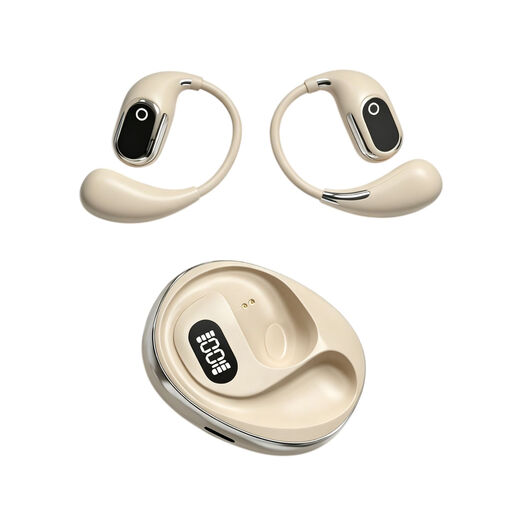
OWS on-ear headphones with simultaneous translation and recording

OWS on-ear headphones with simultaneous translation and recording

For a discussion leader who’ll be doing the talking, the product name lists a built-in condenser microphone.

The product name also mentions a recording function and a Type-C charging case. Check that the translation and recording functions listed are right for your discussion.

Joybuy

Jabra Evolve2 30 SE headset

Jabra Evolve2 30 SE

The product description lists a wired headset for calls, suited to a discussion leader who’ll be staying at their computer.

A USB-A connection, stereo sound and microphone mute controls are listed. Check that USB-A is compatible with your device.

Joybuy

Razer Kraken V3 X headset, black

Razer Kraken V3 X, black

The product description lists a wired headset with a microphone for communicating at your computer.

A USB connection, stereo sound and a 180 cm cable are listed. Check that the connection and cable length suit your setup.

Joybuy

Jabra Evolve2 75 headset

Jabra Evolve2 75

The product description lists Bluetooth and microphones for calls, for a discussion leader who wants freedom to move around.

A USB-C cable and pairing with two devices are listed. The headset has a battery and needs charging.

Joybuy

Frequently asked questions

Can other people around the table share my headset microphone?

Don’t assume they can: a personal headset is designed for its wearer and won’t automatically pick up everyone around the table. If online participants need to hear their voices directly, compare shared microphone setups and test them from different seats. Jabra’s description of the Speak2 55 is no guarantee that it will work for every table.

How can you prevent echo during a book discussion?

Test the microphone and speaker in advance, and don’t have conference audio active on multiple devices in the same room at the same time. Zoom lists several computers with active audio in one meeting room as a possible cause of echo.

What should you do if your headset develops a fault?

Contact the seller if your product is faulty. In the Netherlands, a manufacturer’s warranty is in addition to your statutory rights. The Dutch government states that there is no fixed statutory warranty period for every product.

Do you have a cooling-off period for an online purchase?

According to the Dutch government, purchases made remotely from a business often come with a 14-day cooling-off period. Check the terms and any applicable exceptions. The statutory cooling-off period is different from a shop’s voluntary returns policy.

Which product marking should you check on a headset?

Check that the headset on offer has the correct CE marking. The Dutch Authority for Digital Infrastructure states that electrical and electronic equipment in the Netherlands must have the correct CE marking. Check the marking on the version being offered, not just the brand name or general product description.
