You don’t need to rush out and buy a camera to photograph book covers. First, test whether your smartphone, paired with a tripod, even lighting and a fixed shooting angle, can produce sharp, legible images. A mirrorless camera may suit you if you want more control over framing, lenses or editing. If so, check that the lens is compatible with the camera body and suits your working distance. Neither option will eliminate reflections caused by poor lighting.
Who is this choice relevant to?
New seller with a small book collection
Wants to check whether an existing smartphone, tripod and simple lighting setup can produce sharp cover photos before buying a camera. Shopify Netherlands describes both a smartphone setup and the use of a tripod and suitable background.
Seller with a constantly changing range of titles
Can benefit from a fixed shooting angle, repeatable lighting and a way to reframe books of different sizes. Shopify Netherlands and Canon Europe highlight the value of a consistent setup.
Seller of glossy books or books with fine details
Wants to keep small text and cover details clear while controlling distracting reflections. Lighting deserves at least as much attention as the choice of camera; Shopify Netherlands explains how soft light can reduce harsh shadows.
What should you look for when choosing?
Existing smartphone on a tripod
Choose this when: you mainly photograph full covers and test shots show small title text clearly, without distracting reflections.
Trade-off: you can start by testing equipment you already own, but its suitability depends on your phone, lighting setup and desired final image.
Mirrorless camera with a suitable lens
Choose this when: you want to frame different book sizes from a fixed position or need more control over settings and RAW editing.
Trade-off: a body-only model isn’t a complete setup. Check the lens mount, focusing distance and what’s included in the kit. A different camera body won’t remove reflections caused by badly positioned lighting.
| What to consider |
What to look for when buying |
Who is this important for? |
| Legible text and details |
Assess a test shot from your intended distance and at the size it will appear in your online shop. Also check focus and framing. |
If I want the title and small cover details to remain recognisable, I look beyond the pixel count alone. Around 27% of consumers put legibility and detail first. |
| Reflections and colour |
Test soft, adjustable lighting on both glossy and matt covers, and check shadows, reflections and colour. |
If I photograph glossy covers, I want to be able to control distracting reflections and assess colour accurately. Around 33% of consumers give reflections and colour top priority. |
| Repeatable shots |
Check that a tripod can hold the camera steady and that the controls and screen are easy to use from your shooting position. A zoom lens can help with books of different sizes. |
If I photograph lots of different titles, I want to be able to repeat the angle and framing easily. Around 20% of consumers prioritise a repeatable workflow. |
| Complete setup |
Test the equipment you already have first. If you’re considering a mirrorless camera, compare the complete kit with a body-only model, including the lens and any support or lighting you’ll need. |
If I want to expand my setup, I want to know what I can already use and what else I need. Around 20% of consumers prioritise the cost of the equipment they need. |
Common pitfalls
-
Assuming more pixels will solve glare
Reflections and inconsistent lighting are caused by the shooting setup. A stated resolution won’t tell you whether glare on a cover will disappear.
Test a glossy and a matt cover in soft light before choosing a camera body.
-
Comparing a body-only model with a complete kit
A camera body without a lens isn’t a complete photography setup. Even with a kit, the lens and working distance determine whether the book fits in the frame.
Check exactly what’s included in the kit, the lens mount and the minimum focusing distance before comparing models.
-
Assuming your own photo gives you all the rights to the cover
A book cover may contain work by several rights holders. The Auteursbond points out that multiple parties may be involved, while the Dutch government says permission is the starting point when using protected work.
Check the rights for the specific cover and its publication in your online shop. Don’t simply reuse an existing product photo from another website.
Camera brands to compare
Canon
The EOS R50 with RF-S 18–45mm lens is a specific kit worth comparing for a fixed shooting position and books of different sizes.
- Canon lists a 24.2-megapixel APS-C sensor for the EOS R50. For the RF-S 18–45mm lens, Canon gives a minimum focusing distance of 0.20 m at 18 mm and 0.35 m at 45 mm.
- The working distance changes with the zoom setting. These specifications aren’t an independent test of book covers, so check that you can frame and focus on a book from your shooting position.
Nikon
The Z50II is a mirrorless camera with interchangeable lenses worth comparing if you want to use an electronic viewfinder.
- Nikon describes a viewfinder that shows changes to your settings.
- For a book photography setup, your choice of lens and support still matters. General claims about autofocus or colour haven’t been independently verified specifically for book covers.
Fujifilm
The X-M5 is an APS-C camera body worth comparing if you want to edit RAW files and choose your own X-mount lens.
- Fujifilm lists 26.1 million effective pixels and 14-bit RAW.
- These are specifications for the camera body. Without a suitable lens, they don’t tell you what working distance or angle of view you’ll get above a book.
Sony
The ZV-E10 II is worth comparing if you want to make product videos as well as still photos of book covers.
- Sony lists approximately 26.0 megapixels for photos and RAW support. According to Sony, the lens kit mentioned includes a 16–50mm power zoom lens.
- Check whether you’re looking at the version with or without a zoom lens. Video-focused features aren’t a proven advantage for flat cover photos alone.
Joybuy product picks
This selection of Joybuy products includes digital cameras and a mirrorless camera with a zoom lens for different framing options. Check with test shots that small text remains sharp and reflections are manageable.
 No image available
KOMERY G7 5K digital camera, 18× optical zoom, white
The stated 18× optical zoom gives you the option to adjust your framing. Take a test shot to check whether small cover text stays sharp from your shooting position.
View at Joybuy
 No image available
KOMERY W6 digital camera, 12× optical zoom
The stated 12× optical zoom gives you the option to adjust your framing. Use test shots to see whether the title text and cover details remain clear.
View at Joybuy
 No image available
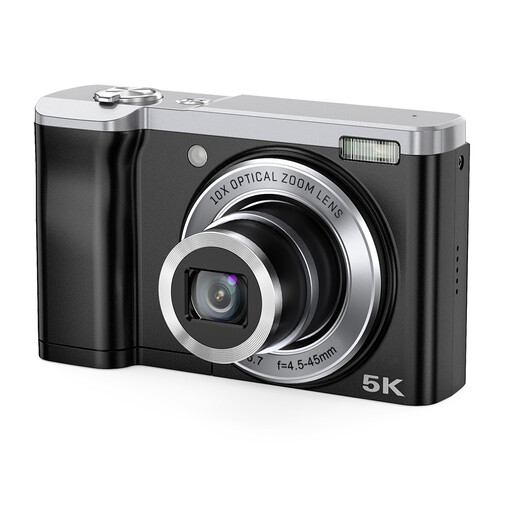
Songdian 5K digital camera, 10× optical zoom, black
The product title lists 10× optical zoom for more flexibility when framing. Take a test shot to check whether the cover text and details you want to capture are legible.
View at Joybuy
 No image available
Sony ZV-E10 with 16–50mm zoom lens, black
The included 16–50mm zoom lens lets you adjust your framing from a chosen shooting position. The product description lists a 24.2-megapixel APS-C sensor; this isn’t a test of how legible text is on book covers.
View at Joybuy
 No image available
Sony Alpha A6100 with 16–50mm f/3.5–5.6 OSS II lens
The kit lens offers zoom options for different framing from your chosen shooting position. The product description lists an electronic viewfinder and a 24.2-megapixel APS-C sensor. Use test shots to check that the working distance suits your books.
View at Joybuy
Frequently asked questions
Do I need more megapixels to make small text on a cover legible?
Not necessarily. Take a test shot from your intended distance and check the text at the size it will appear in your online shop. The lens, focus and any cropping also make a difference. The megapixel figures listed are camera specifications, not the results of a measured legibility test.
How can I prevent reflections on glossy covers and keep photos consistent?
Keep your camera and book in a fixed position and use soft light. Move the light source until distracting reflections disappear from the cover, and keep the setup consistent throughout the series. Check each photo for legibility and colour.
What additional costs and terms should I check when buying a camera?
Check whether you’re buying a kit or just the camera body, and what lens, support or lighting you still need. The KVK explains that business agreements don’t automatically offer the same consumer protection. Before buying, check the applicable sales and warranty terms.
Can I photograph a book cover and publish it in my Dutch online shop?
Check the rights for the specific cover and intended publication before using the photo. The Dutch government says permission is the starting point when using protected work, while the Auteursbond notes that several rights holders may be involved in a cover. Taking the photo yourself doesn’t automatically clear those rights.


