
Online shop with a permanent tabletop setup
You want to show the whole board and the steps being carried out, time after time. Choose your lens or zoom with the overhead mount in mind.


If you’ll mainly be filming from a fixed position above the table, choose a camera with a lens or zoom that lets you fit the whole board in the frame from your planned mounting height. A secure mount, suitable lighting and clear audio are just as important as the type of camera. If you want to reframe without changing lenses, consider a camcorder. For moving or vertical clips, a compact stabilised camera could be a good fit, provided you check the mounting options above the table first.
You want to show the whole board and the steps being carried out, time after time. Choose your lens or zoom with the overhead mount in mind.
You want viewers to be able to follow the rules clearly. So think about more than just the picture: consider where the microphone will be in relation to the person speaking.
As well as an overview of the game, you want to film around the table or use a different orientation. Check that the camera and chosen mount are also suitable for a fixed overhead shot of the board.
A good fit if: you have a fixed filming position and want to choose a lens specifically for the width of the board and the distance to the camera.
Bear in mind: a camera body alone doesn’t make a complete filming setup. Check which lens is included and test the framing at the planned height.
A good fit if: you want to switch between a wide shot and close-ups without changing lenses.
Bear in mind: according to Panasonic, the stated 25 mm-equivalent wide-angle setting on the Panasonic HC-VX3 is available only in certain recording modes.
A good fit if: as well as a fixed shot of the board, you want to move around the table or shoot vertical clips.
Bear in mind: a gimbal is no substitute for a suitable mount for a long, unchanged overhead shot.
| What to consider | What should you check? | Who is this important for? |
|---|---|---|
| Keeping the board and gameplay in frame | Measure the playing area and mounting height. Test whether the chosen lens or zoom can show both the whole board and an example move. | I want viewers to be able to follow both the playing area and the cards and moves. Around 36% of consumers say getting the board framed correctly is their top priority. |
| Clear spoken instructions | Make a test recording from the spot where you’ll actually be speaking. Check that the camera setup has the connections you need for your audio solution. The Consumentenbond notes that an external microphone can help improve sound quality. | If I’m explaining the game myself, I want viewers to hear the rules clearly without having to stand next to the camera. Around 29% of consumers give clear audio their top priority. |
| Recording a complete explanation | Test a full recording in the mode you intend to use. Check which memory card, power source and controls are suitable for the model you’ve chosen. | I want to record an explanation of the game in one go, without the controls or power supply interrupting the recording. Around 21% of consumers prioritise uninterrupted recording. |
| Filming beyond the fixed tabletop shot | Decide which use matters most. Test with your chosen mount to see whether the camera can film the whole board as well as capture the moving or vertical footage you want. | I also want to use the camera for clips around the table or in a different orientation. Around 14% of consumers give this additional use top priority. |
With a mirrorless camera, the lens is one of the factors that determines whether the whole board will fit in the frame from the available height.
Check exactly what’s included in the kit and test the framing at the planned mounting height.
Panasonic states that the HC-VX3’s specified 25 mm-equivalent wide-angle setting is available only in certain recording modes.
Test the framing in the mode you’ll actually use to record the explanation.
A gimbal helps with moving shots, but you’ll still need a suitable mount for a consistent wide shot.
First decide between a fixed shot of the board and moving clips. For a board shot, check that the mount gives you the framing you want.
Video specifications alone can’t tell you whether viewers will be able to hear your explanation clearly from where you’ll be speaking.
Record a short explanation from your intended speaking position and listen back before finalising your audio setup.
The Canon EOS R50 is a mirrorless camera with an RF mount, worth considering if you want to choose a lens specifically for a fixed tabletop setup.
The Sony ZV-E10 II has an interchangeable E-mount lens and is an option if you want to build your own setup for board footage and other video work.
The HC-VX3 is an example of a camcorder with built-in zoom, letting you switch between wide shots and close-ups without changing lenses.
The DJI Osmo Pocket 3 is a compact gimbal camera for creators who also shoot moving clips or footage in different orientations.
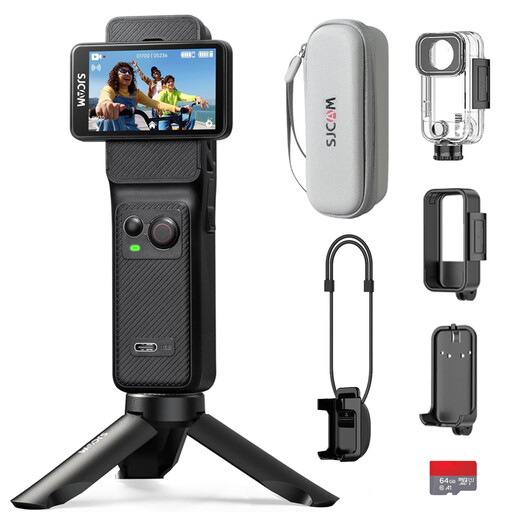
This selection of Joybuy products includes vlog and action cameras, as well as a camera with a zoom lens. For your tabletop setup, check that the framing, mount and audio solution suit the way you film.
 No image available
The title mentions a rotating lens and a mini tripod. Check at your intended mounting height whether the whole playing area fits in the frame.
The product name lists a 330° rotating lens, a 1.72-inch touchscreen, Wi-Fi and 64 MP.
 No image available
The product name lists 3-axis stabilisation and a handle with a 1/4-inch thread. Check that the mount is suitable for your fixed tabletop setup.
Listed specifications include a 1-inch CMOS sensor, 4K/240 fps, 2× lossless zoom and 107 GB of built-in storage.
 No image available
The product description lists mechanical 3-axis stabilisation and a rotating screen for horizontal and vertical footage. Check separately whether a suitable mount is available for filming above the board.
The product name lists a 1-inch CMOS sensor and 4K/120 fps.
 No image available
The included zoom lens lets you adjust the framing. Test from the planned height to check whether the whole board and the gameplay you want to show fit in the frame.
The product information lists 4K video, a vari-angle screen and Product Showcase Setting.
 No image available
The product name lists a battery life of 7 hours. For a full explanation, also check the power supply and settings for the exact model.
Listed specifications include 4K/30 fps, a 154° lens, 6-axis stabilisation and two touchscreens. The product name also mentions an included 64 GB card.
Measure the playing area and test the framing at the actual height of the mount, using the included lens or your chosen zoom setting. Don’t rely on a wide-angle figure alone: for example, Panasonic limits the HC-VX3’s stated 25 mm-equivalent setting to certain recording modes.
For a consistent tabletop shot, a stable, suitable mount is a sensible choice. Once it’s in place, check that you can reach the screen and controls and that your hands won’t obscure the game.
Check what’s included with your chosen model, and what lens, mount, lighting, storage and audio setup you’ll need. Make a test recording with the complete setup in the place where you plan to film the explanation.
According to the Autoriteit Persoonsgegevens, the GDPR applies to footage made and published on behalf of a business or organisation for professional or commercial purposes, and you need a valid legal basis; consent can be one such basis. If you film only the game, without identifiable people, this specific GDPR issue doesn’t automatically apply to footage of the board.
No. You may need permission to use and publish other people’s copyright-protected material. The Dutch Government makes clear that material isn’t automatically free to publish just because you’re using it in an explanation. Check the rights for any added material separately.