Who is this camera setup for?

Top-down content creator

You want to show the whole board, the cards and the action from one stable camera angle. Recording height, field of view and mounting are all important. MOJOGEAR describes mounting the camera and lights as part of a top-down setup.

Filming in changing window light

You want to assess the lighting and colours as the daylight changes. Canon Netherlands explains how ambient light affects perceived colour, while Sony Netherlands outlines how the direction and intensity of light affect exposure and shadows.

Presenter recording for longer

You want the rules to remain clear and your longer explanation to keep recording without stopping unexpectedly. MOJOGEAR lists a microphone as part of a top-down setup; also check the connections, power and storage on the camera you’re considering.

What should you look for when choosing?

Mirrorless camera with interchangeable lens

Choose this option when: you want to match the lens to the table and the available mounting height.

Bear in mind: you’ll need a suitable lens and a secure overhead mount. You’ll also need to assess card legibility in a test frame.

Camcorder

Choose this option when: you film for long stretches and want controls, an audio connection and framing in one video camera.

Bear in mind: check whether the wide-angle setting captures the whole board from your mounting position. A high zoom range won’t automatically help with a fixed overhead shot.

Pocket camera

Choose this option when: you also want to use the camera away from your table setup.

Bear in mind: a gimbal isn’t a substitute for a secure overhead mount. Also check the field of view and what’s included with the version you choose.

Action camera

Choose this option when: a wide field of view and easy mounting matter more to you than natural-looking close-ups of board details.

Bear in mind: check for distortion and legibility around the edges. GoPro warns that long recordings at high settings in a static environment can cause heat build-up.

What to consider What should you check? Who is this important for?
The whole board in frame Compare the field of view, lens choice, mounting height and secure mounting. In a test recording, also check the corners of the board and the card text. I want the board, cards and hands in one useful frame; around 31% of consumers prioritise covering the whole board.
Exposure and colour Record a test clip at the time you expect to film and assess shadows, exposure control and white balance. As the daylight changes, I want to be able to assess shadows and colours. Around 25% of consumers put lighting control first.
Clear explanations of the rules Check the microphone connection or compatible wireless option, and what’s included with the version you choose. Listen back to a test recording. When the camera is above the table, I want to be able to hear the explanation clearly. Around 25% of consumers prioritise clear speech.
Long recording Check the power supply, storage and any limitations with your chosen video setting. Test the planned recording length and make sure recording continues. For a long explanation, I don’t want an interrupted recording to force me to start again halfway through; around 19% of consumers prioritise uninterrupted recording.

Common buying mistakes

  • Assuming 4K can make up for an unsuitable top-down view

    High video resolution won’t bring game components into shot if cards or actions are outside the frame.

    First, create a test frame with the largest board and the actions you want to show. Check that the mount can be positioned securely.

  • Relying only on the camera’s built-in microphone

    A camera above the table may be further away from the speaker. Connections and what’s included vary by model.

    Check the exact microphone connection and what’s included with the version you’re considering, then listen back to a test recording.

  • Assuming a listed feature guarantees long recording times

    A flat battery, full card or interrupted recording could mean you have to record your explanation again. GoPro highlights heat dissipation as something to consider when recording for a long time with the HERO13 Black at high settings in a static environment.

    Test the full planned recording time with your chosen settings, and check the power supply, storage and heat. MOJOGEAR recommends checking that recording is still in progress.

Camera brands to consider

Canon

Canon offers both a mirrorless camera with an interchangeable lens and a camcorder with a fixed zoom lens.

  • Canon Netherlands lists an APS-C sensor, 4K 30p and a microphone connection among the EOS R50’s features. For the LEGRIA HF G70, Canon lists features including 4K 25p, 20x optical zoom and two card slots.
  • Assess the lens choice and wide-angle setting using a test frame. These specifications don’t prove that the whole board will be clearly visible.

Sony

The ZV-E10 II is a mirrorless camera option if you want to match the lens to your table setup.

  • Sony Netherlands lists interchangeable lenses and video up to 4K 60p.
  • Your choice of lens, distance and lighting will still determine the framing. The video specification doesn’t prove that cards will be easier to read.

Panasonic

The LUMIX G100D with 12–32mm lens is a mirrorless camera option if you also film away from your board game setup.

  • Panasonic Netherlands lists 4K 30p, FHD 60p and five audio recording modes.
  • Check that the lens suits your table and mounting height. A video recording mode alone won’t determine how easy the board is to read.

DJI

The Osmo Pocket 3 is an example of the pocket camera option.

  • DJI lists a fixed lens, three built-in microphones and support for DJI Mic 2 and Mic Mini.
  • For a fixed overhead view, check the mounting, field of view and what’s included with the version you choose.

GoPro

The HERO13 Black is an example of the action camera option if a wide field of view and easy mounting are important.

  • GoPro lists wide field-of-view modes and a tripod thread.
  • GoPro warns that long recordings at high settings in a static environment can cause heat build-up. Also test whether details around the edges of the frame remain clear enough to use.

Joybuy cameras for filming at a table

These Joybuy cameras are options to consider for filming around a table. Check that each model’s field of view and mounting are suitable for a fixed overhead shot.

Osmo Pocket 4P Standard Combo, black

Osmo Pocket 4P Standard Combo, black

Consider this pocket camera if you’re specifically looking for the Osmo Pocket 4P with Standard Combo. Test the whole board and your hands in a sample frame.

View at Joybuy
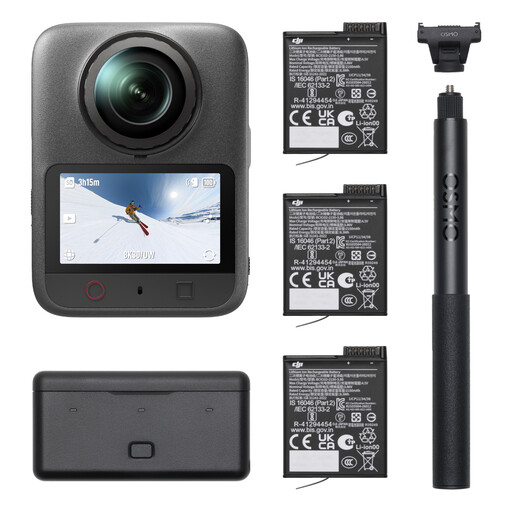
DJI Osmo 360 II Adventure Combo

DJI Osmo 360 II Adventure Combo

Consider this version if you’re specifically looking at the Osmo 360 II Adventure Combo. Make a test recording to see whether the framing suits your fixed table setup.

View at Joybuy

DJI Osmo Pocket 4 Standard Combo

DJI Osmo Pocket 4 Standard Combo

This pocket camera could suit you if you’re looking for a compact camera setup. Check with a test frame that the whole board remains visible.

  • 1″ CMOS sensor
  • 4K/240fps video
  • 3-axis stabilisation and 2× lossless zoom
  • 107GB built-in storage
  • 2″ rotating screen
View at Joybuy
Osmo Pocket 4 Creator Combo

Osmo Pocket 4 Creator Combo

Consider this version if you want to assess the included grip with 1/4″ thread for your table mount. Check your complete setup before choosing.

  • 1″ CMOS sensor
  • 4K/240fps video
  • 3-axis stabilisation and 2× lossless zoom
  • 14-stop dynamic range
  • 107GB built-in storage
  • Grip with 1/4″ thread
View at Joybuy
DJI Osmo Pocket 3 Creator Combo

DJI Osmo Pocket 3 Creator Combo

This pocket camera is worth comparing if you’re looking for a Creator Combo with a microphone. Check the microphone setup and make a test recording of your explanation.

  • 1″ CMOS sensor
  • 4K/120fps video
  • 3-axis stabilisation
  • Microphone included according to the product title
View at Joybuy

Frequently asked questions

Is window light enough to clearly show a board game explanation?

It depends on the table and the time of day. Make a test clip with your hands above the cards and check the shadows, exposure and white balance before choosing a camera.

How can I stop the camera or recording from cutting out halfway through?

Mount the camera securely, test the planned recording time with your chosen settings, and check the power supply, card capacity and recording status. Canon lists two card slots and relay recording as features of the LEGRIA HF G70; test whether your chosen setup meets your recording needs.

What are my rights regarding returns and guarantees when buying online in the Netherlands?

According to the Dutch government, when you buy from a business at a distance, you generally have 14 days to change your mind, although some exceptions may apply. In the Netherlands, there is no fixed period for the legal guarantee that applies to all products; the expected lifespan depends partly on the product.

Can I include recognisable fellow players in a public explanation video?

Images of recognisable people count as personal data. The Dutch Data Protection Authority states that the GDPR applies; before filming and publishing, consider the privacy rules that apply to your situation.

Can I show game illustrations or a rulebook in my video without permission?

Don’t assume you have general permission. Copyright may protect original illustrations and text. Whether a particular use is allowed depends, among other things, on the material, any permission granted and the applicable exceptions.

