
Tabletop video creator
You mainly film from above and want the board, cards and moving hands to remain clear on screen at the same time. The lens, mounting height and focus are all important considerations.


For a fixed overhead shot, start by choosing a camera and lens that can fit the entire board in the frame from your planned mounting height. Then make sure the board and cards are well lit, while keeping the background dark. A mirrorless camera gives you a choice of lenses, while a camcorder lets you zoom optically without changing lenses. A compact gimbal camera is better suited to moving shots. Try filming your own game and check the framing, focus and audio clarity.
You mainly film from above and want the board, cards and moving hands to remain clear on screen at the same time. The lens, mounting height and focus are all important considerations.
You want to keep the background dark while making the game easy to see. So you’ll need to consider the lighting on the playing surface alongside the camera settings.
You switch between wide shots, close-ups and possibly moving footage. An in-built zoom or a compact gimbal camera could suit the way you work.
A good fit if: you want to tailor a fixed tabletop set-up to different board sizes, or film the presenter as well.
Bear in mind: check the lens mount and whether the version you choose actually includes a lens; the camera body alone doesn’t determine the field of view.
A good fit if: you want to switch between the whole board and close-ups while explaining the game, without changing lenses.
Bear in mind: Panasonic specifies 24× optical zoom for the HC-VX3; the stated 25 mm wide-angle applies only in certain recording modes.
A good fit if: you want to film moving shots around the game as well as a tabletop shot.
Bear in mind: a gimbal isn’t a substitute for a suitable mount for a fixed overhead shot; check that the fixed field of view captures the board and hands.
For anyone looking to film a board game against a dark background, the right choice depends mainly on what matters most for their own set-up.
| What to consider | What should you check? | Who is this important for? |
|---|---|---|
| Framing and focus | Film from your planned mounting height with the largest board, the cards and both hands in shot. Check the lens or fixed field of view, and focus at that distance. | If I want the whole game to be clear on screen, I’ll test the set-up before choosing a model. Around 36% of consumers prioritise a complete, sharp frame. |
| Lighting on the playing surface | Light the board and watch a test recording with moving hands. Aperture and shutter speed also affect depth of field and motion blur. | I want the cards and playing pieces to be visible without giving up the dark background. Around 29% of consumers prioritise this balance in the lighting. |
| Clear audio | Record from your planned camera position and listen back. Before adding an external microphone, check the connections and compatibility of the exact version. | If viewers need to follow the rules, I want to know how the explanation sounds from where the camera will be set up. Around 21% of consumers put clear spoken explanations first. |
| Practical filming set-up | Check the mount, power supply, storage and actual recording time for the version you choose. | I want to set up the camera without any unnecessary hassle and be able to finish explaining the game. Around 14% of consumers prioritise a practical filming set-up. |
Camera settings can’t make up for a lack of light without consequences: aperture and shutter speed also affect depth of field and motion blur. Canon Netherlands and Sony Netherlands describe lighting as both a practical and creative part of video.
Start by testing the lighting on the board, then record a test while moving the playing pieces by hand.
With a mirrorless camera, the lens mount and what’s included in the version can vary. Without the right lens, you won’t know whether the whole board will fit in the frame from your planned mounting height.
Check which lens comes with the version you’re considering, then test it with your largest board from the actual filming height.
For the DJI Osmo Pocket 3, DJI lists 4K at 120 fps for slow motion; for standard video, DJI specifies 4K up to 60 fps.
Compare the specifications for the recording mode you’ll actually use to explain the game.
The ZV-E10 II is a mirrorless camera for a fixed tabletop set-up where you want to tailor the field of view using an E-mount lens.
The EOS R50 is an option for a fixed tabletop set-up, or for footage featuring both the game and the presenter.
The HC-VX3 represents the camcorder option if you want to zoom between a full-board shot and close-ups without changing lenses.
The Osmo Pocket 3 is suited to creators who want to film moving shots as well as tabletop footage.
These Joybuy product picks are related to video recording. For a board game set-up, always check that the field of view, focus and mounting options work for the entire playing surface.
 No image available
With its fixed field of view, check how much of the board fits in the frame from your planned filming distance.
The description lists 4K video and a 20 mm f/2.0 lens.
 No image available
Check that the fixed field of view and focus suit your tabletop set-up.
The description lists 4K video and a 20 mm f/2.0 lens.
 No image available
Check the stated field of view against the whole board and the hands in your shot.
The product name lists a 1.54-inch display and a 140° field of view.
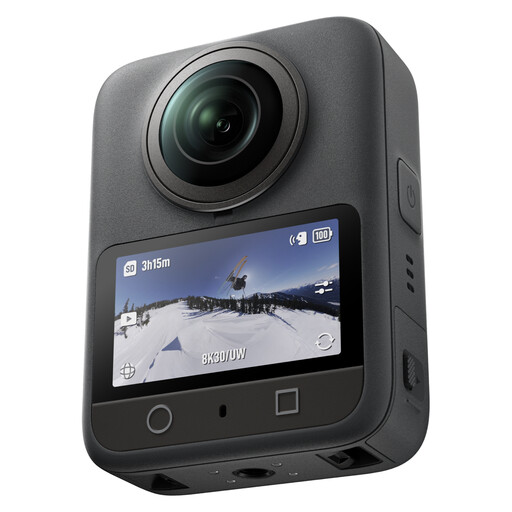 No image available
The 360° recording mode could be useful if you also want to film around the game; decide in advance how you’ll use the final frame.
The description lists 8K video at 30 fps, 105 GB of built-in storage and up to 190 minutes of continuous recording.
 No image available
For a fixed tabletop set-up, you can check the field of view with the included lens at your planned mounting height.
The product description lists a Sony E-mount, 4K video and a 16–50 mm kit lens.
No. First, make sure the board and cards get enough light, then test the exposure with moving hands. Sony Netherlands explains that aperture and shutter speed affect how much light reaches the sensor, but also have an impact on depth of field and motion blur. The stated ISO range alone won’t tell you how your own set-up will look.
Set the camera at your planned height and record a test with the largest board, the cards and both hands in shot. With a mirrorless camera, check which lens is included in the version you choose; with a camera that has a fixed lens, test the framing and focus at the actual distance.
Check whether the version you choose includes a lens, and what mount, lighting and storage you’ll need. DJI states that the Osmo Pocket 3 has no built-in storage and requires a microSD card. The Dutch Government explains that statutory guarantees are separate from any manufacturer’s guarantee, and that the retailer is your point of contact if a product is faulty.
It depends on who is filming and how the video will be used. The Dutch Data Protection Authority distinguishes between private use within a very limited circle and wider or commercial publication. If people are recognisable and the video is published beyond that private circle, the GDPR may apply; you’ll need an applicable legal basis, such as consent.