For a fixed overhead shot, a mirrorless camera lets you choose a lens that captures both the board and players’ hands. A camcorder with built-in zoom may be more convenient if you want to change the framing while explaining the game. Check which lens comes with the version you choose, the options for audio and power, and record a test clip under your own lights to check for flicker.
Who is this camera set-up for?
Tabletop content creator
Wants to film the whole board, cards and moving hands together. The lens, recording mode and distance from the table all affect how much fits in the frame; Canon and Panasonic describe different lens and zoom options for their cameras.
Creator of longer game tutorials
Wants to record a tutorial in one session and check in advance how long the camera can record and how it is powered. Nikon gives the Z 30’s maximum continuous recording time, while Panasonic describes the power options for the HC-VX3.
Presenter who needs picture and sound
Wants to film gameplay while keeping the commentary clear. Check whether the version you’re considering accepts an external microphone; Canon, Nikon and the Consumers’ Association all identify this as an important consideration for video.
What should you look for when choosing?
Mirrorless camera with interchangeable lens
A good fit if: you want to frame a fixed shot of the board and hands using a lens suited to the distance between the camera and table. The Canon EOS R50 supports RF and RF-S lenses, while the Sony ZV-E10 II has an interchangeable lens.
Bear in mind: the camera body alone doesn’t determine the angle of view. Check which lens comes with the version you’re buying and test it at the intended mounting height.
Camcorder with built-in zoom
A good fit if: you want to reframe between a wide shot and close-ups without changing lenses. Panasonic lists a built-in 24× optical zoom for the HC-VX3.
Bear in mind: Panasonic specifies that the quoted 25 mm-equivalent angle of view applies to certain recording modes. Check the angle of view in the mode you plan to use.
| What to consider |
What should you check? |
Who is this important for? |
| Framing the whole board |
Compare the lens or zoom setting with the distance between the camera and table; the 25 mm-equivalent wide angle quoted by Panasonic applies to certain modes. |
If I want to keep the board, cards and hands together in a usable frame, I’ll check the angle of view at my mounting height. Around 33% of consumers say framing is their top buying priority. |
| Reducing flicker |
Record a test clip under your own lights. For a mains frequency of 50 Hz, Sony suggests shutter speeds of 1/50 or 1/100 second as a starting point. |
If I want to avoid stripes or changes in brightness in my footage, I’ll test the camera settings under my own lighting. Around 27% of consumers give reducing flicker top priority. |
| Recording a tutorial in one session |
Compare your planned recording time with the stated maximum; Nikon gives a maximum of 125 minutes for the Z 30. Also check the power options you’ll need for longer recordings. |
If I don’t want my tutorial to stop halfway through, I’ll check recording time and power for the settings I plan to use. Around 20% of consumers prioritise continuous recording. |
| Capturing clear speech |
Check the microphone input on the version you’re considering: Canon lists a 3.5 mm input for the EOS R50 version on its Dutch online shop. Nikon lists both external and built-in microphones for the Z 30. |
If I want to explain the rules while filming the gameplay, I’ll listen to a test recording with the microphone in its planned position. Around 20% of consumers give clear speech top priority. |
Things to watch out for when buying
-
Choosing based on 4K alone
Resolution doesn’t tell you how much of the board will fit in the frame from your camera height. The wide-angle view quoted for the Panasonic HC-VX3 also depends on the recording mode.
Check the angle of view using the lens actually supplied with the version you’re buying, or the camcorder mode you’ve selected.
-
Assuming an anti-flicker feature will fix every light
Flicker can have different causes, and settings vary between models. A feature or setting therefore can’t guarantee a consistent picture with every light.
Test your chosen video mode under your own lighting and, if needed, try a different shutter speed or lighting set-up.
-
Assuming a camera body is a complete recording set-up
A mirrorless camera uses a separate lens, while a camcorder such as the HC-VX3 has built-in zoom. Microphone and power options also depend on the model and version.
Check what’s included with the exact version you’re buying and what else your set-up needs.
Depending on the set you choose, you may also need a lens, mount, microphone or power supply.
Camera brands to consider
Canon
The EOS R50 is a mirrorless camera for which you choose a suitable RF or RF-S lens.
- Canon Netherlands lists 4K 30p and support for RF and RF-S lenses.
- The Canon Netherlands Store lists a 3.5 mm microphone input for the version described.
- The body doesn’t determine the angle of view; check which lens comes with the version you choose.
Sony
The ZV-E10 II is an APS-C mirrorless camera with an interchangeable lens, for a tabletop set-up you can build to suit your needs.
- Sony lists video formats up to 4K 60p.
- A video format alone doesn’t guarantee flicker-free footage. Sony recommends testing the shutter speed under your lighting and notes that features vary by model.
Nikon
The Z 30 is a mirrorless camera to consider if lens choice, recording speech and longer sessions matter to you.
- Nikon lists 4K 30p, an external microphone input and up to 125 minutes of continuous recording.
- The stated maximum recording time is the manufacturer’s limit, not a fixed duration for every card, power source and setting. Also check which lens is included.
Panasonic
The HC-VX3 is a camcorder option with built-in zoom rather than an interchangeable lens.
- Panasonic lists 24× optical zoom and USB-C power for the HC-VX3.
- According to Panasonic, the quoted 25 mm-equivalent wide angle applies only to certain recording modes. Check the angle of view in the mode you plan to use.
Cameras at Joybuy
This selection includes cameras with different ways to film a board game. For each model, check that the framing, audio recording and power options suit your tabletop set-up and lighting.
 No image available
Komery W6 digital camera
The stated optical zoom may be useful if you want to adjust the framing while recording; test the angle of view from where you plan to mount the camera.
The product title lists 12× optical zoom, 4K video and Wi-Fi.
Joybuy
 No image available
DJI Osmo Pocket 3 Creator Combo
The product title mentions an included microphone, which may be useful if you want to record footage and spoken commentary together. Check that the microphone suits your overhead tabletop set-up.
The title lists a 1-inch CMOS sensor and 4K/120 fps video; the product description mentions 3-axis mechanical stabilisation.
Joybuy
 No image available
Sony ZV-E10 with 16–50mm zoom lens, black
The included 16–50mm zoom lens comes with this version; check whether its angle of view captures the whole board from your mounting height.
The product description lists 4K video. It also states that an SD card and adapter or charger are not included.
Joybuy
 No image available
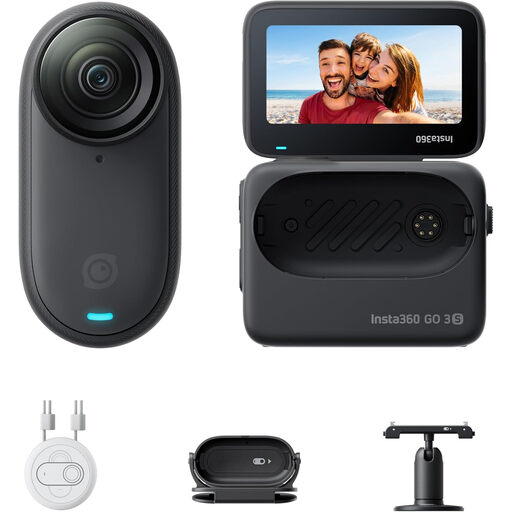
Insta360 GO 3S 128GB
The product title describes a compact camera that can be mounted in different places, which may suit a set-up using your chosen camera mount. Check in advance that the whole board fits in the frame.
The product title lists 128 GB and 4K video recording.
Joybuy
 No image available
DJI Osmo Action 6 Standard Combo
The product description mentions a connection for two DJI microphone transmitters, which may be worth considering if you want to record speech separately. Check that your chosen microphone set-up works for filming above the table.
The title lists 4K video. According to the product description, the camera can record for up to four hours under normal conditions; this duration isn’t guaranteed for every setting.
Joybuy
Frequently asked questions
Which setting should I try if lights cause stripes in my video?
Under lighting with a mains frequency of 50 Hz, try a video shutter speed of 1/50 or 1/100 second and review a test clip. Sony gives these as guidelines, not a guarantee: the effective settings and available features vary by camera and light source.
Can I show recognisable fellow players in a public tutorial video without taking any further steps?
Don’t assume that you can. The Dutch Data Protection Authority distinguishes between private use among a limited group and wider publication or business use. If recognisable people appear in your footage, consider whether the GDPR applies and what legal basis you have for recording and publishing it.
What should I do if my camera turns out to be faulty during normal use?
Contact the seller. According to the Government of the Netherlands, you’re entitled to a product that works as it should; there is no fixed statutory two-year guarantee period. The appropriate solution depends on the circumstances. An additional guarantee doesn’t replace these rights.
What should I check before I start recording?
From the intended camera height, check that the whole board fits in the frame. Record a short test clip under your own lighting and listen to the audio with the microphone in its chosen position. For a longer session, also check how the specific model is powered.


