
Vandaag of morgen in huis

Kwaliteit gegarandeerd

Welkomstaanbiedingen ontgrendelen: GRATIS bezorging | Tot 80% korting | Gratis 30 dagen JoyPlus-proefperiode
Download de app
A Bluetooth speaker seems simple: connect it, start playing music and you’re ready to go. But many buyers discover the limitations only after making a purchase. A compact speaker may be handy when you’re out and about, for example, but not loud enough for a party. A model with lots of lighting features may look appealing, while its battery life or connections might not suit your needs.
So don’t focus only on wattage or marketing claims such as “powerful sound”. Pay attention to the combination of battery life, connections, protection rating and intended use. That way, you can avoid leaving your wireless speaker unused in a cupboard after just a few weeks.
Higher wattage can indicate more power, but on its own it tells you little about sound quality, bass or clarity. The size of the drivers, the enclosure and the tuning all play a part too. So check whether the product information clearly states the type of speakers, amplifier and connections.
You’ll often need different features for a desk or bedroom than for a garden party. A gaming speaker with a low peak power may be suitable for listening at close range, while a living room may benefit more from a larger enclosure and wider sound coverage.
“Up to 12 hours” or “up to 20 hours” is usually a maximum quoted under specific conditions. Actual battery life depends on volume, the Bluetooth connection, lighting and the type of audio. So a Bluetooth speaker with lighting may run for less time if the light effects are on continuously.
Also check the charging time, the type of charging port and whether you can use the speaker while it’s charging. A USB-C connection is practical for regular outdoor use, but always check whether a charger or cable is included.
Check the exact IP rating. A higher IP rating tells you about protection against dust and water, but the conditions still matter. A speaker without an IP rating isn’t suitable for use in the rain or by a swimming pool. Even with a waterproof speaker, you should follow the instructions: submersion, salt water and charging while the port is wet can all pose risks.
Bluetooth 5.0 or later can provide a modern connection, but range and stability are also affected by walls, other devices and the smartphone you’re using. Multipoint is handy if two people want to take turns playing music.
A Wi-Fi speaker connects over Wi-Fi and may be a better choice for regular use at home. Models with AirPlay 2 or similar features can be used in a multi-room speaker setup. Check in advance that your phone, streaming service and home network are supported.
A speaker with USB and AUX offers extra flexibility. USB may be for playing audio from a storage device or for power only; these are different functions. An AUX input is useful when you want to listen without a wireless connection, for example from a laptop, television or older device.
Latency matters for films and gaming. Bluetooth can cause a slight delay between picture and sound. For a television, a soundbar or wired connection may be more practical than a portable Bluetooth speaker.
A portable Bluetooth speaker shouldn’t just be small; it should also be easy to carry around. Check the weight, whether it has a handle or attachment point, and how the controls work on the device. A retro Bluetooth speaker may look right at home in your living room, but might not be as suitable for cycling or walking.
Also check whether the stated playback time and dimensions apply to the battery-powered version. Product variants can differ in weight, power supply and battery life.

Why it suits this type of user: This model combines Bluetooth with FM radio, AUX, USB and a TF card slot. It’s a good fit if you want different playback options without buying a more advanced system straight away.
The product information lists specific connections and physical controls. Before using it, check that the stated battery life meets your needs at your preferred volume.
FM radio, AUX, USB and TF card support; hands-free calls and long playback time according to the product information.

Why it suits this type of user: Bluetooth 5.3, Wi-Fi, USB, AUX and AirPlay 2 make this a good fit for home use, films and music, as well as a potential multi-room setup.
The specifications list several connection options and a 5200 mAh battery. Edifier states that playback time is up to 12 hours, although actual results may vary.
60 W RMS according to the product information; USB, AUX, Bluetooth 5.3, Wi-Fi, LDAC and AirPlay 2 support.
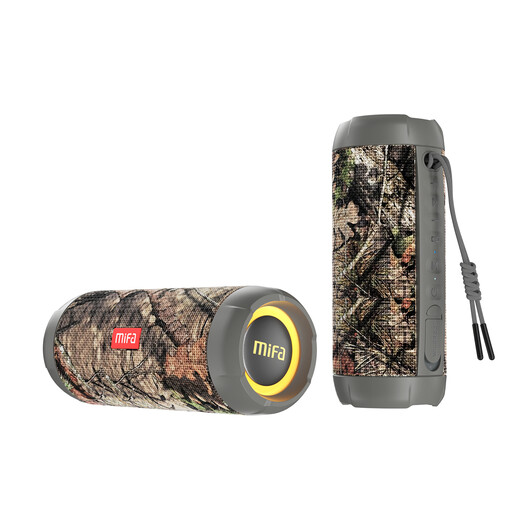
Why it suits this type of user: This is a sensible choice for outdoor use, such as camping, a trip to the beach or a garden party, thanks to its stated IP67 and IPX7 ratings.
The water and dust ratings are clearly stated. Check the instructions and make sure the charging port is dry before connecting the speaker.
Bluetooth 5.3, 30 W according to the product information, RGB lighting, dual-device pairing and up to 12 hours of playback according to the manufacturer.
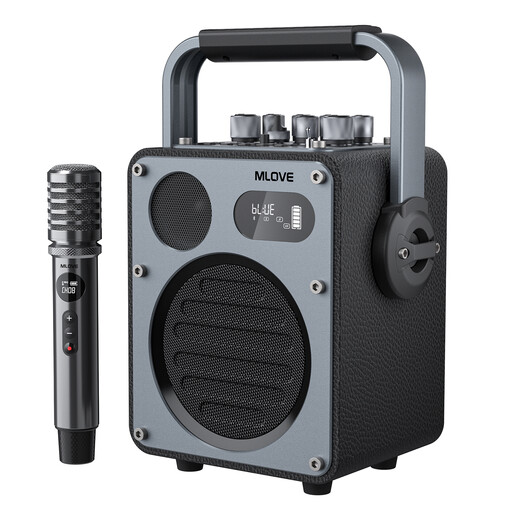
Why it suits this type of user: This model is designed for karaoke, performances, livestreams and parties. The included wireless microphone and range of EQ modes make it more specialised than a standard wireless speaker.
The product description specifies microphone support, USB-C OTG, AUX and separate modes. This makes it clearer what the system is designed for.
Bluetooth 5.4, one wireless microphone, USB-C, AUX and up to 10 hours of music playback according to the product information.
We’ve put together a complete, up-to-date list of products that meet these strict selection criteria and current European safety regulations.
Switch on the speaker and activate pairing mode. Then open Bluetooth in your phone’s settings and select the speaker’s name. If the device has been paired before, it will often connect automatically. If it doesn’t work, remove the old pairing and try again. Keep the speaker close to your phone while pairing.
Its lifespan depends on the battery, charging habits, enclosure and conditions of use. Avoid prolonged exposure to heat and moisture, and don’t leave the battery completely flat for long periods. With outdoor models, keep the connections clean and dry. The stated battery life doesn’t guarantee the product’s overall lifespan.
A portable speaker uses power from its built-in battery while playing audio. Consumption per charge depends on volume, lighting and connection type. A Wi-Fi speaker may also use more power in standby than a model that’s switched off completely. Turn the speaker off when you’re not using it for an extended period, and use a suitable charger as instructed in the product manual.
