
Vandaag of morgen in huis

Kwaliteit gegarandeerd

Welkomstaanbiedingen ontgrendelen: GRATIS bezorging | Tot 80% korting | Gratis 30 dagen JoyPlus-proefperiode
Download de app
Want to stream music in your car, make hands-free calls or charge your phone without installing a new car stereo? A Bluetooth FM transmitter for your car could be a practical solution. It uses the 12V socket and sends audio to your existing radio via an unused FM frequency.
However, these accessories vary considerably in their connections, controls and compatibility. A low price doesn’t automatically mean it’s easy to use, while a long list of features won’t always be relevant to your car. Read on to find out what to look for and which options suit different types of user.
A Bluetooth car adapter with Bluetooth 5.0 sounds appealing, but the overall experience also depends on the FM transmission, the frequency you choose and the distance between the transmitter and the radio. In the Netherlands, a busy FM band can lead to interference or dropouts more quickly.
So check whether the device has an adjustable frequency range and lets you choose an unused frequency manually. The Oxerbog’s stated FM range is 87.5 to 108.0 MHz.
Two USB ports don’t automatically mean that two devices will charge at high speed at the same time. Check the total output, how power is shared between the ports and whether there’s a USB-C or Type-C port.
A USB car charger with PD support may be suitable for certain phones, but charging speed still depends on your phone, cable and charging protocol. Don’t use damaged cables or connect equipment that requires more power than the transmitter can supply.
A built-in microphone can let you make calls through your car radio, but call clarity is affected by wind, vehicle noise and the position of the transmitter. Noise-cancellation claims are made by the manufacturer. According to Oxerbog’s product information, the model features CVC noise cancellation and wind noise reduction. This doesn’t guarantee the same experience in every car.
Set up the Bluetooth connection and frequency while the car is stationary. When you’re driving, operating the device and road safety must always come first.
A car FM transmitter needs to be tuned to an unused frequency that’s also set on your car radio. Ideally, choose a channel where you can’t hear a local radio station in your area. If you regularly travel between counties, you may need to retune it.
A stable connection is especially important if you make long journeys or often travel between different areas. A transmitter with physical buttons or an easy-to-read display may be more practical than one controlled only through an app.
Bluetooth is enough for streaming music in your car, but some people also want to use a USB stick or memory card. If so, check:
Oxerbog’s product information states that it supports USB storage and Micro SD cards up to 32 GB. MP3, WMA, WAV, APE and FLAC are also listed. Before buying, check that your storage device and files are formatted correctly.
Check that the transmitter is suitable for your vehicle’s voltage. The Oxerbog is specified for 12V to 24V systems, making it suitable for many cars and some other vehicles. Always check this against your car’s manual.
Also consider the position of the 12V socket. A large model may block buttons or other connections. If the socket continues to supply power after you switch off the car, unplug the transmitter. According to the product information, this helps prevent unnecessary drain on the battery.
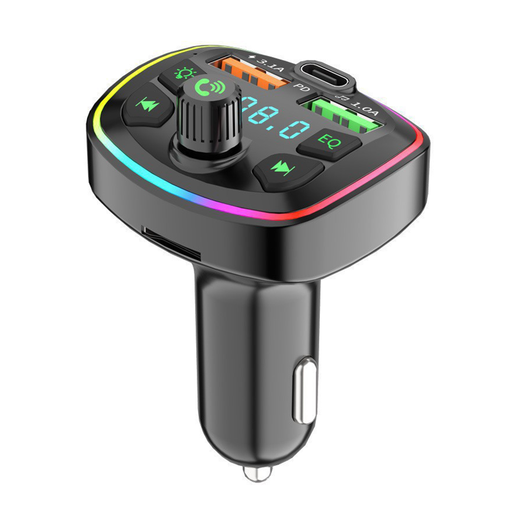
Why it suits this type of user: This Bluetooth car radio adapter combines wireless audio, hands-free calling and several charging ports in one device that plugs into a 12V socket.
The stated frequency range of 87.5–108.0 MHz can be tuned manually. The specifications also list USB and Micro SD playback up to 32 GB.
Bluetooth 5.0, two USB ports and one Type-C port; supports 12V–24V systems and several listed audio formats.

Why it suits this type of user: This isn’t a car FM transmitter. It’s a standalone option for anyone looking for a portable radio and Bluetooth speaker, with USB or TF card playback, to use outside the car.
The product information clearly describes its standalone operation with a battery, AUX, USB and Micro SD. So you don’t need to connect this model to a car radio.
Bluetooth, AUX, USB drive and TF card; built-in battery and LCD screen according to the stated product specifications.
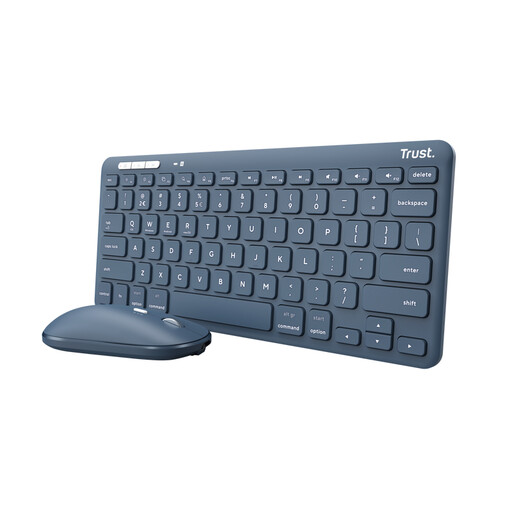
Why it suits this type of user: This isn’t a Bluetooth car kit or a car FM transmitter. It’s suited to people who work on several devices while travelling and need a compact keyboard and mouse.
Its clearly stated purpose helps prevent a mistaken purchase: this model is designed for input, not for transmitting FM audio to a car radio.
Bluetooth and USB receiver; connects to up to three devices according to the stated specifications.
We’ve put together a complete, up-to-date list of products that meet these strict selection criteria and comply with current European safety regulations.
Make a note of the frequency you’ve chosen and check whether your phone reconnects automatically. If you hear interference, trying another unused frequency often helps.
This type of adapter can be used in many cars with an FM radio and a 12V socket. Check the vehicle voltage, the space around the socket and whether you can tune the car radio manually to FM frequencies.
Choose a frequency that isn’t being used by a radio station, then set the transmitter and car radio to exactly the same frequency. Interference can also be caused by signal disruption, a loose connection or a busy FM band. Trying another frequency is usually the first practical step.
Power consumption is generally low, but some cars continue to supply power through the 12V socket when the engine is off. So unplug the adapter if you’re leaving the car parked for a long time. This helps prevent unnecessary drain on the battery.
