
Vandaag of morgen in huis

Kwaliteit gegarandeerd

Welkomstaanbiedingen ontgrendelen: GRATIS bezorging | Tot 80% korting | Gratis 30 dagen JoyPlus-proefperiode
Download de app
You don’t have to replace an older car stereo just because it doesn’t have Bluetooth. A Bluetooth FM transmitter for your car sends music, navigation audio and phone calls from your smartphone to an unused FM frequency. The transmitter receives the Bluetooth signal and then broadcasts it to your car stereo.
However, not all models are equally practical. A low price may be appealing, but unclear frequency settings, limited charging power or restricted compatibility can cause frustration on the road. So, look out for these common pitfalls.
An FM transmitter only works well when the selected frequency isn’t being used by a local radio station. If you simply pick a frequency at random, you may hear static, interruptions or overlapping music. Check that the transmitter and car stereo are set to exactly the same unused frequency.
Some models have several ports, but they don’t always provide the same charging current through each one. Check the stated output, such as USB, USB-C, PD or a combined current rating. Also make sure your smartphone cable will fit. A USB-C port doesn’t automatically mean that every device will charge at maximum speed.
An FM transmitter for hands-free calls needs to do more than support Bluetooth. Microphone placement, control buttons and automatic reconnection are important too. Remember to prioritise road safety: set up the device and pair your phone before you set off. Only adjust the settings when the car is stationary.
A useful Bluetooth FM transmitter lists its available frequency range. According to the product description, the Oxerbog Car Stereo/Radio supports 87,5 to 108,0 MHz and is suitable for vehicles with a 12V to 24V connection. That makes it important to check the voltage of your car, van or other vehicle first.
Choose an unused frequency on the transmitter, then set your car stereo to the same frequency. Keeping the transmitter closer to the radio may help reduce interference, but the results also depend on local radio signals and your vehicle’s electronics.
Bluetooth 5.0 is often highlighted as a benefit in a car music adapter. The version tells you about the wireless technology used, but it doesn’t automatically indicate the final sound quality. Check whether the transmitter reconnects automatically and resumes playback after you start the car.
According to Oxerbog’s product description, the model supports automatic Bluetooth reconnection and has a memory function for the channel and track number. This can be useful if you use the same smartphone every day.
If you want more than streaming, look for additional playback options. An FM transmitter with an SD card slot or USB input can play music files directly. According to the product information, the Oxerbog model supports USB flash drives and Micro SD cards up to 32 GB, as well as Bluetooth. The listed formats include MP3, WMA, WAV, APE and FLAC.
For charging, the product description lists two USB ports and one USB-C port, with a stated USB output of 4,8 A and PD support. Actual charging speeds may vary depending on the device, cable and how power is shared. Don’t connect equipment that exceeds the permitted capacity.
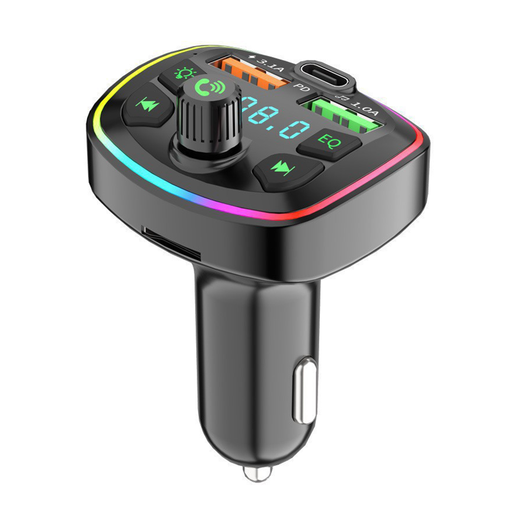
Why it suits this profile: This solution is designed for drivers who want to connect an older car stereo wirelessly without replacing the built-in radio. Bluetooth, USB, Micro SD and three charging ports give you several ways to get started.
The product description specifies the FM range, vehicle voltage and supported music sources. This lets you check in advance whether the connection and playback options are suitable for your car.
Bluetooth 5.0, support for USB and Micro SD up to 32 GB, plus two USB ports and a USB-C port for connected devices.
Why it suits this profile: If you’re looking for a comprehensive set of features, you get hands-free calling, voice assistant support and a range of connection options as well as wireless audio.
Its features go beyond Bluetooth streaming: the stated support for USB, Micro SD and several audio formats gives you an alternative if you don’t want to play music wirelessly.
The product description mentions CVC noise reduction and wind noise reduction. These are claims made in the product information, not a guarantee of sound quality in every car.
Why it suits this profile: Multiple charging options and local music sources are practical for long journeys, commutes or travelling with several passengers.
With two USB ports, USB-C, a USB flash drive and Micro SD support, you don’t have to rely on a single smartphone connection.
Suitable for 12V to 24V systems, with a stated transmission range of 10 to 15 metres and support for Siri and Google Assistant according to the product description.
We’ve put together a full, up-to-date list of products that meet these strict selection criteria and the applicable European safety regulations.
A transmitter will generally work in vehicles with a suitable 12V socket and an FM radio. Check the stated input voltage. The Oxerbog model lists 12V to 24V. Sound quality and the amount of interference depend on the available FM frequencies and the car stereo.
Yes, as long as your smartphone sends both audio sources to the transmitter via Bluetooth. Your navigation app may temporarily lower the music volume when giving spoken directions. This is mainly determined by your smartphone and the apps you use.
Power consumption is usually limited, but the transmitter continues to draw power for as long as it’s plugged into the 12V socket. So, unplug the device when you’re not using the car. If you’re charging several devices at once, check the stated charging output and use suitable cables.
