
Vandaag of morgen in huis

Kwaliteit gegarandeerd

Welkomstaanbiedingen ontgrendelen: GRATIS bezorging | Tot 80% korting | Gratis 30 dagen JoyPlus-proefperiode
Download de app
Want to listen to music, the radio, podcasts or phone calls wirelessly? You’ll probably be looking at Bluetooth audio devices. There’s plenty to choose from, including Bluetooth speakers and wireless headphones, as well as a Bluetooth adapter for your existing stereo or an adapter for your car.
A low price doesn’t tell you everything. A device may look suitable on paper, but still be awkward to use because it has the wrong connection, limited battery life or an unstable connection. Keep these points in mind to find an option that suits your home, car or daily listening routine.
A higher Bluetooth number doesn’t automatically mean better sound. Audio quality also depends on the speaker drivers, audio codecs, amplification and the device you’re streaming from. So don’t just check the Bluetooth version: look at the connections, driver size and stated battery life too.
A Bluetooth audio adapter won’t automatically make an existing speaker wireless. First check whether your setup has a 3.5mm jack, RCA input or another suitable connection. The same applies to cars: according to the product information, the Motorola MA1 works with vehicles that support Android Auto. That’s different from a general Bluetooth receiver or an FM transmitter for a car.
Stated playback time is usually a maximum figure under certain conditions. Volume, distance, codec, temperature and app use can all affect actual battery life. Check the charging time and connection type too. USB-C is convenient, but make sure you know whether a charging cable or mains adapter is included.
A Bluetooth music receiver receives audio from your phone and sends it to a wired speaker or stereo. A Bluetooth transmitter does the opposite. This distinction matters when you’re connecting older televisions, amplifiers and car radios.
A manufacturer might state a range of 10 or 15 metres, for example. Walls, furniture and other wireless signals can reduce this range. For a living room, a stable connection matters more than a high theoretical maximum. With a Bluetooth adapter for your car, automatic connection when you start the car is a key consideration.
For a portable speaker, weight, charging port and protection against dust or water are all relevant. An IP67 rating means protection against dust and temporary immersion under specified test conditions, according to the relevant protection standard. Check that the connections are sealed, and follow the instructions for use.
With wireless headphones, consider comfort, weight, microphone quality and whether you can pair them with multiple devices. If you mainly listen at home, you might prefer large ear cups and long battery life. For listening on the go, a foldable design and light weight are usually more practical.
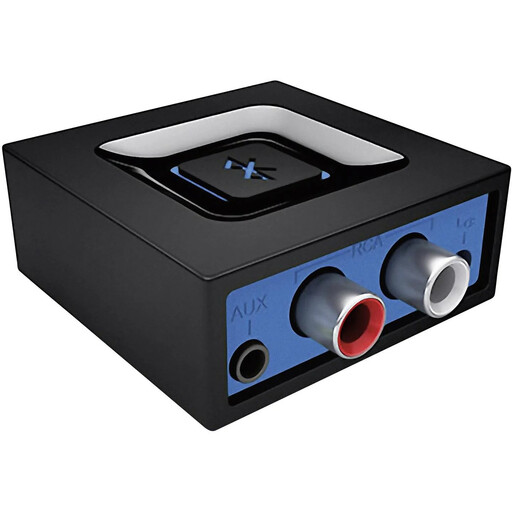
Why it suits this user: This Bluetooth audio adapter is ideal if you want to use your existing speakers wirelessly without buying a new setup. According to the product information, it has 3.5mm and RCA connections.
The connections are clearly listed, so you can check in advance whether your speaker is compatible. According to Logitech, the multipoint feature supports pairing with two devices.
Bluetooth 3.0, 3.5mm and RCA outputs, stated range of up to 15 metres and a compact weight of 34 grams.
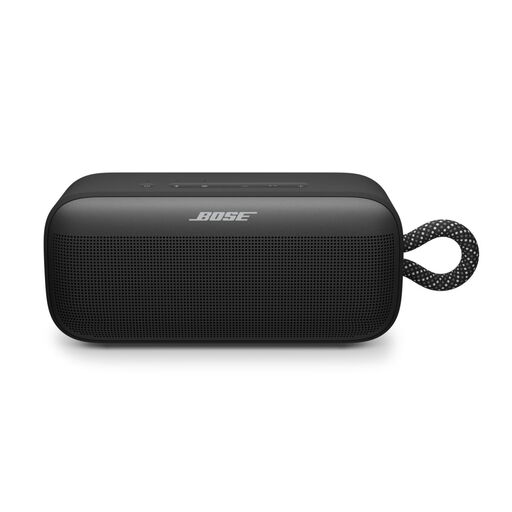
Why it suits this user: This portable speaker is designed for anyone who wants a standalone Bluetooth speaker for indoor and outdoor use. According to the product information, it has an IP67 rating and stated battery life of up to 20 hours.
The casing rating and charging details are more specific than a general claim about a rugged design. Be sure to check the conditions of the IP67 standard.
USB-C port, an app for adjusting bass, mid-range and treble, plus the option to pair two compatible speakers.

Why it suits this user: This model is designed for drivers who want to use Android Auto wirelessly via the USB port in a compatible car.
Compatibility is described more specifically than for a general Bluetooth adapter for a car. Before buying, check Android Auto support, the USB port and your smartphone’s version.
USB connection, Bluetooth 5.0 and support for hands-free calls, music and navigation, according to the product description.
We’ve put together a complete, up-to-date list of products that meet these strict selection criteria and current European safety regulations.
Connect the adapter to the 3.5mm or RCA input on your speaker or stereo. Then connect the power supply, turn on Bluetooth on your phone and select the adapter from the list of available devices. If several devices with the same name appear, consult the manual.
No. A general Bluetooth audio adapter, an Android Auto adapter and an FM transmitter for a car all work in different ways. If you’re using an FM transmitter, check whether your car radio can use a clear FM frequency. For a wireless Android Auto adapter, both your car and phone must support this feature.
It varies by model and usage. Manufacturers usually state the maximum playback time. Listening at high volume, making calls, using app features and having a weak connection can all reduce battery life. So, as well as battery life, compare charging time, charging port and whether the battery can be replaced.
