What should you look for when choosing?
When space is limited, start by considering the discs you own: standard Blu-rays and DVDs need different support from Ultra HD Blu-rays. Extra audio outputs are mainly relevant if you need them for your existing equipment.
Compact Full HD player
Choose this option: if you mainly watch standard Blu-rays and DVDs and have limited cabinet space.
Bear in mind: the listed specifications for the Sony BDP-S1700/K do not include Ultra HD Blu-ray support.
Ultra HD Blu-ray player
Choose this option: if you want to play Ultra HD Blu-ray discs and your TV supports the HDR format you want.
Bear in mind: at 320 × 45 × 217 mm, the Sony UBP-X700/K is larger than the BDP-S1700/K. Upscaling does not turn a standard Blu-ray into an Ultra HD Blu-ray.
| What to consider |
What should you check? |
Who is this important for? |
| Dimensions and placement |
Measure the width, height and depth, allowing for cables, the disc tray and the placement instructions. Sony lists dimensions of 230 × 39 × 194 mm for the BDP-S1700/K and 320 × 45 × 217 mm for the UBP-X700/K. |
If my TV stand has limited space, I want to know whether the player will fit when connected and in use. Around 33% of consumers make available space their top priority. |
| Supported discs |
Compare the exact model’s list of playable discs with the types you own. Sony lists BD-ROM and DVD-Video for the BDP-S1700/K; LG lists BD-ROM, BD-R and BD-RE, among others, for the BP250. |
If I own both Blu-rays and DVDs, I want to keep using my existing collection. Around 25% of consumers prioritise compatibility with the discs they own. |
| Ultra HD and HDR |
Check that Ultra HD Blu-ray is explicitly listed in the disc specifications, and compare the HDR format with your TV and films. Sony lists HDR10 and Dolby Vision for the UBP-X700/K; Panasonic lists HDR10+ for the DP-UB424. |
If I want to watch films on Ultra HD Blu-ray, I want to be sure that both the player and the TV are compatible with my discs and preferred HDR playback. Around 25% of consumers prioritise Ultra HD support. |
| Audio connections |
Note the inputs on your TV, receiver or soundbar and compare them with the player’s outputs. Sony lists two HDMI outputs for the UBP-X700/K; LG lists no optical or coaxial audio output for the BP250. |
If I want to play sound through a separate system, I want to check in advance that the connections are compatible with my equipment. Around 17% of consumers prioritise connecting to their existing audio equipment. |
Blu-ray players at Joybuy
This selection includes a compact Full HD player for standard Blu-rays and DVDs, and an Ultra HD player for anyone looking specifically for Ultra HD Blu-ray support.
 No image available
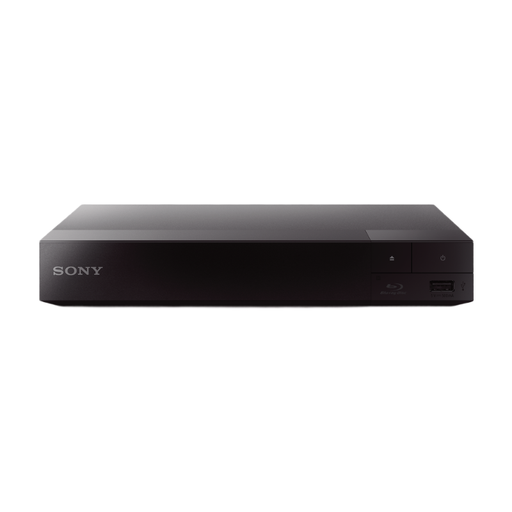
Sony BDP-S1700K Blu-ray player
Suited to anyone who wants to play standard Blu-rays and DVDs while making the most of the available space.
- Dimensions for the Sony BDP-S1700/K: 230 × 39 × 194 mm, according to Sony Netherlands.
- Full HD 1080p and Blu-ray and DVD playback, according to the product description.
View at Joybuy
 No image available
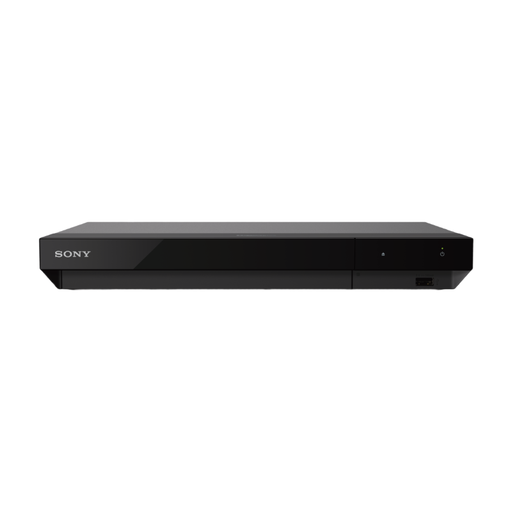
Sony UBP-X700K 4K Ultra HD Blu-ray player
Suited to anyone who wants to play Ultra HD Blu-ray discs and match their TV and audio equipment to the available connections.
- Ultra HD Blu-ray playback, according to the product description.
- HDR10 and Dolby Vision, according to Sony Netherlands.
- Two HDMI outputs and coaxial SPDIF, according to the product description.
- Dimensions: 320 × 45 × 217 mm, according to Sony Netherlands.
Measure the available space; this model is larger than the BDP-S1700/K.
View at Joybuy
Frequently asked questions
Will a standard Blu-ray player also play Ultra HD Blu-rays?
Don’t assume so: check that Ultra HD Blu-ray is explicitly listed in the disc specifications. Sony lists this format for the UBP-X700/K, but not in the stated disc specifications for the BDP-S1700/K.
Can I play an imported film on my player?
For a standard Blu-ray, check the region code on the case and the player’s region information. On 11 March 2025, Sony stated that Europe is Region B and that Ultra HD Blu-ray discs are region-free.
How do I fit a Blu-ray player into a cramped TV cabinet?
Measure the available space and compare it with the width, height and depth of your chosen model. Then check the manual for placement instructions, allowing for cables and an open disc tray.
Who should I contact about a fault after buying in the Netherlands?
Contact the retailer. According to the Dutch government, the retailer must supply a product that works properly. If a product is faulty, you can ask the retailer to provide a solution, such as a repair or replacement. A manufacturer’s warranty does not replace these statutory rights.
Where can I take my old player?
According to the Dutch government, when you buy a similar new appliance, the shop must take your old one free of charge. You can also ask about a local council recycling point.


