For an overview shot, suitable framing, a stable setup and manageable lighting matter more than a particular camera body. For tiny decorations, the close-up capability of the exact camera and lens combination is what counts. A compact camera can be handy if you want to work without changing lenses, while a mirrorless camera gives you more lens options but may need an additional lens for high magnification. With a shiny tin, diffuse light and a fixed white balance can help; changing the camera body won’t automatically get rid of reflections.
Who is this guide for?
Maker with a shiny tin
You want the decorations to remain visible without bright spots or a reflection of the room dominating the photo. Your lighting setup is therefore just as important as your choice of camera. Canon Netherlands and Basler AG explain the importance of a stable setup and diffuse light.
Maker taking close-up photos
You want to show small patterns individually. So compare magnification, focusing distance and the available space in front of the lens for your exact setup. OM SYSTEM Netherlands and Nikon Netherlands describe close-up options with specific camera and lens combinations.
One-off exhibition photographer
You’re looking for a useful overview shot without immediately investing in a more extensive camera system. A stable setup and simple camera settings are practical first steps; Canon Netherlands describes using a tripod to keep framing consistent.
What should you look for?
Start with a test shot of the tin to see whether you mainly need an overview, individual details or more control over the lighting. Canon Netherlands describes using a tripod to keep framing consistent, while Basler AG describes diffused lighting for highly reflective surfaces.
| What to consider |
What should you check? |
Who is this important for? |
| Reflections and lighting |
Can you position the camera and tin securely and try diffuse light? Change the angle of the light if needed. |
If the tin is shiny, you’ll want to minimise reflections without losing the decorations. Around 31% of consumers put lighting and reflections at the top of their list. |
| Small decorations |
Compare the maximum magnification of the exact lens or close-up mode; also check the focusing distance and the space in front of the lens for lighting. |
If you want to make small patterns large enough in the frame, the camera and lens combination is key. Around 31% of consumers prioritise magnifying details. |
| Overall shot and colour |
Can you fit the whole tin in the frame from the available distance? Keep the lighting constant and check the white balance; Nikon Netherlands recommends checking it again if the lighting changes. |
For a repeatable overview shot, you’ll want the decorations to remain recognisable and the colours not to change unintentionally. Around 23% of consumers prioritise consistent presentation. |
| Complete setup |
Check whether the offer includes a camera with a lens or just a body. If you have equipment available already, take a test shot with it first. |
If you need the camera for a single exhibition, you won’t want to buy components you won’t use. Around 15% of consumers prioritise convenience and manageable overall costs. |
Common buying mistakes
-
Buying an expensive camera to solve reflection problems
Reflections depend on the surface and the lighting; changing the camera body won’t automatically remove them.
First try diffuse light, a different angle of lighting and stable framing with your own tin.
-
Assuming close focusing means sufficient magnification
Focusing distance, magnification and the free space in front of the lens are different features. A short focusing distance doesn’t guarantee that a detail will appear large enough in the frame or that there will be room for lighting.
Check the maximum magnification of the exact lens or camera and take a test shot from the distance you want to use.
-
Assuming a camera body is a complete photography kit
A camera body doesn’t automatically include the lens you need for an overview or close-up. A macro lens may also be sold separately.
Check what’s in the box and compare complete setups, not just camera bodies.
Camera brands to consider
Canon
The EOS R50 kit with RF-S 18-45mm is a mirrorless camera option for overview shots and flexible framing.
- Canon specifies a 24.2-megapixel APS-C sensor for the R50 and confirms that this kit includes the RF-S 18-45mm lens.
- At 45 mm, this lens has a maximum autofocus magnification of 0.16×. So don’t assume the kit offers true macro magnification.
OM SYSTEM
The Tough TG-7 is a compact camera option for close-ups without changing lenses.
- OM SYSTEM lists a microscope mode that focuses from 1 cm and a 12-megapixel sensor.
- Focusing distance alone doesn’t tell you how much room there is for lighting or how suitable the shot is for a large exhibition print.
Nikon
The Z50II is a mirrorless camera that you can pair with a Z lens suited to the detail shots you want to take.
- For the NIKKOR Z DX MC 35mm f/1.7, sold separately, Nikon lists a maximum reproduction ratio of 0.67×.
- This lens specification doesn’t apply to every Z50II kit. At the minimum focusing distance, allow for around 7.2 cm of space in front of the lens.
Sony
The Alpha 6400 is an APS-C mirrorless camera with an E-mount for anyone who wants to put together their own lens combination.
- Sony specifies around 24.2 effective megapixels for the ILCE-6400 and compatibility with E-mount lenses.
- The body specifications don’t tell you how well you can take close-ups; that depends on the lens you choose.
Cameras at Joybuy
These cameras at Joybuy are suited to photographing your tin, with options for compact use and mirrorless cameras supplied with a zoom lens. Check whether the features listed for each camera suit the overview or detail shots you want to take.
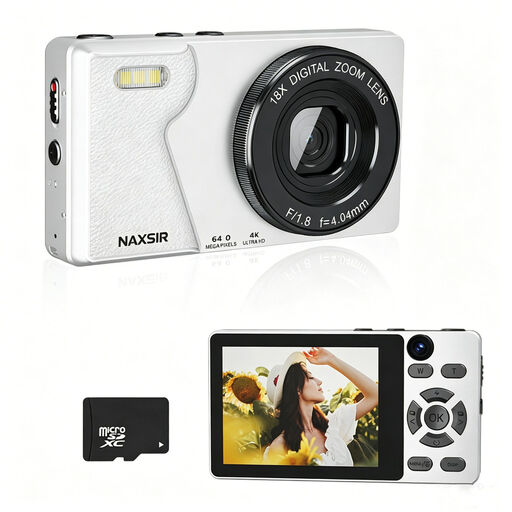 Image unavailable
NAXSIR digital camera with 32 GB memory card
A digital camera option if you’re looking for a simple setup for an overview shot; the stated digital zoom doesn’t, by itself, indicate macro capability.
The product title lists 4K Ultra HD, 64 MP photo resolution, 18× digital zoom and a 32 GB memory card. The description mentions autofocus.
View at Joybuy
 Image unavailable
Komery W6 digital camera
A zoom camera for flexible framing; take a test shot to check whether your chosen details appear large enough in the frame.
The product title lists 12× optical zoom and 64 MP. The description mentions Wi-Fi and autofocus.
View at Joybuy
 Image unavailable
Sony ZV-E10 with 16-50mm zoom lens, black
The supplied zoom lens lets you adjust the framing for an overview shot. According to the product description, Product Showcase mode shifts focus from a face to a subject.
The description lists a 24.2 MP APS-C sensor and E-mount. It also states that an adapter/charger and SD card are not included.
View at Joybuy
 Image unavailable
Sony Alpha A6100 with 16-50mm f/3.5-5.6 OSS II lens
The supplied zoom lens gives you room to adjust the framing for an overview shot; assess close-ups with a test image.
The product title lists a 16-50mm f/3.5-5.6 OSS II lens. The description mentions a 24.2 MP sensor, autofocus and touchscreen controls.
View at Joybuy
 Image unavailable
Sony ZV-1 compact camera
This compact camera is an option if you want to work without changing lenses; take a test shot to check whether it works for both close-ups and overview shots of the tin.
The product description lists a 20 MP resolution, 2.7× optical zoom, autofocus and a tilting touchscreen.
View at Joybuy
Frequently asked questions
Do I need a macro lens to photograph the whole tin?
Not necessarily: first take an overview shot from the distance available and assess the test image. For very small decorations, compare the maximum magnification of the exact lens or close-up mode; you can’t determine this from the camera body alone.
How can I prevent distracting reflections on the tin?
Position the tin and camera securely, then compare test shots using diffuse light and a different lighting angle. Canon Netherlands describes using a tripod to keep framing consistent, while Basler AG describes diffused lighting for highly reflective surfaces.
How can I keep the colours consistent between shots?
Keep the lighting as constant as possible and check the white balance before taking your series of shots. Nikon Netherlands recommends checking the white balance again when the lighting conditions change.
Can I use someone else’s photo for the exhibition?
Don’t assume you can use it without permission. The Chamber of Commerce states that photos are protected by copyright; it’s best to take the photo yourself or get permission to use someone else’s photo.


