
Analyst working with wide tables of counts
Scrolls through rows, columns and documents frequently, and benefits from scroll controls suited to those tasks. Trust lists a side scroll wheel for the Ozaa+.


For analysing wide bird-count tables, a mouse with an explicitly stated horizontal scroll wheel is a logical choice. In a shared office, buttons described as quiet matter too. If you use a mouse for long periods, hand fit and workstation set-up are just as important: a vertical mouse or trackball changes how you control the cursor, but doesn’t guarantee a comfortable working posture. Before buying, check the connection and any software requirements, and break up your screen work, as Arboportaal advises.
Scrolls through rows, columns and documents frequently, and benefits from scroll controls suited to those tasks. Trust lists a side scroll wheel for the Ozaa+.
Works close to colleagues and wants to reduce audible mouse clicks without compromising on ease of use. Trust, Logitech and HP list quiet buttons or clicks on specific models.
Uses a mouse for long periods and considers hand fit, posture and varying tasks. Arboportaal identifies repetitive actions and a static posture as factors to consider when working at a screen.
Suited to: anyone navigating wide tables who wants to be considerate of colleagues; Trust lists quiet buttons and a side scroll wheel for the Ozaa+.
Keep in mind: Trust describes it as a large mouse, so check whether it suits your hand.
Suited to: anyone who wants to try a different way of holding a mouse; Logitech recommends the Lift for small to medium-sized hands and lists quiet buttons.
Keep in mind: a vertical shape may take some getting used to; also check that you choose the version for the correct hand.
Suited to: anyone with limited room to move a mouse, or who wants to consider a control that can be used with either hand; Kensington lists a scroll ring and adjustable DPI for the Orbit.
Keep in mind: you control the cursor with a ball instead of moving the mouse; quiet buttons aren’t listed for this model.
Suited to: anyone who values quiet clicks more than specialist table features; HP lists a quiet-click function for the HP 280 Silent Wireless Mouse.
Keep in mind: HP gives this model a battery life of up to 18 months; check separately whether you need horizontal scrolling.
| What to consider | What should you check? | Who should pay extra attention? |
|---|---|---|
| Table navigation | Check whether the exact model is listed as supporting horizontal scrolling, and whether that control works with your software. | When I analyse wide bird-count tables, I want to move smoothly between columns and rows. Around 33% of consumers say table navigation is their top buying priority. |
| Click noise | Check whether quiet buttons are explicitly listed for the version you’ve chosen; that doesn’t mean the whole mouse is silent. | If you work close to colleagues, you’ll want to reduce repeated clicking sounds without compromising on ease of use. Around 27% of consumers put click noise first. |
| Hand fit and posture | Consider your hand size and whether you need a left- or right-handed version; vary your screen work and set up your workstation to suit you. | When using a mouse for long periods, I want a shape that suits my hand, rather than assuming a particular design will prevent discomfort. Around 27% of consumers prioritise hand fit and posture. |
| Connection | Compare Bluetooth or a receiver with the available ports, and check whether any configuration software is permitted. | If my work computer restricts certain connections or software, I want to know in advance which connection I can use. Around 13% of consumers make connection type their top priority. |
A claim that the buttons are quiet doesn’t automatically tell you how much noise the scroll wheel or other parts make.
Check which parts the manufacturer describes as quiet, and try the controls in the space where you work.
Arboportaal also identifies repetitive actions and a static posture as factors to consider when working at a screen. Changing your mouse alone won’t resolve issues with your workstation set-up or how your work is organised.
Consider the fit for your hand and your workstation set-up, vary your tasks and seek appropriate workstation advice if you start to experience discomfort.
Joybuy listings for the Signature M650 L may differ in hand orientation and version; sharing a model range doesn’t mean every variant is identical.
Compare the full model code, hand orientation, connection and included accessories before choosing a version.
The Ozaa+ is a conventional mouse to consider if quiet buttons and a side scroll wheel are important to you.
The Lift offers vertical control for anyone who’s considering hand shape and quiet buttons.
The Orbit Wireless Trackball with scroll ring is an option for stationary use.
The HP 280 Silent Wireless Mouse is a simple wireless option if quiet clicks are your priority.
These mice are suited to scrolling through long or wide files, vertical control and wireless connectivity for office work. Check the features and connection options listed for each model.
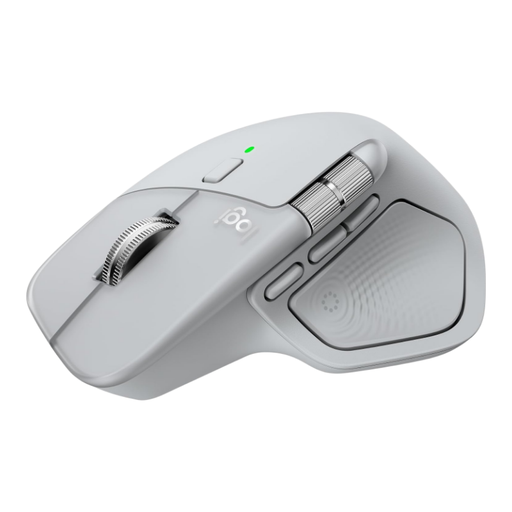 No image available
Suited to anyone working through wide spreadsheets and documents who wants horizontal scrolling.
MagSpeed scrolling and horizontal thumb wheel; Bluetooth 5.1 or USB-C receiver; right-handed shape.
 No image available
A vertical mouse to consider if you want to compare a different shape with a conventional mouse.
USB-C charging; Bluetooth and 2.4 GHz connectivity; four-way scroll wheel; three DPI settings: 800, 1200 and 1600.
 No image available
Suited to anyone who wants vertical control combined with adjustable cursor sensitivity.
Bluetooth and 2.4 GHz connectivity; USB-C charging; six buttons; adjustable DPI from 800 to 1600.
 No image available
An option to compare if you’re looking for several connection methods and adjustable cursor sensitivity.
PAW3311 sensor; 24,000 DPI; six DPI settings; Bluetooth, 2.4G and Type-C cable connection.
 No image available
Suited to anyone working through long documents who wants to scroll quickly.
Uses a USB receiver, not Bluetooth; the description mentions fast scrolling.
No, Dutch regulations don’t require you to buy a specific type of mouse. Consider which mouse shape suits your hand and tasks; Arboportaal also emphasises the set-up and organisation of screen work.
Break up screen work with other tasks or breaks. Arboportaal also recommends varying your working posture and taking microbreaks; a different mouse doesn’t replace these measures.
Before buying, check whether your work computer supports the stated Bluetooth or receiver connection and whether any configuration software is permitted. If the model uses a battery, also check the stated battery life; for a rechargeable model, check how it is charged.
According to ACM ConsuWijzer, a product should meet reasonable expectations when used normally. If a product is faulty, contact the seller for an appropriate free solution, such as repair or replacement; a manufacturer’s warranty doesn’t replace your statutory rights.
Arboportaal states that screen work should be broken up at regular intervals with other work or a break. This isn’t legal approval of any particular mouse model.