
Count data analyst
Processes counts and trends. Dataset size and the R analyses being used help determine whether extra memory or processor cores are relevant. Posit says system requirements depend on the specific analysis work.


Choose a desktop based on your analysis software and the size of your datasets. Posit says the processing power you need for R depends on the work you do, while ArcGIS Pro requires a Windows environment. For a shared workspace, separate user accounts, suitable connections and clear service arrangements also matter. A compact Windows desktop suits a team that needs Windows software; a Mac mini is an option if the applications you need run on macOS.
Processes counts and trends. Dataset size and the R analyses being used help determine whether extra memory or processor cores are relevant. Posit says system requirements depend on the specific analysis work.
Sets up a computer for multiple users and organises accounts, access to any personal data and support. Microsoft Support describes separate Windows accounts for users; the Dutch Data Protection Authority highlights the need to prevent unauthorised access to personal data.
Combines count results with maps and needs to check in advance which GIS application and operating system are required. Esri describes ArcGIS Pro for Windows; QGIS is available for Windows, macOS and Linux, among other platforms.
Start with the software you need and the analyses you carry out. Then decide which configuration, shared access and complete workspace setup will suit you.
| What to consider | What to look for when buying | Who should pay closest attention? |
|---|---|---|
| Analysis capacity | List the software, file sizes and tasks you run at the same time. Then compare the memory, processor and storage in the exact configuration. Extra processor cores are not essential for every analysis. | If I work with large count files or several applications, I want enough capacity without choosing components my work doesn’t need. Around 33% of consumers give analysis performance top priority. |
| Shared use | Check that users can have separate accounts, and set up screen locking and appropriate access permissions. Also consider the monitor and the connections you need. | If colleagues use the same office PC, I want to keep their settings and documents separate and manage access to files. Around 27% of consumers prioritise shared use. |
| Software compatibility | List the applications you need and check the operating system of the configuration you choose. Esri describes ArcGIS Pro for a Windows environment; check the QGIS installation for your chosen system. | If our mapping and analysis applications are already decided, I want to make sure they will run on the desktop before we choose a platform. Around 27% of consumers prioritise software compatibility. |
| Complete workspace and support | Check which accessories are included with your order and what monitors or peripherals you still need. Also review the support terms and any options for expanding the configuration. | If I’m setting up a workspace for colleagues, I want to know in advance what’s needed to use it and how faults will be dealt with. Around 13% of consumers put a complete setup and support at the top of their list. |
The capacity you need depends on your R analyses and other tasks. Posit says extra processor cores are not automatically the most important consideration for every type of work.
First, note the datasets, analyses and tasks you actually run at the same time. Then compare the complete configurations.
Esri says ArcGIS Pro can be used on a Mac with an M-series chip only through a virtual Windows environment, not directly in macOS. This requires additional setup.
Before buying, check all the applications you need and how they work with your chosen operating system.
A monitor is sold separately for the Lenovo ThinkCentre M70q Gen 5. You may also need a keyboard and mouse, depending on what’s included with your order.
Check the contents of the exact order and make a list of the equipment your workspace needs.
Ondernemersplein states that the statutory guarantee under consumer law does not apply to sales between businesses.
Check whether the purchase is personal or business, and agree warranty and service arrangements in advance for business purchases.
ThinkCentre Tiny includes compact business Windows desktops for office spaces where desk space is limited.
The Pro Mini 400 G9 is a compact business Windows desktop.
The Pro Micro Plus is a compact business Windows desktop with configurable components.
Mac mini is a compact macOS desktop for teams whose software and peripherals are compatible with macOS.
These product options focus on compact desktops for analysis work in a shared office, with both macOS and Windows choices, as well as one barebone that still needs further configuration.
 No image available
Suitable for an analysis workspace where the applications you need run on macOS.
24 GB of memory and a 512 GB SSD.
ArcGIS Pro does not run directly in macOS on a Mac with an M-series chip; Esri describes using it through a virtual Windows environment.
 No image available
A compact Windows desktop for a shared office setup. Check that your team’s applications are compatible with Windows 11 Home.
16 GB LPDDR5X memory, a 512 GB SSD and a 0.65-litre chassis.
The product description says the memory is soldered and can be upgraded to a maximum of 32 GB.
 No image available
A compact Windows desktop for an office workspace. Check that the connections suit the monitors your team uses.
16 GB DDR5 memory, a 512 GB NVMe SSD, Windows 11 Home and a 1-litre chassis.
 No image available
A compact Windows 11 Pro desktop to consider if its features suit the applications you need and your workspace management arrangements.
16 GB DDR5 memory, a 512 GB SSD and a DisplayPort connection.
The product description lists VESA mounting as an option.
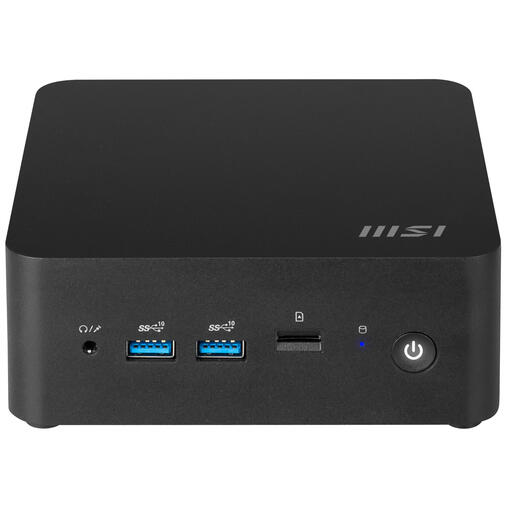 No image available
An option if you want to configure the desktop yourself. Remember to allow for installing the operating system and the software you need.
0.84-litre chassis, support for up to 64 GB DDR5 memory and VESA mounting.
This is a barebone; the product description says the operating system and software need to be configured after installation.
Not just for bird counts. First, work out which analyses and GIS application you use, then check their requirements. Posit says the processing power and memory you need depend on the specific R work you do.
Use separate user accounts and enable screen locking. If the files contain personal data, your organisation must manage access appropriately and prevent unauthorised access.
Choose the installation for your desktop’s operating system and coordinate the version with colleagues working on the same projects. QGIS recommends the Long Term Release.
No. Ondernemersplein states that the statutory guarantee under consumer law does not apply to sales between businesses, so agree warranty and service arrangements for business purchases. For personal purchases, the Dutch Government describes the right to a product that meets the required standards.
There are requirements for setting up a workstation used for screen work. Arboportaal, for example, describes a requirement for employees who work at a screen for more than two hours a day. If an organisation processes personal data in count files, the Dutch Data Protection Authority says it must prevent unauthorised access. These requirements do not set uniform minimum desktop specifications.