For short recordings on your computer that you want to listen back to straight away, a wired computer headset with an adjustable microphone boom is a sensible choice, provided the connection is compatible with your computer. If you practise while moving around, consider a worn presentation microphone, but you’ll need a suitable input or transmitter; a standalone head-worn mic doesn’t automatically include headphones for listening back. Follow the microphone positioning instructions and make test recordings in both languages. Shure and Sennheiser recommend positioning the microphone by the corner of your mouth.
Who is this choice relevant to?
Speakers who listen back to check their pronunciation
You record both versions of your speech to compare your articulation, pace and tone. A consistent microphone position and the ability to listen back straight away are more important here than freedom of movement. Logitech and Audio-Technica describe solutions that include both a microphone and a listening option.
Speakers who want to practise easily on a computer
You want to make short recordings without a separate transmitter or audio mixer. Check that the connection is compatible with your computer and that you can select the headset as your recording and playback device. Logitech and Jabra describe computer headsets with USB connections.
Speakers who rehearse while moving around
You want to move as you would during the actual presentation. Check that the microphone, any transmitter and the receiving sound system work together. Shure describes standalone worn microphones for use with compatible equipment.
What should you look for when buying?
First decide where you’ll be recording: a computer headset gives you a straightforward way to record and listen back on your computer; to practise while moving around, you’ll need a suitable presentation input or a compatible wireless system.
| Key consideration |
What to look for |
Who is this most relevant to? |
| Clear voice recordings |
Check that the microphone boom stays securely beside your mouth. Record both languages at your normal and louder speaking volume, then listen back. |
I want to listen back to my pronunciation in both languages under similar conditions. Around 40% of consumers are most concerned about getting a clear, consistent voice recording. |
| Recording and listening back |
Check the exact USB configuration and computer port. Select the right input and output in your recording software and make a short test recording. |
When I make short recordings on my computer, I want to listen back without a separate microphone interface. Around 30% of consumers prioritise easy recording. |
| Freedom of movement |
Decide whether you’ll be practising while moving around. Then check the microphone connector and, for a wireless system, the frequency and suitability for your location. |
I want to practise my presentation without being tied to a computer. Freedom of movement is the main concern for around 20% of consumers. |
| Connecting to existing equipment |
Compare the complete model variant and both connectors with your equipment; also check how you’ll listen to yourself. |
If I already have recording or presentation equipment, I want to know whether the microphone and headphones will connect to it. Around 10% of consumers prioritise compatibility. |
Buying pitfalls
-
Mistaking a standalone head-worn mic for a complete headset
A standalone microphone doesn’t automatically include headphones for listening back to your recording. The Audio-Technica BPHS1 does combine a microphone and headphones, but it uses separate connections.
Decide in advance which recording input and headphone output you’ll use. Check the full model variant and connectors.
Brands to consider
Logitech
The H390 is a wired computer headset for recording and listening back on a computer. Check that the USB configuration is compatible with your port.
- According to Logitech, the USB-A version described has a positionable microphone boom, an in-line mute control and a 1,9 m cable.
- The cable limits your freedom of movement, and the manufacturer’s description isn’t an independent test of bilingual speech recordings.
Jabra
The wired Evolve2 40 SE is a computer headset where fit and microphone controls may be important. Check whether you want the mono or stereo version and which USB variant you need.
- The manual describes a microphone boom that can be positioned close to your mouth, as well as different USB versions.
- According to Jabra, not all USB-C devices or apps support an audio connection with the Evolve2 40 SE.
HP Poly
The Blackwire 3220 USB-A is a wired stereo headset for recording and listening through a compatible computer.
- HP lists a USB-A cable and controls, including mute, for this version.
- Check the full variant: another Blackwire version may have a different connection.
Audio-Technica
The BPHS1 combines a worn microphone with headphones for use with compatible audio equipment.
- Audio-Technica specifies separate XLR and 6,3 mm plugs for the BPHS1, along with a replaceable cable and ear pads.
- According to Audio-Technica, the BPHS1-XF4 has a different connection intended for intercom use. Check the exact variant and your inputs.
Shure
The WH20 and SM35 microphones are options for an existing presentation or audio system.
- Shure documents different WH20 connectors and describes the SM35 for use with a bodypack. The manual recommends positioning the SM35 by the corner of your mouth.
- These are standalone microphones, not complete computer headsets with headphones for listening back.
Joybuy product picks
These Joybuy product picks include headsets and headphones with microphones for recording and listening back. Check that each model’s connection and recording function are compatible with your device.
 No image available
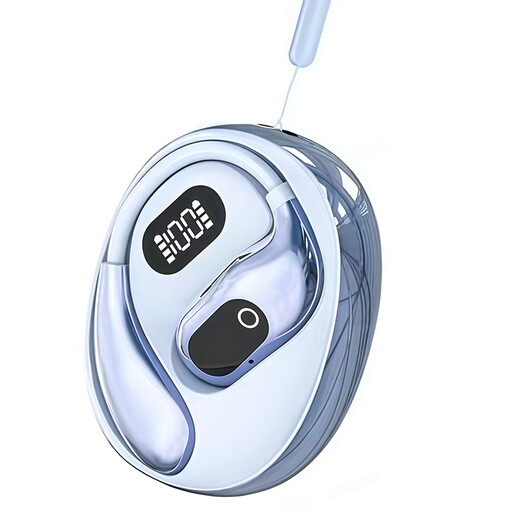
OWS on-ear headphones with binaural mode and Type-C charging case
The product name mentions a built-in condenser microphone and on-location recording, with on-ear headphones for listening; check that the recording function works with your device.
Binaural mode; Type-C charging case.
View at Joybuy
 No image available
Logitech PC 960 USB headset
For computer practice when you want to adjust the microphone position: the product description mentions an adjustable microphone boom and a USB connection.
Wired; 240 cm cable according to the product description.
View at Joybuy
 No image available
Logitech H340 USB headset, black and wired
For practising on your computer: the product description mentions USB plug-and-play and an adjustable microphone; check your device’s recording settings.
Digital stereo audio; the cable is 180 cm according to the product description.
View at Joybuy
 No image available
Jabra Evolve2 55 wireless stereo headset
For practising with a computer, the product description mentions a flexible microphone boom and a USB adapter included for connecting to a laptop. Check that it works with your recording app.
Wireless stereo headset; the product description mentions two microphones and on-headset controls.
View at Joybuy
 No image available
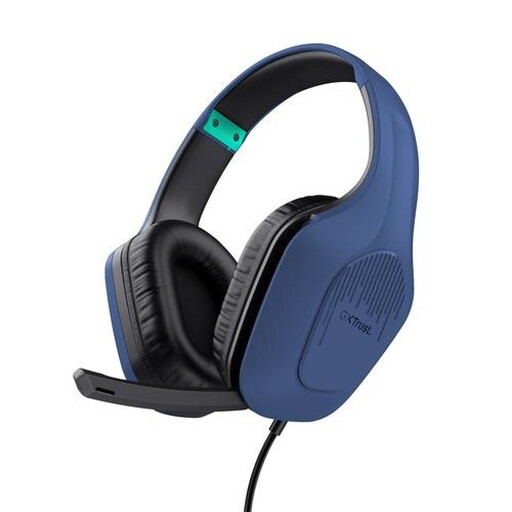
Trust GXT 415B Zirox wired gaming headset
For practising on a PC or laptop, if the connection is compatible: the product description mentions a foldable microphone and 3,5 mm connectivity.
Wired 3,5 mm connection; 2 m cable according to the product description.
View at Joybuy
Frequently asked questions
Where should you position the microphone when making a test recording in both languages?
Follow the instructions for your model and make a test recording. Shure recommends placing the SM35 by the corner of your mouth, rather than directly in front of it, to reduce plosive sounds. For the head-worn mic discussed, Sennheiser specifies a distance of 2–3 cm from the corner of the mouth; this isn’t a universal setting for every headset.
Can you connect a standalone presentation microphone directly to your laptop?
It depends on the connectors on the exact version and the inputs on your laptop or audio equipment. Shure specifies a three-pin XLR plug for the WH20XLR; other WH20 versions have different connectors. The Audio-Technica BPHS1 also has a separate connection for the headphones.
How can you avoid surprises when using and maintaining your microphone?
First, test both language versions using your chosen recording input and check that the microphone isn’t muted. For the SM35, Shure recommends using the windscreen and letting the microphone dry completely after exposure to sweat before putting it away; this guidance applies to that model.
Can you use a wireless headset microphone in the Netherlands without a licence?
Only if the system meets the applicable requirements for the frequency and transmission power used. The Dutch Authority for Digital Infrastructure publishes licence-exempt frequency bands; some other bands require a licence. So check the exact system frequency, transmission power and availability at your location.
What cooling-off period applies to online purchases if the fit isn’t right?
For an applicable online consumer purchase, ACM ConsuWijzer states that you generally have a statutory cooling-off period of up to 14 days after delivery. There are exceptions, including for certain hygiene products whose seal has been broken. Before buying, check which terms and conditions apply to the product.


