If you practise at a computer, a wired USB headset with an adjustable microphone boom is a practical choice, provided the connection is compatible. If you want to monitor through closed-back earcups and record using an audio interface, a broadcast headset could be suitable, but check both the microphone and headphone connections. Record both languages with the microphone in the same position: a noise-cancelling claim or broadcast specification alone won’t predict how your intro will sound.
Who is this choice relevant to?
Practising solo at your computer
If you want to record and listen back to your intro repeatedly without a separate recording interface, check the connection and whether the microphone boom is adjustable. Logitech, HP and Jabra describe connection and microphone features for their respective headsets.
Recording with an audio interface
If you want a microphone close to your mouth and headphone monitoring, check that the microphone and headphone connections are compatible with your existing equipment. Audio-Technica describes the connections on the BPHS1.
Moving freely while speaking
A standalone headworn microphone can move with your head, but you’ll also need headphones to listen back. Shure describes the WH20 as a headworn microphone available with different connection options.
What should you look for when choosing?
Wired USB headset
Suitable if: you want to use a single wired headset with your computer to record and listen back.
Keep in mind: specifications for calls are not an independent assessment of podcast recordings.
Broadcast headset
Suitable if: you want to monitor through closed-back earcups and already have compatible audio connections, or intend to use them.
Keep in mind: the Audio-Technica BPHS1 has separate XLR and 6.3 mm connections; the BPHS1-XF4 has a different intercom connection.
Standalone headworn microphone
Suitable if: you want the microphone to move with your head and to manage recording and monitoring separately.
Keep in mind: the Shure WH20 is not a complete headset; choose the plug variant to suit your recording equipment.
| Factor to consider |
What should you check? |
Who is this important to? |
| Microphone position |
Check that the boom reaches your mouth, and test both languages for breath and plosive sounds. |
I want to keep the microphone in the same place for repeated takes and assess my voice in both languages; around 36% of consumers prioritise being able to record their voice consistently. |
| Connection |
Check the exact variant and all the inputs you need on your computer or interface. |
I want to avoid buying a headset that won’t connect to my recording device; around 29% of consumers prioritise compatibility with their device. |
| Monitoring and comfort |
Consider whether you need built-in headphones, mono or stereo sound, and a comfortable fit. |
I want to monitor and listen back to takes comfortably; around 21% of consumers prioritise monitoring and comfort. |
| Equipment needed |
List any interface, microphone input, headphone connection and separate headphones you might need. |
I want to know in advance what I’ll need in addition to the microphone; around 14% of consumers prioritise a complete setup. |
Common mistakes
-
Assuming a noise-cancelling claim means good podcast sound
Features that manufacturers describe for calls don’t, on their own, tell you how a bilingual intro will sound once recorded.
Before choosing, record both language versions at your usual speaking volume and listen back for clarity, background noise and plosive sounds.
-
Treating a broadcast headset like a USB headset
Audio-Technica describes the BPHS1 as having separate XLR and 6.3 mm plugs; the BPHS1-XF4 has a different connection for intercom systems.
Check the exact model suffix, then trace the microphone and headphone connections separately to your recording device.
-
Mistaking a standalone headworn microphone for a complete headset
The Shure WH20 is a microphone; listening is a separate part of your setup.
Decide how you’ll listen back to your intro, then check which WH20 plug variant is compatible with your equipment.
Brands to compare
Logitech
The H390 is a wired computer headset with earcups, a microphone boom and in-line controls.
- Logitech describes an adjustable microphone boom and a mute control.
- Check whether you need the USB-A or USB-C version; the call features described are not an independent test of podcast recording.
Poly
The Blackwire 5220, version 8X231AA, is a wired stereo headset with several connection options listed.
- HP lists USB-C, a USB-C/A adapter, a 3.5 mm connection and a mute control.
- Check which connection is compatible with your recording device; the stated microphone bandwidth is not an assessment of bilingual podcast sound.
Audio-Technica
The BPHS1 is a broadcast headset with closed-back earcups and separate microphone and headphone connections.
- Audio-Technica specifies a cardioid dynamic microphone and swivel boom for the BPHS1, with XLR for the microphone and 6.3 mm for the headphones.
- The BPHS1-XF4 has a different intercom plug; don’t assume it connects directly via USB.
Jabra
The Evolve2 40 SE is a USB call headset available in mono and stereo versions.
- Jabra lists three microphones, an adjustable fit and USB-A or USB-C versions.
- According to the manual, not every USB-C device or app supports audio with this headset; call features don’t prove podcast recording quality.
Shure
The WH20 is a standalone dynamic headworn microphone; you’ll need separate equipment for listening.
- Shure describes an adjustable design and a windscreen.
- Several plug variants are available. Check which one suits your microphone input or transmitter, and remember that you’ll need separate headphones for monitoring.
Joybuy products
These wired headsets are for anyone looking for a microphone and a way to listen back while practising; check that each model’s connection is compatible with your device.
 No image available
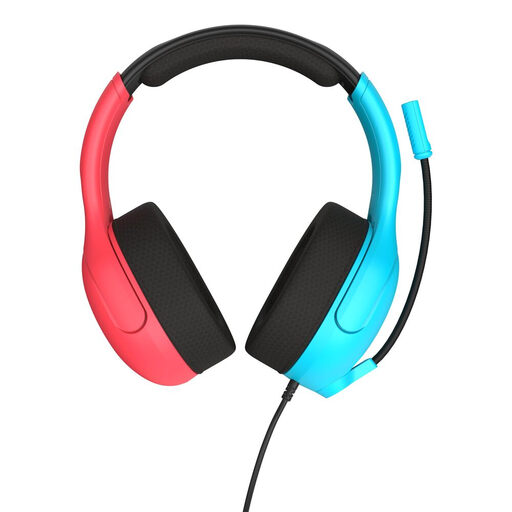
Turtle Beach Airlite Fit gaming headset, 3.5 mm, blue/red
A wired headset with a microphone and earcups for anyone who wants to listen back while practising.
The product description mentions a 3.5 mm connection and a microphone that flips up to mute. Check that your recording device has a compatible connection.
View at Joybuy
 No image available
Razer Kraken V3 X headset, black
The microphone and stereo audio described may be useful if you want to record and listen back using a single headset.
The product information describes a wired gaming headset with a cardioid microphone and stereo audio. Assess the voice recording with a test of your own.
View at Joybuy
 No image available
Logitech PC 960 USB headset
The adjustable microphone boom is useful if you want to reset the microphone position between takes.
The product description mentions USB, stereo audio and a mute control. Check that your device supports the required USB connection.
View at Joybuy
 No image available
Logitech H650e stereo headset, wired
This wired headset could be suitable if you want a USB connection and stereo sound for recording and listening back.
The product description mentions USB, in-line controls and a microphone for calls. It doesn’t tell you how podcast recordings will sound.
View at Joybuy
 No image available
Logitech H340 USB headset, black
A wired USB headset with an adjustable microphone for anyone who wants to change the microphone position while practising.
The product description mentions stereo audio and an adjustable microphone. Check that the USB connection is compatible with your recording device.
View at Joybuy
Frequently asked questions
How should you position the microphone for your first test recording?
Adjust the boom so it sits close to your mouth, then record short sentences in both languages. If you hear breath or plosive sounds, try positioning it slightly to the side of the direct airflow. Shure’s positioning advice for a different vocal microphone is a useful technique tip, not a guaranteed distance for every headset.
Can you connect the Audio-Technica BPHS1 directly to your laptop’s USB port?
Not with the BPHS1 cable described by Audio-Technica: it has a 3-pin XLR plug for the microphone and a 6.3 mm plug for the headphones. Check that your recording equipment has compatible inputs.
Will USB-C work with every phone and recording app?
No. Jabra states that not every USB-C device or app supports the audio connection for the Evolve2 40 SE. Check that your device, headset version and recording app are compatible.
What should you consider when buying extra equipment and shopping online?
With an XLR or standalone headworn microphone, also check whether you need a compatible recording interface and separate headphones. According to the Dutch government, online purchases from a business generally come with a 14-day cooling-off period, with some exceptions; check which terms apply to your purchase. For a faulty product, the Dutch government describes rights to repair or replacement under the applicable terms.
Does a CE mark mean that a microphone sounds good?
No. According to Business.gov.nl, CE marking is not a quality mark and says nothing about a product’s overall quality or safety. It therefore doesn’t assess how a podcast recording sounds.


